Manual · Intermec
Intermec AC1 Battery Instructions
Manual2 pagesPDF 463 KB
Both pages are below, each with its text.
Filed with · 1 model
Also filed with these models on the old site
From the manual · read page by page
Key facts from this manual
Each line names its page in the PDF.
A two-page Intermec instruction sheet (2003) for the AB1 battery, the lithium-ion pack of the CK30 handheld computer. It shows how to replace and charge the battery, names the AC1 4-Slot Battery Charger among four charging methods, and gives specifications, care recommendations and disposal advice.
- Battery
- AB1, 2200 mAh lithium-ion, for the CK30 Handheld Computers p. 1
- Charging methods
- AC1 4-Slot Battery Charger, AC2 4-Bay Charging Dock, AD1 1-Bay Communications Dock, AD2 4-Bay Communications Dock p. 2
- Charge time
- 3 to 5 hours at most for a fully discharged battery, depending on method, at 21°C (69.8°F) p. 2
- Dimensions
- 82.5 x 63.5 x 22 mm (3.25 x 2.65 x 0.9 in) p. 1
- Weight
- 132 g (4.64 oz) p. 1
- Storage temperature
- -20°C to 60°C (-4°F to 140°F) p. 1
- Best charging range
- 0°C to 45°C (32°F to 113°F) for charging and storing p. 2
What this manual walks you through
- Replacing the battery in a CK30 p. 1
- Charging methods and times for the AB1 battery p. 2
- Care recommendations for the battery p. 2
- Disposing of a spent battery p. 2
Good to know
- Fully charge the battery before first using it in a CK30. p. 2
- Recharge the AB1 only by the methods on the sheet; another charger could damage it. p. 2
- Do not store the battery above 60°C (140°F), such as in a hot car or direct sunlight. p. 2
- Replace the battery right away after removing it, or important data or applications may be lost. p. 1
- Use the AB1 battery only with a CK30. p. 2
Questions this manual answers
What battery does the Intermec CK30 use?
The AB1, a 2200 mAh lithium-ion battery. p. 1
Does the Intermec AC1 charger charge the CK30 AB1 battery?
Yes, the AC1 4-Slot Battery Charger is one of the four charging methods listed for the AB1 battery. p. 2
How do I change the battery in an Intermec CK30?
Turn off the CK30, pull down the battery latch, pull out the discharged battery, then insert the tabs of the charged one and snap it in. p. 1
How long does an AB1 battery take to charge?
The sheet gives maximum times of 3 to 5 hours for a fully discharged battery at 21°C, depending on the charging method. p. 2
The file
Size and text
Every page · 2
Read it here
Each page as it is printed, and its words beside it, so a phone can search and copy them.
Page1of 2
Open in the PDF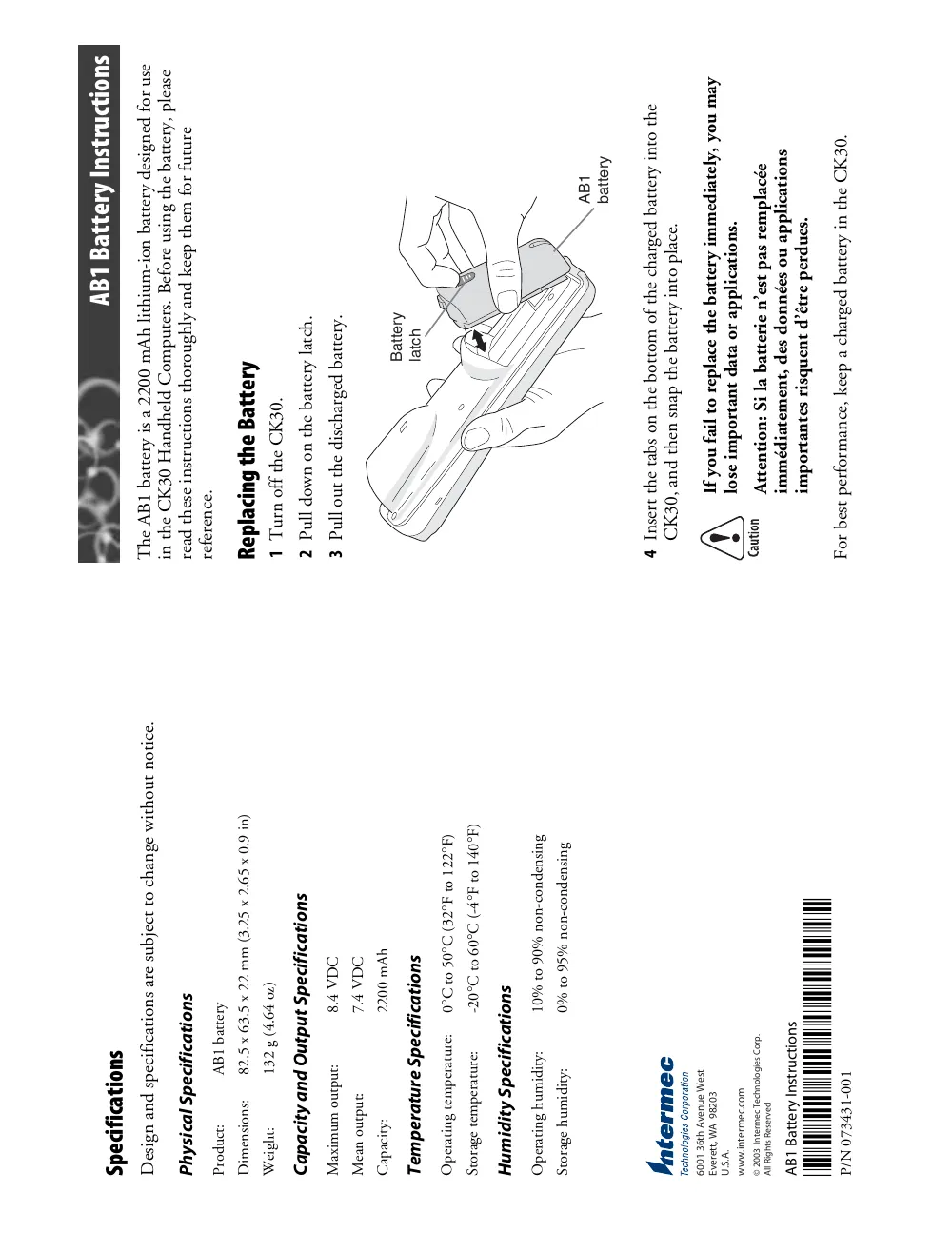
The text of page 1, from the PDF itself
132 g (4.64 oz)
- Weight
- 7.4 VDC
2200 mAh
Mean output:
- Capacity
- -20°C to 60°C (-4°F to 140°F)
- Storage temperature
- P/N 073431-001
*073431-001*
AB1 Battery Instructions
For best performance, keep a charged battery in the CK30.
Attention: Si la batterie n’est pas remplacée immédiatement, des données ou applications importantes risquent d’être perdues.
© 2003 Intermec Technologies Corp. All Rights Reserved
4 Insert the tabs on the bottom of the charged battery into the CK30, and then snap the battery into place. If you fail to replace the battery immediately, you may lose important data or applications.
0% to 95% non-condensing
- Storage humidity
- 6001 36th Avenue West Everett, WA 98203 U.S.A. www.intermec.com
10% to 90% non-condensing
- Operating humidity
- Humidity Specifications
0°C to 50°C (32°F to 122°F)
- Operating temperature
- Battery latch
3 Pull out the discharged battery.
8.4 VDC
- Maximum output
- Temperature Specifications
2 Pull down on the battery latch.
Capacity and Output Specifications
AB1 battery
82.5 x 63.5 x 22 mm (3.25 x 2.65 x 0.9 in)
- Dimensions
- 1 Turn off the CK30.
Replacing the BatteryAB1 battery
- Product
- Physical Specifications
The AB1 battery is a 2200 mAh lithium-ion battery designed for use in the CK30 Handheld Computers. Before using the battery, please read these instructions thoroughly and keep them for future reference.
AB1 Battery Instructions
Design and specifications are subject to change without notice.
Specifications
Page2of 2
Open in the PDF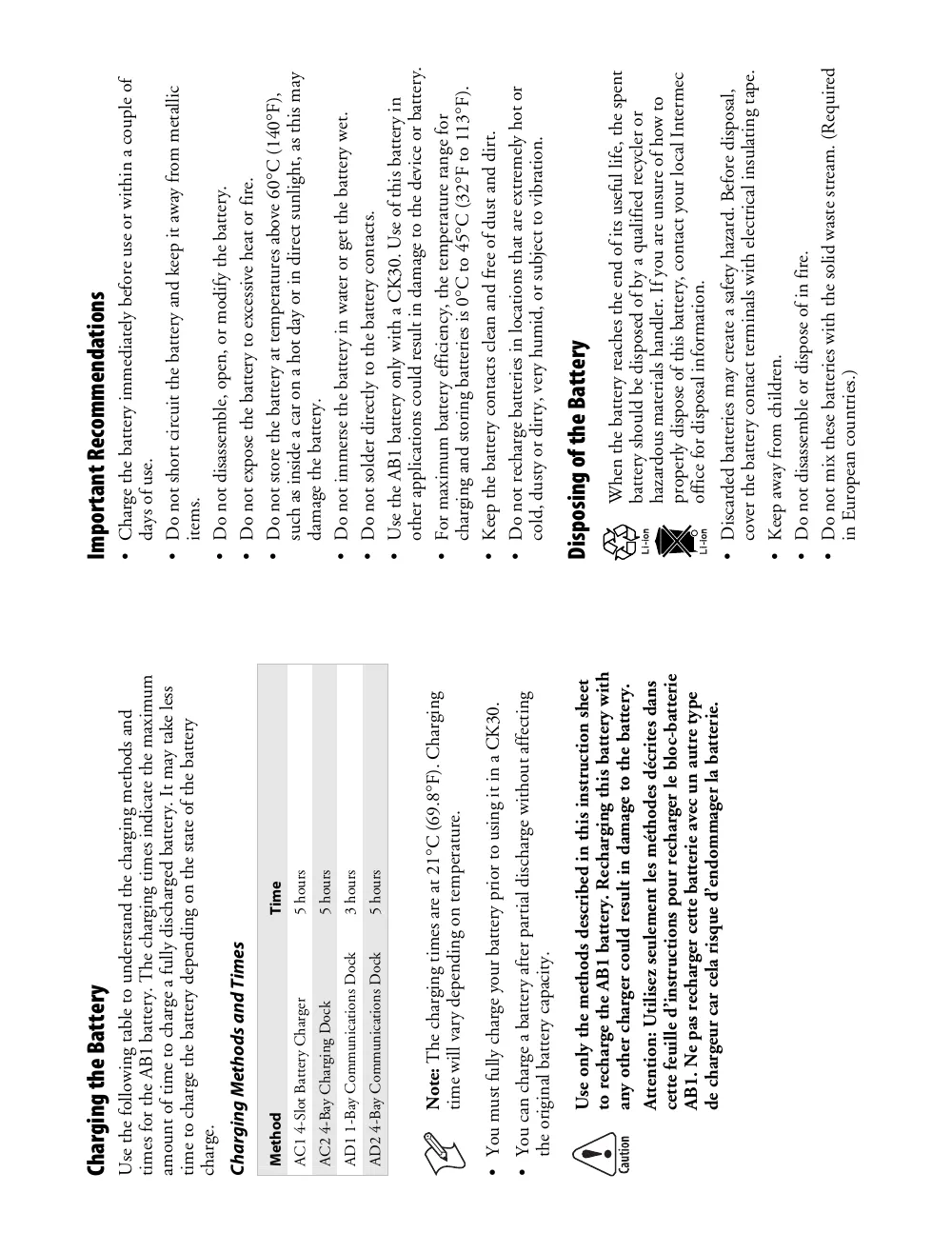
The text of page 2, from the PDF itself
5 hours 5 hours 3 hours 5 hours
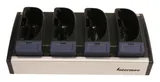
AC1 4-Slot Battery Charger
AC2 4-Bay Charging Dock
AD1 1-Bay Communications Dock
AD2 4-Bay Communications Dock
Use only the methods described in this instruction sheet to recharge the AB1 battery. Recharging this battery with any other charger could result in damage to the battery. Attention: Utilisez seulement les méthodes décrites dans cette feuille d’instructions pour recharger le bloc-batterie AB1. Ne pas recharger cette batterie avec un autre type de chargeur car cela risque d’endommager la batterie.
- You can charge a battery after partial discharge without affecting the original battery capacity.
- You must fully charge your battery prior to using it in a CK30.
Note: The charging times are at 21°C (69.8°F). Charging time will vary depending on temperature.
Time
Method
- Discarded batteries may create a safety hazard. Before disposal, cover the battery contact terminals with electrical insulating tape.
- Keep away from children.
- Do not disassemble or dispose of in fire.
- Do not mix these batteries with the solid waste stream. (Required in European countries.)
L i -ion
L i -ion
When the battery reaches the end of its useful life, the spent battery should be disposed of by a qualified recycler or hazardous materials handler. If you are unsure of how to properly dispose of this battery, contact your local Intermec office for disposal information.
Disposing of the Battery
- Charge the battery immediately before use or within a couple of days of use.
- Do not short circuit the battery and keep it away from metallic items.
- Do not disassemble, open, or modify the battery.
- Do not expose the battery to excessive heat or fire.
- Do not store the battery at temperatures above 60°C (140°F), such as inside a car on a hot day or in direct sunlight, as this may damage the battery.
- Do not immerse the battery in water or get the battery wet.
- Do not solder directly to the battery contacts.
- Use the AB1 battery only with a CK30. Use of this battery in other applications could result in damage to the device or battery.
- For maximum battery efficiency, the temperature range for charging and storing batteries is 0°C to 45°C (32°F to 113°F).
- Keep the battery contacts clean and free of dust and dirt.
- Do not recharge batteries in locations that are extremely hot or cold, dusty or dirty, very humid, or subject to vibration.
Use the following table to understand the charging methods and times for the AB1 battery. The charging times indicate the maximum amount of time to charge a fully discharged battery. It may take less time to charge the battery depending on the state of the battery charge.
Charging Methods and Times
Important Recommendations
Charging the Battery