Manual · Intermec
EasyLAN 10i2 Ethernet Adapter Quick Start Guide
Manual12 pagesPDF 125 KB
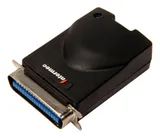
Quick start guide for the Intermec EasyLAN 10i2 Ethernet adapter (external P/N 072885, internal 072894 and 072884) for printers.
Covers · 1 model
The models it covers
Summary
What is in it
Intermec's quick start guide for the EasyLAN 10i2 Ethernet adapters, the external P/N 072885 and the internal P/N 072894 and 072884, which let everyone on an Ethernet network share a printer. It lists which EasyCoder and ColorCoder printers each adapter fits, describes the connectors, LED and Test button, and explains connecting the adapter to the network, printing a test label, setting the IP address by DHCP or ARP, and where to find management and configuration help.
Its parts
- Introducing the EasyLAN 10i2 Adapter
- Physical Description
- Out of the Box
- Installing the EasyLAN 10i2 Adapter
- Managing and Configuring the EasyLAN 10i2 Adapter
From the manual · read page by page
Key facts from this manual
Some pages are scans or cannot be read; this says only what the readable text supports. Each line names its page in the PDF.
Intermec quick start guide for the EasyLAN 10i2 Ethernet adapter, which puts an Intermec label printer on an Ethernet network. It covers the external adapter (P/N 072885) and the internal adapters (P/N 072894 and P/N 072884): which printers each fits, the connectors, LED and Test button, how to connect the adapter, print a test label and give it an IP address.
- Device type
- External EasyLAN 10i2 Ethernet adapter that shares an Intermec printer over an Ethernet network p. 5
- Network
- 10BaseT connection, 10 Mbps p. 6
- Printer connection
- External adapter: high-speed parallel port connector that plugs straight into the printer's parallel port, no cable p. 7
- Printers (external)
- EasyCoder 91, 301/E4, 401, 401LL, 501, 501E, 501S, 501XP, 601XP, 4630, 7421, PC41, 7422, C4, PC4 and ColorCoder 901/V4; also EasyCoder 3240, 3400D and earlier, 3440 and 3600 with the parallel port option p. 5
- External power
- External power supply needed on EasyCoder 91, 301/E4, 401, 401LL, 501, 501E, 501S, 4630, 7422 and ColorCoder 901/V4 p. 5
- IP address
- From a DHCP server automatically, or set a static address with ARP p. 10
- Configuration
- Web browser interface at the adapter's IP address; Intermec print monitor for a network port on Windows 95/98 p. 12
- Test button
- Prints a test label of the adapter's settings, or resets the adapter to factory default settings p. 7
- LED
- Shows power-up diagnostics and network activity; blinks on network activity p. 7, 10
- Internal versions
- P/N 072894 (EasyCoder 3240, 3400D and earlier, 3440, 3600); P/N 072884 (EasyCoder 3400e, 4420, 4440) p. 5
- Default host name
- INTERMEC_ followed by the last six digits of the MAC address p. 11
- Software and manual
- PrinterCompanion CD-ROM with the EasyLAN 10i2 Ethernet Adapter User's Manual (P/N 072889) and the Intermec print monitor p. 8
- Guide part number
- P/N 072890-002 p. 12
What this manual walks you through
- Connecting the internal adapter to the network p. 8
- Connecting the external adapter to a printer and the network p. 8, 9
- Checking the power-up diagnostics p. 10
- Printing a test label p. 10
- Setting an IP address with ARP from a Windows PC p. 11
- Setting an IP address with ARP from a UNIX host p. 11
- Managing the adapter with a web browser or the Intermec print monitor p. 12
Good to know
- With the internal adapter installed, the printer's parallel port cannot be used. p. 6
- Printers that do not use Intermec Printer Language (IPL) or Direct Protocol (DP) cannot print a test label. p. 7, 10
- The MAC address is on the underside of the adapter and is needed during configuration. p. 8
- The ARP command varies between UNIX systems: BSD expects name and address reversed, and IBM AIX needs the argument ether. p. 11
Questions this manual answers
Which printers work with the Intermec 072885 EasyLAN 10i2 adapter?
Many EasyCoder models such as the 91, 301/E4, 401, 501, 601XP, 4630, 7421, PC41, 7422, C4 and PC4, the ColorCoder 901/V4, and the EasyCoder 3240, 3400D, 3440 and 3600 when they have the parallel port option. p. 5
How do I set a static IP address on the EasyLAN 10i2?
Use ARP from a Windows PC or a UNIX host with the adapter's MAC address, then ping the new address; with a DHCP server the adapter gets its address automatically. p. 10, 11
Does the external EasyLAN 10i2 need a power supply?
On some printers, such as the EasyCoder 91, 401, 501, 4630 and 7422 and the ColorCoder 901/V4, it needs an external power supply. p. 5
How do I reset the EasyLAN 10i2 to factory defaults?
The guide states the Test button resets the adapter's settings to the factory default settings. p. 7
What network speed does the EasyLAN 10i2 support?
It uses a 10BaseT connection with a network speed of 10 Mbps. p. 6
Contents
Chapters and sections
Each line opens the PDF at its page.
The whole text · 3 parts
Read the manual here as text
Its text as extracted from the PDF, unedited, in parts; each page opens the PDF at that page.
The file