Manual · Intermec
0100 Access Point User's Manual
Manual88 pagesPDF 932 KB
User's manual for the Intermec 0100 Access Point, a 2.4 GHz wireless bridge between JANUS RF readers and an Ethernet network.
Covers · 1 model
The models it covers
Summary
What is in it
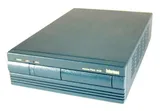
The user's manual for the Intermec 0100 Access Point, which bridges JANUS RF readers and other 2.4 GHz wireless LAN products to a wired Ethernet network. It explains how the access point fits into network operating systems and RF networks (including roaming), how to install it and make a quick installation, and how to configure it locally, remotely or with SNMP: radio parameters, spanning tree, filters and security ID. It closes with helpful hints, troubleshooting, specifications and the radio and spanning tree parameters.
Its parts
- Before You Begin
- 1 Learning About the Access Point
- 2 Installing the Access Point
- 3 Configuring the Access Point
- 4 Helpful Hints
- Appendix A
- Appendix B
From the manual
Key facts from this manual
Each line names its page in the PDF.
User's manual (P/N 062367-002, 1995) for the Intermec 0100 Access Point, a wireless bridge between 2.4 GHz JANUS RF readers and a wired Ethernet network. It explains how to unpack and install the access point, configure it locally, remotely or by SNMP, and solve common problems.
- Device
- Wireless bridge (access point) linking 2.4 GHz JANUS RF readers to an IEEE 802.3 Ethernet LAN p. 13
- Network interfaces
- Ethernet 10BASE2 (Thin Coax BNC) and 10BASET (Twisted Pair) p. 57
- Radio
- 2.4-2.483 GHz spread spectrum frequency hopping, 15 independent channels, 100 mW p. 57
- Data rate
- 1.6 Mbps (uncompressed) RF; 10 Mbps Ethernet p. 57
- Range
- 240 ft radius (80 m) p. 57
- Frame types
- Ethernet_802.2, Ethernet_802.3, Ethernet_II p. 57
- Media access
- CSMA/CA p. 57
- Power
- Any voltage from 100 to 240 VAC at 50 Hz or 60 Hz; 110V North American cable supplied p. 25, 29
- In the box
- Access point, configuration software disk, boot software disk, antenna, 110V power cable p. 25
- Configuration port
- RS-232 serial port on the back; needs a null modem RS-232 cable and a DOS-based PC p. 34
- Front LEDs
- Green Power; yellow LAN1 flashes for RF traffic; red LAN2 flashes for Ethernet traffic p. 26
- Antenna
- Custom antenna connector; only the supplied antenna may be used p. 28
- Related manuals
- Mounting Bracket Instruction Sheet 062475; JANUS 2.4 GHz Installation Utility 062368; JANUS 2020 User's Manual 062366 p. 9
- Software
- Runs from a 3.5 inch boot disk in its own drive; DOS configuration program (CFG) or SNMP station p. 26, 29
What this manual walks you through
- How the access point fits into network operating systems and roaming p. 13, 14
- Unpacking and checking the package contents p. 25
- Making a backup copy of the boot disk p. 28
- Quick installation: antenna, Ethernet cable, power and boot disk p. 28, 29, 30
- Configuring the access point locally over a serial cable p. 34, 35
- Configuring the access point remotely across Ethernet p. 36
- Setting traffic filters and security IDs p. 46, 47
- Choosing master and alternate master stations p. 51, 52
- Antenna placement and troubleshooting p. 53, 54
Good to know
- ETSI and FCC rules require that the antenna not be alterable; using a different antenna can damage the connector and the bridge. p. 28
- Microwave ovens share the frequency band and can degrade network performance within range of the 0100. p. 52
- IP protocol stacks may not run while the CFG program is loaded. p. 34
- International power cables are purchased separately. p. 25
- If the access point is mounted toward the ceiling, the antenna should not go on top of it. p. 53
Questions this manual answers
What cable do I need to configure the Intermec 0100 access point from a PC?
A null modem RS-232 cable from a DOS-based PC's serial port to the RS-232 port on the back of the access point. p. 34
What is the range of the 0100 Access Point?
The specifications give a 240 ft (80 m) radius. p. 57
Why does the 0100 access point not respond when I configure it locally?
Check that SLIP.BAT has the right COM port I/O address and IRQ, that there are no IRQ conflicts, and that the cable is a null modem cable. p. 54
What Ethernet connections does the 0100 Access Point support?
10BASE2 thin coax (BNC) and 10BASET twisted pair. p. 26
What voltage does the Intermec 0100 run on?
Any voltage from 100 to 240 VAC at 50 Hz or 60 Hz. p. 29
The whole text · 9 parts
Read the manual here as text
Its text as extracted from the PDF, unedited, in parts; each page opens the PDF at that page.
The file