Manual · Hypercom
Hypercom T77 Manual
Manual4 pagesPDF 1.5 MB
All 4 pages are below, each with its text.
Covers · 1 model
The models it covers
From the manual · read page by page
Key facts from this manual
Each line names its page in the PDF.
Two quick reference cards, one for restaurant and one for retail use, for a card payment application on HyperCom T7P, T77 and T7-Plus terminals. They show the key presses for sales, tips, refunds, debit, offline sales, voids, receipt reprints, reports and settlement, and explain the error messages and AVS response codes.
- Document
- Restaurant and retail quick reference cards for HyperCom T7P, T77 and T7-Plus terminals p. 1, 3
- Error ND
- ERROR CALL HELP ND: the terminal is not detecting a dial tone; retry the transaction p. 2, 4
- Error 544
- RETRY-COMM ERROR 544: an error occurred uploading the batch; retry the batch upload p. 2, 4
- Error 539
- CALL HELP CENTER 539: an error occurred on the host system; contact the help desk p. 2, 4
- COMMS ERROR
- Communication error; retry the transaction p. 2, 4
- Error FE
- ERROR CALL HELP FE: authorization declined p. 2, 4
- Card errors
- TR: invalid transaction; CM: card number not recognized as valid; AM: invalid amount p. 2, 4
- Lost or stolen card
- PLEASE CALL LC: card reported lost; PLEASE CALL CC: card reported stolen p. 2, 4
- AVS codes
- Y address and zip match; A address only; Z zip only; N neither; U unavailable or not supported; R retry; E error or ineligible; S not supported by issuer p. 2, 4
- Receipt reprint
- Reprint, invoice number, then 1 for the merchant receipt or 2 for the customer receipt p. 3
What this manual walks you through
- Running a swiped or manually entered sale with a tip p. 1
- Adjusting a tip p. 1
- Debit sales with the PIN pad p. 1, 3
- Offline or forced sales with an approval code p. 1, 3
- Refunds and voids p. 3
- Reprinting a receipt p. 1, 3
- Settling the batch p. 2, 4
- Getting a voice authorization by phone p. 2, 4
- Reading error messages and AVS response codes p. 2, 4
Good to know
- A sale authorized by the voice line is not deposited automatically; it must be entered on the terminal as a FORCE/OFFLINE sale. p. 2, 4
- Answering No at the settlement prompt cancels the settlement. p. 2, 4
Questions this manual answers
What does ERROR CALL HELP ND mean on a Hypercom T77?
The terminal is not detecting a dial tone; the card says to retry the transaction. p. 2, 4
What does RETRY-COMM ERROR 544 mean?
An error occurred while uploading the batch; retry the batch upload. p. 2, 4
Why is a voice-authorized sale missing from my deposit?
A voice authorization does not deposit the sale; it must be entered on the terminal as a FORCE/OFFLINE sale to be batched. p. 2, 4
How do I reprint a customer receipt?
Press Reprint, enter the invoice number, then choose 2 for the customer receipt (1 is the merchant receipt). p. 3
The file
Size and text
Every page · 4
Read it here
Each page as it is printed, and its words beside it, so a phone can search and copy them.
Page1of 4
Open in the PDF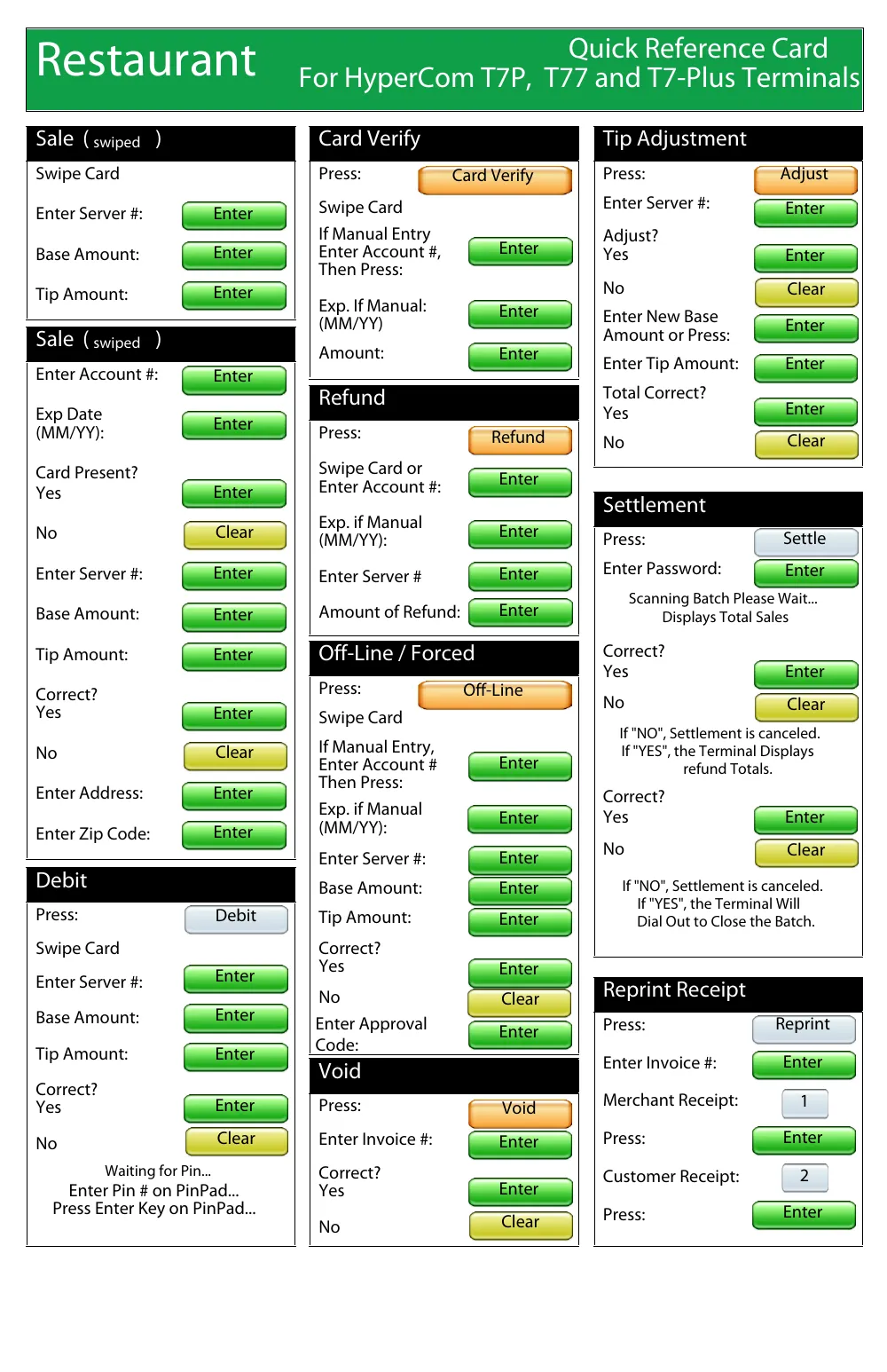
The text of page 1, from the PDF itself
Restaurant
Quick Reference Card For HyperCom T7P, T77 and T7-Plus Terminals
Sale ( swiped )Card VerifySwipe Card
Press:
- Enter Server #
- Enter
- Base Amount
- Enter
Swipe Card If Manual Entry Enter Account #, Then Press:
- Tip Amount
- Enter
- Sale ( swiped ) Enter Account #
- Enter
- Exp Date (MM/YY)
- Enter
Tip Adjustment Card Verify
Enter
Exp. If Manual: (MM/YY)
Enter
- Amount
- Enter
- Refund Press
- Refund Enter
- Press
- Adjust
- Enter Server #
- Enter
Adjust? YesEnterNoClear
- Enter New Base Amount or Press
- Enter
- Enter Tip Amount
- Enter
Total Correct? YesEnterNoClearCard Present? YesEnter
- Swipe Card or Enter Account #
- No
Clear
- Exp. if Manual (MM/YY)
- Enter
- Press
- Settle
- Enter Server #
- Enter
Enter Server #Enter
- Enter Password
- Enter
SettlementEnter
- Base Amount
- Enter
Amount of Refund:
- Tip Amount
- Enter
- Off-Line / Forced Press
- Correct? Yes
EnterNoClear
- Enter Address
- Enter
- Enter Zip Code
- Enter
- Debit Press
- Debit
Swipe CardCorrect? YesEnterNoClear
If "NO", Settlement is canceled. If "YES", the Terminal Displays refund Totals.
If Manual Entry, Enter Account # Then Press:
Enter
- Exp. if Manual (MM/YY)
- Enter
Correct? YesEnter
- Enter Server #
- Enter
NoClear
- Base Amount
- Enter
- Tip Amount
- Enter
Correct? YesEnterEnter
- Base Amount
- Enter
- Tip Amount
- Enter
- No Enter Approval Code
- Correct? Yes
Enter
- Press
- No
Clear Waiting for Pin...
Off-LineSwipe Card
- Enter Server #
- Enter Pin # on PinPad... Press Enter Key on PinPad...
Scanning Batch Please Wait... Displays Total Sales
If "NO", Settlement is canceled. If "YES", the Terminal Will Dial Out to Close the Batch.
ClearReprint ReceiptEnter
- Press
- Reprint
- Enter Invoice #
- Enter
Void
- Merchant Receipt
- 1
- Enter Invoice #
- Enter
- Press
- Correct? Yes
EnterNoClearVoid
- Customer Receipt: Press
- Enter 2 Enter
Page2of 4
Open in the PDF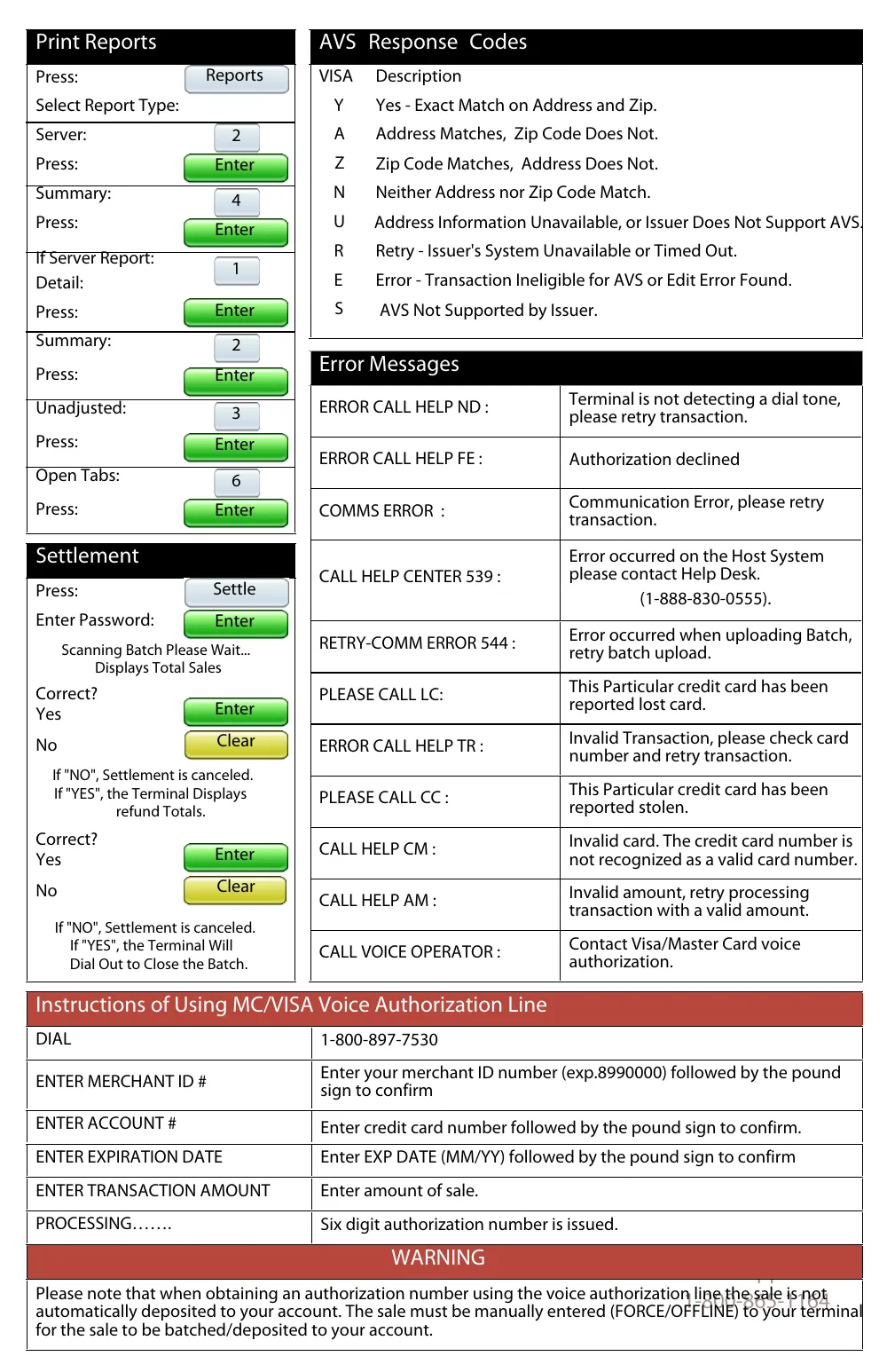
The text of page 2, from the PDF itself
- Print Reports Press
- AVS Response Codes Reports
Yes - Exact Match on Address and Zip.
A
Address Matches, Zip Code Does Not.
Enter
Z
Zip Code Matches, Address Does Not.
4
N
Neither Address nor Zip Code Match.
Enter
U
Address Information Unavailable, or Issuer Does Not Support AVS.
R
Retry - Issuer's System Unavailable or Timed Out.
E
Error - Transaction Ineligible for AVS or Edit Error Found.
S
AVS Not Supported by Issuer.
Summary: Press: If Server Report: Detail: Press:
1 Enter
- Summary: Press
- 2 Enter
- Unadjusted: Press
- 3 Enter
- Open Tabs: Press
- Description
2
- Server: Press
- VISA Y
Select Report Type:
Error Messages ERROR CALL HELP ND :
Terminal is not detecting a dial tone, please retry transaction.
- ERROR CALL HELP FE
- Authorization declined
- COMMS ERROR
- Communication Error, please retry transaction.
- CALL HELP CENTER 539
- Error occurred on the Host System please contact Help Desk. (1-888-830-0555).
- RETRY-COMM ERROR 544
- Error occurred when uploading Batch, retry batch upload.
- PLEASE CALL LC
- This Particular credit card has been reported lost card.
- ERROR CALL HELP TR
- Invalid Transaction, please check card number and retry transaction.
- PLEASE CALL CC
- This Particular credit card has been reported stolen.
- CALL HELP CM
- Invalid card. The credit card number is not recognized as a valid card number.
- CALL HELP AM
- Invalid amount, retry processing transaction with a valid amount.
- CALL VOICE OPERATOR
- Contact Visa/Master Card voice authorization.
6 Enter
- Settlement Press
- Settle
- Enter Password
- Enter
Scanning Batch Please Wait... Displays Total Sales
Correct? YesEnterNoClear
If "NO", Settlement is canceled. If "YES", the Terminal Displays refund Totals.
Correct? YesEnterNoClear
If "NO", Settlement is canceled. If "YES", the Terminal Will Dial Out to Close the Batch.
Instructions of Using MC/VISA Voice Authorization Line DIAL
1-800-897-7530
ENTER MERCHANT ID #
Enter your merchant ID number (exp.8990000) followed by the pound sign to confirm
ENTER ACCOUNT #
Enter credit card number followed by the pound sign to confirm.
ENTER EXPIRATION DATE
Enter EXP DATE (MM/YY) followed by the pound sign to confirm
ENTER TRANSACTION AMOUNT
Enter amount of sale.
PROCESSING…….
Six digit authorization number is issued.
WARNING
24-Hour Technical Support
Please note that when obtaining an authorization number using the voice authorization line the sale is not 1-800-865-1164 automatically deposited to your account. The sale must be manually entered (FORCE/OFFLINE) to your terminal for the sale to be batched/deposited to your account.
Page3of 4
Open in the PDF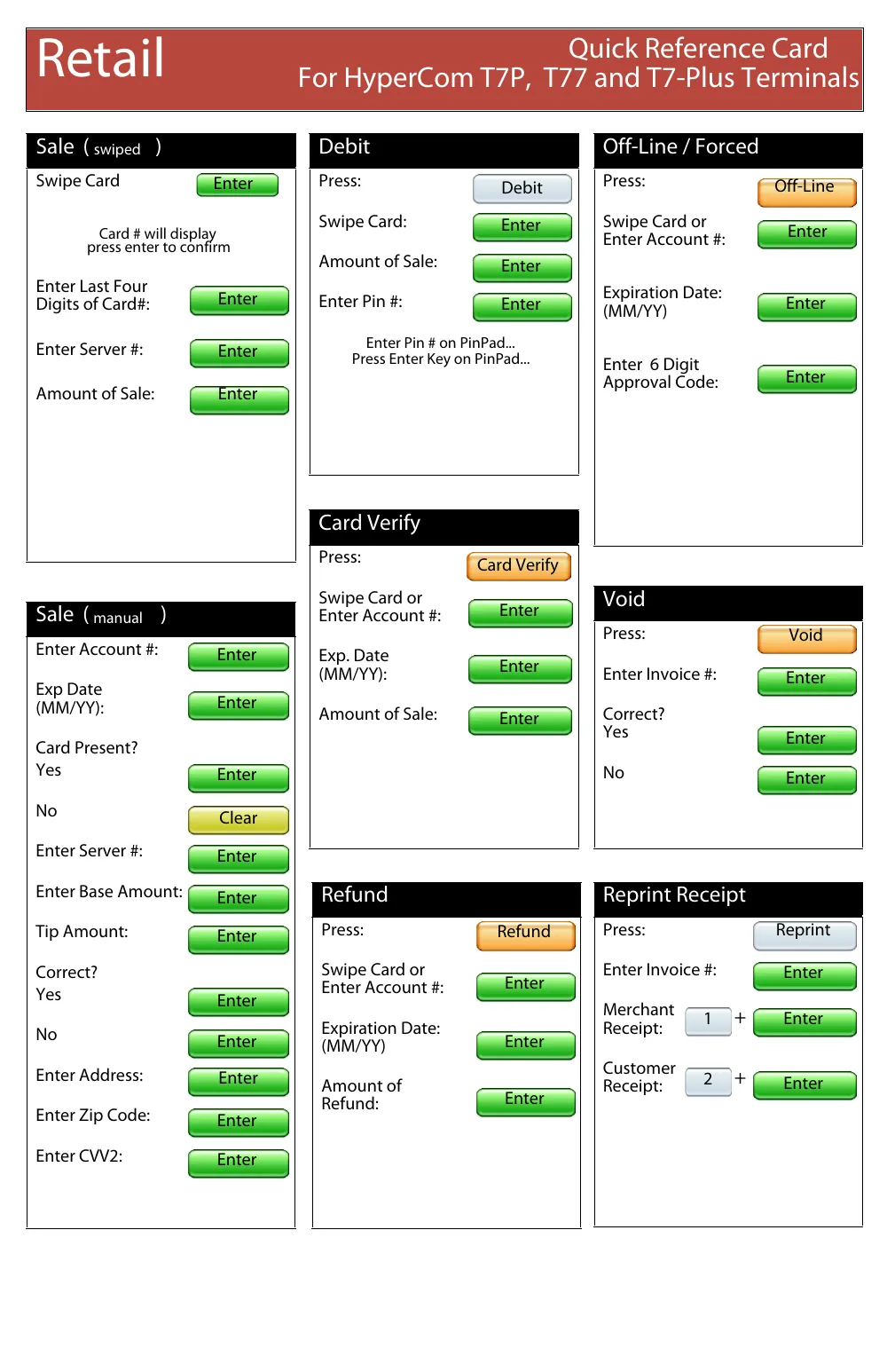
The text of page 3, from the PDF itself
Retail
Quick Reference Card For HyperCom T7P, T77 and T7-Plus Terminals
Sale ( swiped )DebitSwipe Card
- Press
- Debit
Press:
- Swipe Card
- Enter
- Swipe Card or Enter Account #
- Enter
- Amount of Sale
- Enter
- Enter Pin #
- Enter
Expiration Date: (MM/YY)
Enter
- Enter 6 Digit Approval Code
- Enter
Enter
Card # will display press enter to confirm
- Enter Last Four Digits of Card#
- Enter
- Enter Server #
- Enter
- Amount of Sale
- Enter
Off-Line / Forced
Enter Pin # on PinPad... Press Enter Key on PinPad...
Off-Line
Card Verify Press:
Sale ( manual ) Enter Account #: Exp Date (MM/YY):
Enter EnterCard Verify Enter
- Press
- Void
- Exp. Date (MM/YY)
- Enter
- Enter Invoice #
- Enter
- Amount of Sale
- Enter
Correct? YesEnterNoEnterCard Present? YesEnterNoClear
- Enter Server #
- Enter
- Enter Base Amount
- Enter
Refund
- Tip Amount
- Enter
- Press
- Refund
- Swipe Card or Enter Account #
- Enter
Expiration Date: (MM/YY)
EnterCorrect? YesEnterNoEnter
- Enter Address
- Enter
- Enter Zip Code
- Enter
- Enter CVV2
- Enter
Void
Swipe Card or Enter Account #:
- Amount of Refund
- Reprint Receipt
Enter
- Press
- Reprint
- Enter Invoice #
- Enter
- Merchant Receipt
- 1
+Enter
- Customer Receipt
- 2
+
Enter
Page4of 4
Open in the PDF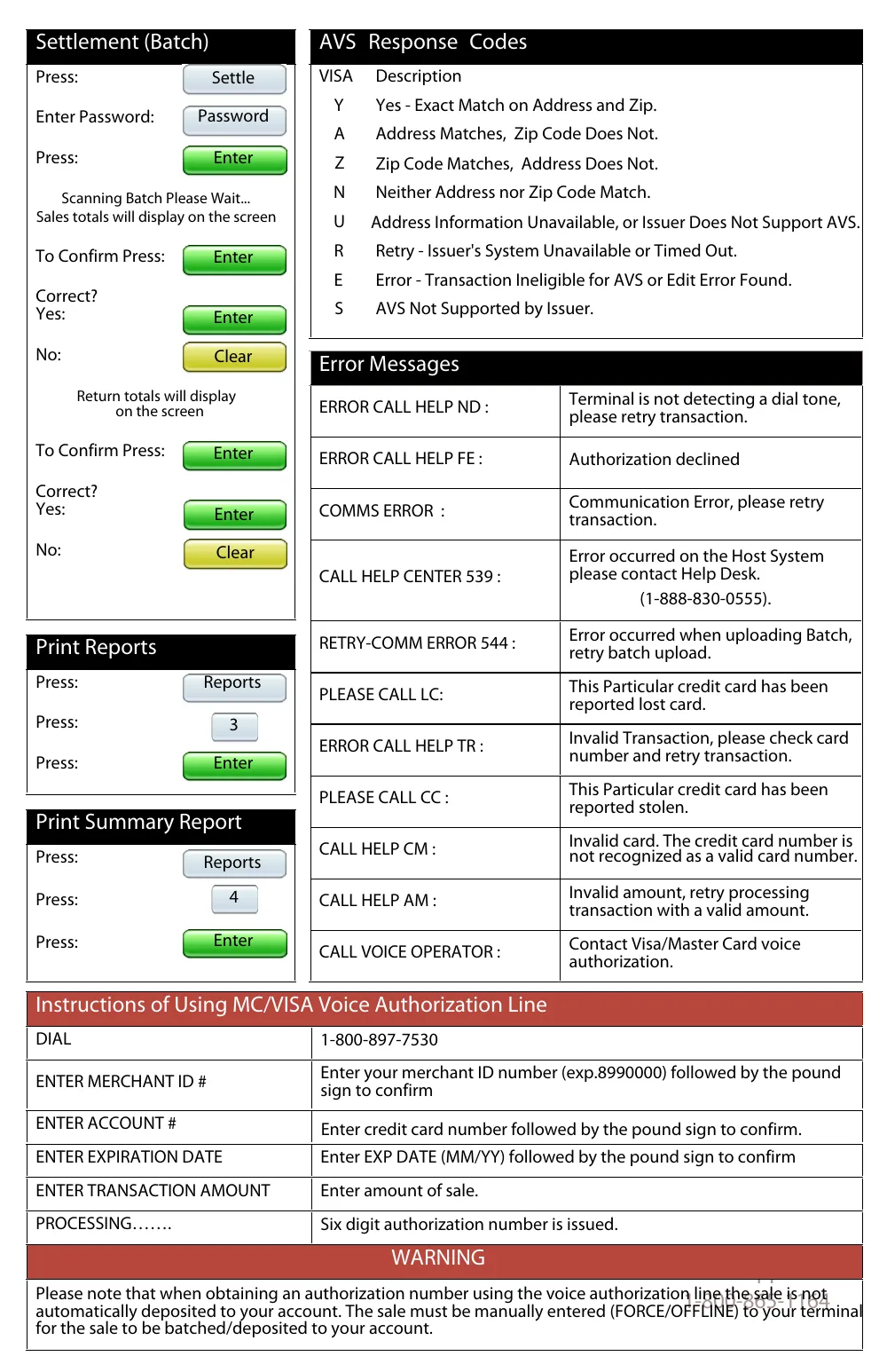
The text of page 4, from the PDF itself
Settlement (Batch) Press: Enter Password:
AVS Response Codes Settle
Password
- Press
- Enter
VISADescriptionY
Yes - Exact Match on Address and Zip.
A
Address Matches, Zip Code Does Not.
Z
Zip Code Matches, Address Does Not.
Scanning Batch Please Wait... Sales totals will display on the screen
N
Neither Address nor Zip Code Match.
U
Address Information Unavailable, or Issuer Does Not Support AVS.
- To Confirm Press
- R
Retry - Issuer's System Unavailable or Timed Out.
E
Error - Transaction Ineligible for AVS or Edit Error Found.
S
AVS Not Supported by Issuer.
Enter
- Correct? Yes
- Enter
- No
- Clear Return totals will display on the screen
Error Messages ERROR CALL HELP ND :
Terminal is not detecting a dial tone, please retry transaction.
- To Confirm Press
- Enter
- ERROR CALL HELP FE
- Authorization declined
- Correct? Yes
- Enter
- COMMS ERROR
- Communication Error, please retry transaction.
No:
- Clear CALL HELP CENTER 539
- Error occurred on the Host System please contact Help Desk. (1-888-830-0555).
- RETRY-COMM ERROR 544
- Error occurred when uploading Batch, retry batch upload.
- PLEASE CALL LC
- This Particular credit card has been reported lost card.
- ERROR CALL HELP TR
- Invalid Transaction, please check card number and retry transaction.
- PLEASE CALL CC
- This Particular credit card has been reported stolen.
- CALL HELP CM
- Invalid card. The credit card number is not recognized as a valid card number.
- CALL HELP AM
- Invalid amount, retry processing transaction with a valid amount.
- CALL VOICE OPERATOR
- Contact Visa/Master Card voice authorization.
- Print Reports Press
- Reports
- Press
- 3
- Press
- Enter
- Print Summary Report Press
- Reports
- Press
- 4
- Press
- Enter
Instructions of Using MC/VISA Voice Authorization Line DIAL
1-800-897-7530
ENTER MERCHANT ID #
Enter your merchant ID number (exp.8990000) followed by the pound sign to confirm
ENTER ACCOUNT #
Enter credit card number followed by the pound sign to confirm.
ENTER EXPIRATION DATE
Enter EXP DATE (MM/YY) followed by the pound sign to confirm
ENTER TRANSACTION AMOUNT
Enter amount of sale.
PROCESSING…….
Six digit authorization number is issued.
WARNING
24-Hour Technical Support
Please note that when obtaining an authorization number using the voice authorization line the sale is not 1-800-865-1164 automatically deposited to your account. The sale must be manually entered (FORCE/OFFLINE) to your terminal for the sale to be batched/deposited to your account.