Manual · HP
User Guide for the Zire 72 Handheld
Manual706 pagesPDF 6.7 MB
User guide for the palmOne Zire 72 handheld: setup, synchronizing, built-in camera, music, Bluetooth and the Palm OS applications.
Covers · 2 models
The models it covers
Summary
What is in it
The complete user guide for the palmOne Zire 72 handheld. It walks through charging the handheld, installing Palm Desktop software and connecting to a Windows or Mac computer, then covers moving around applications, Graffiti 2 writing, synchronizing by cable, IR or network, expansion cards, Contacts, Calendar, Tasks, Memos, Note Pad, expenses, voice memos, taking photos and videos with the built-in camera, music, Bluetooth connections and e-mail.
Its parts
- Setting Up Your Handheld and Your Computer
- Exploring Your Handheld
- Moving Around in Applications
- Entering Information
- Synchronizing Your Handheld with Your Computer
- Expanding Your Handheld
- Managing Your Contacts
- Managing Your Calendar
- Managing Your Tasks
- Writing Memos
- Writing Notes in Note Pad
- Performing Calculations
- Managing Your Expenses
- Recording Voice Memos
- Taking and Viewing Photos and Videos
From the manual
Key facts from this manual
Each line names its page in the PDF.
The palmOne user guide (version 1.1) for the Zire 72 handheld. It walks through setup and synchronizing with a computer, the controls, the built-in camera, expansion cards, wireless connections and the bundled applications. It also covers care, resets and common questions.
- Device
- Palm OS handheld with a built-in camera, music playback and wireless connections p. 40
- Connectors
- Mini-USB connector for the HotSync cable, power connector, 3.5 mm stereo headphone jack, IR port p. 42, 43, 44, 45
- Wireless
- Internal Bluetooth radio and an IR port for beaming p. 42, 44, 45
- Expansion cards
- SDIO, SD and MultiMediaCard p. 124
- Screen and input
- Touch-sensitive screen with an input area for Graffiti 2 writing or an onscreen keyboard; adjustable brightness p. 41, 45
- Buttons
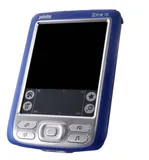
- 5-way navigator; Calendar, Contacts, Camera and Music buttons; Voice Memo button; power button p. 41, 42, 43
- In the box
- Handheld, HotSync cable, power adapter, software installation CD p. 24
- Charging
- Power adapter; three hours for the first charge p. 26
- Photo and video saving
- Photos saved as JPG on the handheld or a card; videos saved as ASF (MPEG-4) to an expansion card only p. 250
- Viewable formats
- Photos: JPG, BMP, TIFF (uncompressed), GIF; videos from a card: MPEG-1 and ASF (MPEG-4) p. 250
- Audio
- Speaker, microphone for videos and voice memos, headphone jack p. 43, 44
- Windows computer
- Pentium II or higher; Windows 98, ME, 2000 or XP; Internet Explorer 4.01 SP2 or later; 60 MB disk; one USB port p. 24, 25
- Mac computer
- PowerPC; Mac OS 9.2.2 or Mac OS X 10.2 or 10.3; 800 X 600 monitor; one USB port p. 25
- Desktop software
- Palm Desktop software on the supplied CD p. 24
What this manual walks you through
- Charging and turning on the handheld for the first time p. 26, 27, 28
- Installing Palm Desktop software p. 29
- Connecting to a computer and synchronizing p. 30
- Locating the controls p. 41, 42, 43, 44, 45
- Choosing expansion cards p. 124
- Photo and video file types p. 250
- Doing a soft reset and a hard reset p. 633, 634, 635
- Restoring information after a hard reset p. 636, 637
- Fixing Palm Desktop installation problems p. 639, 640
- Checking and conserving battery life p. 641
Good to know
- A hard reset deletes all records and entries, including the username, so synchronize first. p. 635
- Use only the supplied power adapter to charge the handheld. p. 632
- Do not open the handheld; there are no serviceable parts inside. p. 641
- Video clips captured on the handheld cannot be viewed on a Mac. p. 250
- Keep the handheld dry and away from very hot or cold temperatures. p. 633
Questions this manual answers
How do I reset a frozen Zire 72?
Gently press the reset button in the hole on the back panel with the stylus tip for a soft reset. If that fails, a hard reset erases everything. p. 633, 634
What memory cards does the Zire 72 take?
SDIO, SD and MultiMediaCard expansion cards. p. 124
Where does the Zire 72 save videos?
Only to an expansion card, in ASF (MPEG-4) format. p. 250
How long do I charge a new Zire 72?
Three hours with the power adapter before turning it on for the first time. p. 26
Contents
Chapters and sections
Each line opens the PDF at its page.
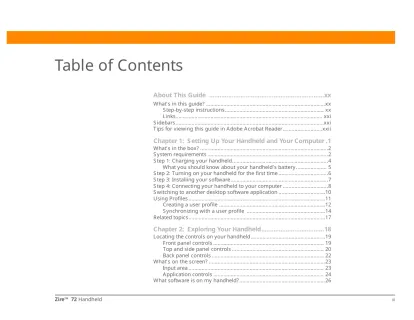
- User Guide for the Zire™ 72 Handheld1
- About This Guide20
- Setting Up Your Handheld and Your Computer23
- Exploring Your Handheld40
- Moving Around in Applications54
- Entering Information66
- Synchronizing Your Handheld with Your Computer95
- Expanding Your Handheld123
- Managing Your Contacts134
- Managing Your Calendar154
- Managing Your Tasks189
- Writing Memos204
- Writing Notes in Note Pad211
- Performing Calculations221
- Managing Your Expenses225
- Recording Voice Memos237
- Taking and Viewing Photos and Videos249
- Listening to Music280
- Connecting Wirelessly to Other Devices298
- Sending and Receiving E-mail Messages320
- Sending and Receiving Text and Multimedia Messages438
- Browsing the Web465
- Dialing Phone Numbers from Your Handheld504
- Sharing Information512
- Keeping Your Information Private525
- Using Categories to Organize Information548
- Installing and Removing Applications557
- Managing Clock Settings573
- Customizing Your Handheld586
- Maintaining Your Handheld632
- Common Questions639
- Getting Help665
- Product Regulatory Information667
- Index672
The whole text · 71 parts
Read the manual here as text
Its text as extracted from the PDF, unedited, in parts; each page opens the PDF at that page.
- Pages 1 to 101-10
- Pages 11 to 2011-20
- Pages 21 to 3021-30
- Pages 31 to 4031-40
- Pages 41 to 5041-50
- Pages 51 to 6051-60
- Pages 61 to 7061-70
- Pages 71 to 8071-80
- Pages 81 to 9081-90
- Pages 91 to 10091-100
- Pages 101 to 110101-110
- Pages 111 to 120111-120
- Pages 121 to 130121-130
- Pages 131 to 140131-140
- Pages 141 to 150141-150
- Pages 151 to 160151-160
- Pages 161 to 170161-170
- Pages 171 to 180171-180
- Pages 181 to 190181-190
- Pages 191 to 200191-200
- Pages 201 to 210201-210
- Pages 211 to 220211-220
- Pages 221 to 230221-230
- Pages 231 to 240231-240
- Pages 241 to 250241-250
- Pages 251 to 260251-260
- Pages 261 to 270261-270
- Pages 271 to 280271-280
- Pages 281 to 290281-290
- Pages 291 to 300291-300
- Pages 301 to 310301-310
- Pages 311 to 320311-320
- Pages 321 to 330321-330
- Pages 331 to 340331-340
- Pages 341 to 350341-350
- Pages 351 to 360351-360
- Pages 361 to 370361-370
- Pages 371 to 380371-380
- Pages 381 to 390381-390
- Pages 391 to 400391-400
- Pages 401 to 410401-410
- Pages 411 to 420411-420
- Pages 421 to 430421-430
- Pages 431 to 440431-440
- Pages 441 to 450441-450
- Pages 451 to 460451-460
- Pages 461 to 470461-470
- Pages 471 to 480471-480
- Pages 481 to 490481-490
- Pages 491 to 500491-500
- Pages 501 to 510501-510
- Pages 511 to 520511-520
- Pages 521 to 530521-530
- Pages 531 to 540531-540
- Pages 541 to 550541-550
- Pages 551 to 560551-560
- Pages 561 to 570561-570
- Pages 571 to 580571-580
- Pages 581 to 590581-590
- Pages 591 to 600591-600
- Pages 601 to 610601-610
- Pages 611 to 620611-620
- Pages 621 to 630621-630
- Pages 631 to 640631-640
- Pages 641 to 650641-650
- Pages 651 to 660651-660
- Pages 661 to 670661-670
- Pages 671 to 680671-680
- Pages 681 to 690681-690
- Pages 691 to 700691-700
- Pages 701 to 706701-706
The file