Spec sheet · HHP
HHP TT1500 Spec Sheet
Spec sheet2 pagesPDF 130 KB
Both pages are below, each with its text.
Covers · 1 model
The models it covers
From the sheet · read page by page
Key facts from this sheet
Each line names its page in the PDF.
A two-page HHP specification sheet for the Transaction Team 1500 (TT1500), a backlit LCD signature capture terminal for point of transaction systems. It gives the signature window, display, serial interface, power, size, software toolkit and certification details.
- Device
- Backlit LCD signature capture terminal with a pressure-sensitive screen and passive stylus p. 1
- Signature window
- Resistive, transparent, pressure-sensitive; 1024 x 1024 coordinates, 418 x 798 dpi p. 2
- Display
- High contrast backlit LCD, 160 x 65 dots, 26 characters per line in the standard font p. 2
- Interface
- RS-232 at 9600 baud with AC power adapter, HDB15 serial port p. 2
- Pass-through
- Passes data from another RS-232 device to the host; optional cable p. 1, 2
- Power
- 200 mA at 9V DC unregulated; 9V AC adapter, with European and host-powered options p. 2
- Size
- 7.9 in. W x 6 in. L x 1.5 in. D (20.1 x 15.24 x 3.81 cm) p. 2
- Weight
- 16 ounces (0.45 kg) p. 2
- CPU
- RISC microcontroller p. 2
- LEDs
- 2: one green, one red p. 2
- Signature compression
- 5:1 standard; decompression required at the host p. 2
- Toolkit systems
- MS-DOS, Windows 3.x, 95, 98, NT 3.51 or higher, IBM 4680/4690 OS p. 2
- Image formats
- BMP, SIG, DIB, CGM, EPS, PCL, TIFF, TXT, NLC, WMF, PCX and PLS p. 2
- Object tools
- VBX and ActiveX p. 2
What this sheet walks you through
- Adding signature capture to a PC point of transaction system with a magnetic stripe reader p. 1
Good to know
- The spec sheet states FCC Class A, CE and UL agency conformance. p. 2
- Specifications and features are subject to change without notice. p. 2
Questions this sheet answers
What power supply does the TT1500 need?
A 9V AC adapter; it draws 200 mA at 9V DC unregulated. European and host-powered options were also offered. p. 2
How does the TT1500 connect to a computer?
Through an RS-232 serial port (HDB15) at 9600 baud; an optional cable passes another RS-232 device through to the host. p. 1, 2
Does the TT1500 need an electronic pen?
No. Its pressure-sensitive screen works with an inexpensive non-electronic stylus. p. 1
What operating systems does the TT1500 toolkit support?
MS-DOS, Windows 3.x, 95, 98, NT 3.51 or higher, and IBM 4680/4690 OS. p. 2
The file
Size and text
Every page · 2
Read it here
Each page as it is printed, and its words beside it, so a phone can search and copy them.
Page1of 2
Open in the PDF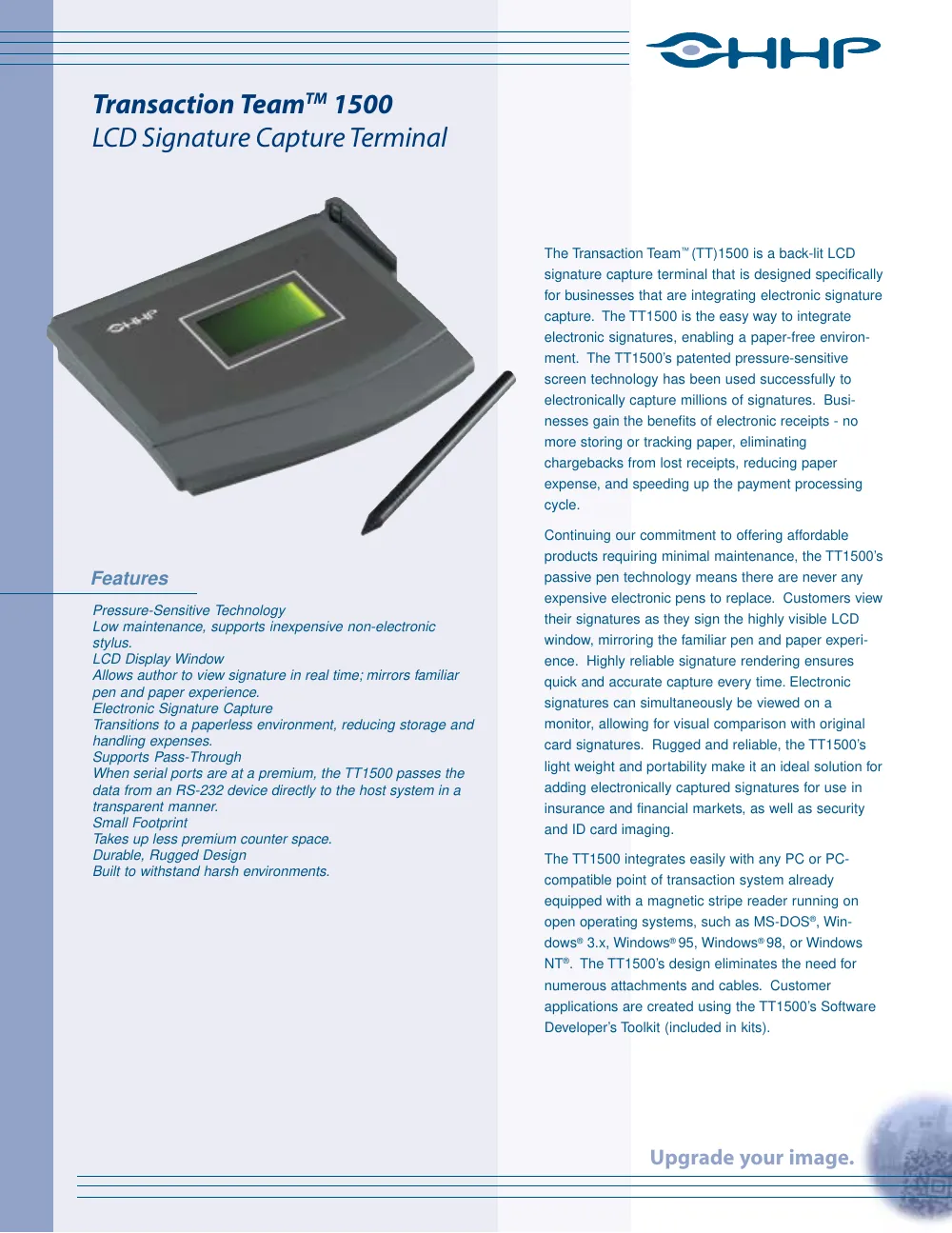
The text of page 1, from the PDF itself
Transaction TeamTM 1500 LCD Signature Capture Terminal
The Transaction Team™ (TT)1500 is a back-lit LCD signature capture terminal that is designed specifically for businesses that are integrating electronic signature capture. The TT1500 is the easy way to integrate electronic signatures, enabling a paper-free environment. The TT1500’s patented pressure-sensitive screen technology has been used successfully to electronically capture millions of signatures. Businesses gain the benefits of electronic receipts - no more storing or tracking paper, eliminating chargebacks from lost receipts, reducing paper expense, and speeding up the payment processing cycle. Continuing our commitment to offering affordable
Features Pressure-Sensitive Technology Low maintenance, supports inexpensive non-electronic stylus. LCD Display Window Allows author to view signature in real time; mirrors familiar pen and paper experience. Electronic Signature Capture Transitions to a paperless environment, reducing storage and handling expenses. Supports Pass-Through When serial ports are at a premium, the TT1500 passes the data from an RS-232 device directly to the host system in a transparent manner. Small Footprint Takes up less premium counter space. Durable, Rugged Design Built to withstand harsh environments.
products requiring minimal maintenance, the TT1500’s passive pen technology means there are never any expensive electronic pens to replace. Customers view their signatures as they sign the highly visible LCD window, mirroring the familiar pen and paper experience. Highly reliable signature rendering ensures quick and accurate capture every time. Electronic signatures can simultaneously be viewed on a monitor, allowing for visual comparison with original card signatures. Rugged and reliable, the TT1500’s light weight and portability make it an ideal solution for adding electronically captured signatures for use in insurance and financial markets, as well as security and ID card imaging. The TT1500 integrates easily with any PC or PCcompatible point of transaction system already equipped with a magnetic stripe reader running on open operating systems, such as MS-DOS®, Windows® 3.x, Windows® 95, Windows® 98, or Windows NT®. The TT1500’s design eliminates the need for numerous attachments and cables. Customer applications are created using the TT1500’s Software Developer’s Toolkit (included in kits).
Upgrade your image.
Page2of 2
Open in the PDF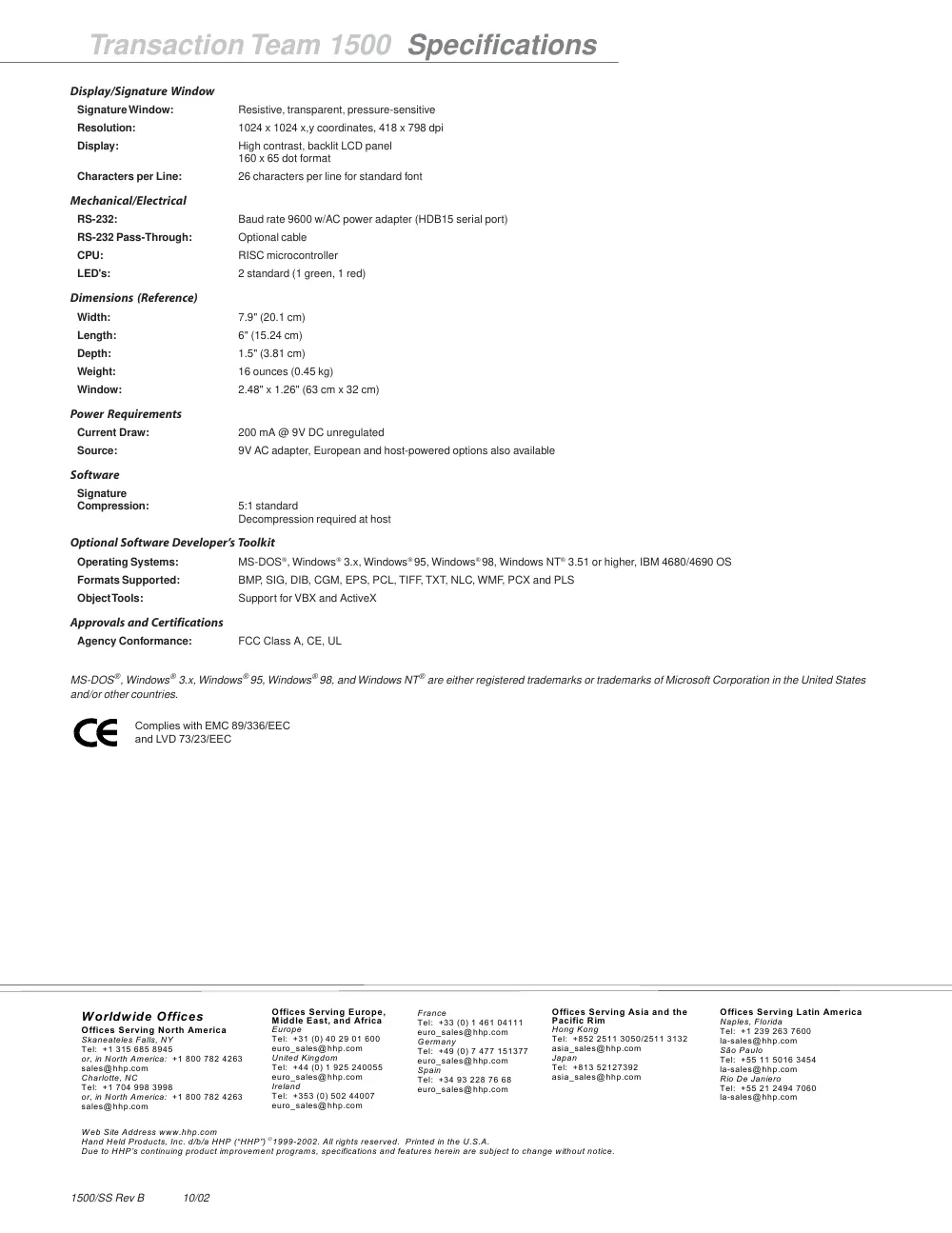
The text of page 2, from the PDF itself
Transaction Team 1500 Specifications Display/Signature Window Signature Window:
Resistive, transparent, pressure-sensitive
- Resolution
- 1024 x 1024 x,y coordinates, 418 x 798 dpi
- Display
- High contrast, backlit LCD panel 160 x 65 dot format
- Characters per Line
- 26 characters per line for standard font
- Mechanical/Electrical RS-232
- Baud rate 9600 w/AC power adapter (HDB15 serial port)
- RS-232 Pass-Through
- Optional cable
- CPU
- RISC microcontroller
- LED's
- 2 standard (1 green, 1 red)
- Dimensions (Reference) Width
- 7.9" (20.1 cm)
- Length
- 6" (15.24 cm)
- Depth
- 1.5" (3.81 cm)
- Weight
- 16 ounces (0.45 kg)
- Window
- 2.48" x 1.26" (63 cm x 32 cm)
- Power Requirements Current Draw
- 200 mA @ 9V DC unregulated
- Source
- 9V AC adapter, European and host-powered options also available
- Software Signature Compression
- 5:1 standard Decompression required at host
Optional Software Developer’s Toolkit Operating Systems:
MS-DOS, Windows 3.x, Windows 95, Windows 98, Windows NT 3.51 or higher, IBM 4680/4690 OS
- Formats Supported
- BMP, SIG, DIB, CGM, EPS, PCL, TIFF, TXT, NLC, WMF, PCX and PLS
- Object Tools
- Support for VBX and ActiveX
Approvals and Certifications Agency Conformance:
FCC Class A, CE, UL
MS-DOS, Windows 3.x, Windows 95, Windows 98, and Windows NT are either registered trademarks or trademarks of Microsoft Corporation in the United States and/or other countries. Complies with EMC 89/336/EEC and LVD 73/23/EEC
W orldw ide O ffices O ffices Serving N orth Am erica Skaneateles Falls, NY Tel: +1 315 685 8945 or, in North Am erica: +1 800 782 4263 sales@ hhp.com Charlotte, NC Tel: +1 704 998 3998 or, in North Am erica: +1 800 782 4263 sales@ hhp.com
O ffices Serving Europe, M iddle East, and Africa Europe Tel: +31 (0) 40 29 01 600 euro_sales@ hhp.com United Kingdom Tel: +44 (0) 1 925 240055 euro_sales@ hhp.com Ireland Tel: +353 (0) 502 44007 euro_sales@ hhp.com
France Tel: +33 (0) 1 461 04111 euro_sales@ hhp.com G erm any Tel: +49 (0) 7 477 151377 euro_sales@ hhp.com Spain Tel: +34 93 228 76 68 euro_sales@ hhp.com
O ffices Serving Asia and the Pacific R im
Hong Kong Tel: +852 2511 3050/2511 3132 asia_sales@ hhp.com Japan Tel: +813 52127392 asia_sales@ hhp.com
W eb Site Address www.hhp.com Hand Held Products, Inc. d/b/a HHP (“HHP”) 1999-2002. All rights reserved. Printed in the U.S.A. Due to HHP’s continuing product im provem ent program s, specifications and features herein are subject to change without notice.
1500/SS Rev B
10/02
O ffices Serving Latin Am erica Naples, Florida Tel: +1 239 263 7600 la-sales@ hhp.com São Paulo Tel: +55 11 5016 3454 la-sales@ hhp.com Rio De Janiero Tel: +55 21 2494 7060 la-sales@ hhp.com