Manual · HHP
Quick Check 2D Print Quality Assessment User's Guide
Manual36 pagesPDF 512 KB
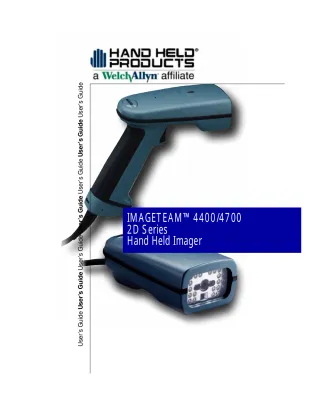
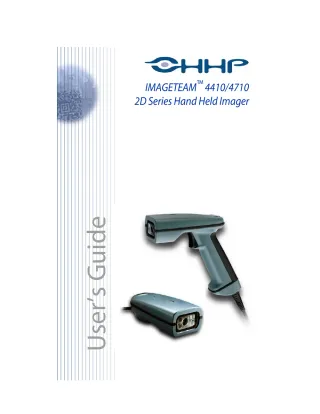
User's guide to HHP Quick Check 2D print quality assessment on the IMAGETEAM 4410 and 4710 image readers.
Names · 1 model
The models it names
Filed with · 1 model
Also filed with these models on the old site
Summary
What is in it
HHP's user's guide to 2D Print Quality Assessment (2D PQA), a feature of its IMAGETEAM 4410 and 4710 image readers that reads a 2D symbol and reports graded quality measurements. It explains how to connect the imager as a keyboard wedge or to a serial port, how to hold it for repeatable results, how to turn on full or screening reports, what is reported for PDF417, MicroPDF417, Aztec Code, QR Code, POSTNET, PLANET and 4-State codes, what each parameter means, and how to use the Quick*View software.
Its parts
- Introduction
- Quick*View
- Customer Support
From the manual
Key facts from this manual
Each line names its page in the PDF.
This is the HHP Quick Check 2D Print Quality Assessment User's Guide from 2002. As printed, it covers the 2D PQA feature of the IMAGETEAM 4410/4710 imagers, which reads a 2D symbol and grades its print quality. It explains how to connect the imager, turn the reports on, read each line of a report, and set up the Quick*View software.
- What it is
- 2D Print Quality Assessment (2D PQA): identifies a read symbol and reports graded print quality measurements; not true verification p. 5
- Required imager
- IMAGETEAM 4410/4710 with firmware revision 1.91.2.18 or higher p. 5
- Power supply
- 4 to 9 volt power supply p. 6
- Factory interface
- Keyboard wedge to an IBM PC AT with a USA keyboard p. 5
- Test distance
- LR 5.0 in (12.7 cm), HD 2.0 in (5.1 cm), LX 7.0 in (17.8 cm) from window to symbol p. 7
- Report modes
- Full Report (2D_PQA1); Screening with minimum grade A to D (2D_PQA2 to 2D_PQA5); exit with 2D_PQA0 p. 9, 10
- Screening beeps
- Single beep if all parameters pass; triple beep if one or more miss the minimum grade p. 9
- Symbologies graded
- PDF417, MicroPDF417, Aztec Code, Data Matrix, QR Code, MaxiCode, POSTNET, PLANET Code and 4-State codes p. 8, 11, 15
- PDF417 grades
- Row Height, Useful Row Height, Data Safety Margin, Edge Accuracy and Print Growth p. 12
- X-dimension
- Approximate, based on the IT4410LR at optimum focus; varies with other HHP imagers p. 12
- Software
- Quick*View, a Microsoft Windows program that shows decoded messages and captures images p. 27
- Imager user's guide
- IMAGETEAM 4410/4710 User's Guide p/n 44/4710/UG p. 27
- Quick*View port
- Defaults to com 1; other ports set under File - Preferences p. 29
- Data Matrix margin
- Data Safety Margin is measured only for ECC200 symbols p. 17
What this manual walks you through
- Connecting the imager in keyboard wedge mode p. 5, 6
- Connecting the imager to a serial port p. 6, 7
- Holding the imager for repeatable print quality reads p. 7, 8
- Turning Full Report and Screening modes on and off p. 9, 10
- Reading a PDF417 or MicroPDF417 report line by line p. 11, 12, 13, 14, 15
- Reading Aztec Code, Data Matrix, QR Code and MaxiCode reports p. 15, 16, 17, 18
- Installing Quick*View from diskette or the web p. 27, 28
- Setting the Quick*View com port and viewing scan data p. 29, 30
Good to know
- 2D PQA is not true verification, though it can help with print process control. p. 5
- Hand movement, rotation and location affect the results; keep the imager still and take several reads. p. 7, 8
- Reported X-dimensions are approximate and vary with imagers other than the IT4410LR. p. 12
- The imager cannot take its power from the PC's com port. p. 27
- After the temporary Quick*View setup on a keyboard wedge unit, cycle the power to return to keyboard wedge. p. 28
Questions this manual answers
What firmware does the IT4410 need for 2D print quality assessment?
An IMAGETEAM 4410/4710 with firmware revision 1.91.2.18 or higher. p. 5
How far should I hold the imager when checking print quality?
5.0 in (12.7 cm) for LR models, 2.0 in (5.1 cm) for HD and 7.0 in (17.8 cm) for LX, measured from the front window. p. 7
What does a triple beep mean in Quick Check Screening mode?
One or more measured parameters fell below the Minimum Acceptable Grade. A single beep means all parameters are okay. p. 9
How do I turn on the full print quality report?
Type the menu command 2D_PQA1 in Quick*View or scan the Full Report bar code. Exit with 2D_PQA0 or the Exit bar code. p. 9, 10
Is Quick Check 2D PQA a true bar code verifier?
No. The guide says it is not true verification, but it gives test results useful for 2D print quality process control. p. 5
Contents
Chapters and sections
Each line opens the PDF at its page.
The whole text · 6 parts
Read the manual here as text
Its text as extracted from the PDF, unedited, in parts; each page opens the PDF at that page.
The file