Manual · Fujitsu
Stylistic 3400 User's Guide
Manual58 pagesPDF 368 KB
User's guide for the Fujitsu Stylistic 3400 pen tablet computer: features, operation, battery, care, troubleshooting and specs.
Covers · 1 model
The models it covers
Summary
What is in it
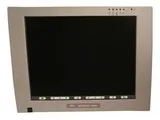
Fujitsu's user's guide for the Stylistic 3400, a pen-based tablet computer for Windows 98, Windows NT 4.0 Workstation or Windows 2000. It lists the in-box items and optional accessories, shows the tablet's features, status display and connectors, and explains system states, powering up and suspending, hotpads, using and calibrating the pen, charging and replacing the battery pack, the modem and PC Card slot. Later chapters cover care, troubleshooting and peripheral settings, and appendices give agency notices and hardware specifications.
Its parts
- Getting Started
- Using the Stylistic 3400 Pen Tablet
- Care and Maintenance
- Appendix A Agency Notices
- Appendix B Stylistic 3400 Hardware Specifications
- Appendix C Digitizer Technology Notice
From the manual
Key facts from this manual
Some pages are scans or cannot be read; this says only what the readable text supports. Each line names its page in the PDF.
Fujitsu user's guide (FPC58-0700-00C, 2001) for the Stylistic 3400 pen tablet computer, models FMW4203TX (XGA) and FMW4203TS (SVGA). It describes the in-box items, the optional accessories with their part numbers, the controls, status lights and connectors, battery charging and swapping, troubleshooting, and the hardware specifications.
- Device
- Pen tablet computer for Windows 98, Windows NT 4.0 Workstation or Windows 2000 p. 7
- Processor
- Intel Pentium III, 400 MHz, Intel 440MX - 100 chip set p. 49
- Memory
- 64 MB on the main board; 32MB, 64MB and 128MB expansion modules, 192 MB maximum p. 49
- Display
- 10.4” TFT, 256K colors: XGA (1024 x 768) indoor or SVGA (800 x 600) indoor/outdoor p. 50
- Battery
- Removable 6-cell lithium ion, 10.8 V @ 2600 mAH, warm-swappable, about 2.5 hours of use p. 51
- Storage
- Removable 2.5” 6 GB IDE hard disk drive, Ultra DMA p. 49
- Interfaces
- One Type II CardBus slot with Zoom Video, USB, RJ-11, floppy port, video connector, IrDA 1.1 (FIR, 4Mbps), audio jacks p. 50
- Modem and LAN
- Internal LAN/56 Kbps (V.90) modem module; the LAN port is on the optional mini-dock or port replicator p. 7, 10
- Model numbers
- FMW4203TX (XGA), FMW4203TS (SVGA) p. 4
- Docks and cradles
- Port replicator FMW42PR1, mini-dock FMW42DS1, high-usage cradle FMW42CR1, wall-mount cradle FMW42CR3 p. 8
- Accessories
- Spare battery FMW42BP1, external charger FMW42BC1, AC adapter (US) FMWAC6A, auto adapter FMWCB2, pens (5) FMW42PN1 p. 8
- Size and weight
- 11” w x 8.5" d x 1.1” h (280mm x 215mm x 27.4mm), 3.2 lbs (1.45 Kg) p. 49
- Operating temp
- 0 to 40 °C (32 to 104 °F), 20 to 80% humidity non-condensing p. 51
- Digitizer
- Resistive, with palm rejection p. 50
What this manual walks you through
- Checking the in-box items and choosing optional accessories p. 7, 8
- Reading the power, charge, battery, disk and hovering status lights p. 13, 14, 15
- Calibrating the pen p. 30
- Charging the battery pack in the tablet p. 30, 31
- Removing and installing the battery pack p. 32
- Troubleshooting resume, blank screen, pen tracking, infrared and audio problems p. 40, 41
- Clearing small air bubbles in the display p. 53
Good to know
- The modem's 56 Kbps rate is nominal; actual rates are limited to 53 Kbps. p. 7
- Charging does not start if the battery is already at 90% or more, to prevent overcharging. p. 31
- A built-in bridge battery keeps the tablet in Suspend-to-RAM for about 5 minutes during a battery swap. p. 32
- Do not block the air flow vents. p. 10
- When too hot, the tablet goes into Suspend-to-RAM and cannot resume until it cools. p. 40
Questions this manual answers
What battery does the Fujitsu Stylistic 3400 use?
A removable 6-cell lithium ion pack, 10.8 V at 2600 mAH; the spare pack is FMW42BP1. p. 8, 51
How long does the Stylistic 3400 battery take to charge?
From empty, about 4 hours to 100% with the tablet not in use, or about 8 hours while in use. p. 31
How much RAM can the Stylistic 3400 take?
It has 64 MB on the main board and takes 32, 64 or 128 MB expansion modules, up to 192 MB. p. 49
What docks fit the Stylistic 3400?
The port replicator FMW42PR1, the mini-dock FMW42DS1, the high-usage cradle FMW42CR1 and the wall-mount cradle FMW42CR3. p. 8
Why won't my Stylistic 3400 resume from suspend?
The battery may be defective or critically low, or the tablet may be too hot; connect the AC adapter or a charged battery, or move it somewhere cooler. p. 40
The whole text · 6 parts
Read the manual here as text
Its text as extracted from the PDF, unedited, in parts; each page opens the PDF at that page.
The file