Manual · Extron
User's Manual: SW VGA / Ars Series
Manual28 pagesPDF 1.9 MB
User's manual for the Extron SW VGArs and SW VGA Ars series two, four and six input VGA switchers: installation, operation, remote control.
What this file really is
The old site listed this file as a manual for the Extron SVDA 6 MX and SW VGA Ars. This is the manual for the Extron SW VGArs and SW VGA Ars series VGA switchers; it does not mention the SVDA 6 MX.
Names · 1 model
The models it names
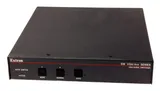
Filed with · 1 model
Also filed with these models on the old site
Summary
What is in it
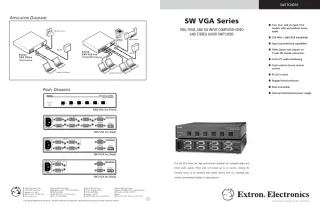
Extron's user's manual for the SW2, SW4 and SW6 VGArs and VGA Ars switchers, two, four or six input VGA switchers with a buffered output; the Ars models add audio. It covers features, rack and furniture mounting, rear panel power, input, output and remote connections, board versions and jumpers, front panel buttons and normal and auto switch modes, RS-232 SIS commands, the Windows control program and firmware updates, VSW I AAP, contact closure and IR 102 remote control, specifications and part numbers.
Its parts
- Introduction
- Installation
- Operation
- Remote Control
From the manual
Key facts from this manual
Each line names its page in the PDF.
Extron user's manual from 2009 for the SW VGA / Ars Series switchers: the SW2, SW4 and SW6 VGArs and the SW2, SW4 and SW6 VGA Ars with audio. It does not describe the SVDA 6 MX. It walks through mounting, rear panel wiring, front panel and auto switch operation, RS-232 and contact closure control, and lists specifications and part numbers.
- Device
- Two, four or six input VGA switcher with one buffered output, 350 MHz (-3 dB); Ars models add audio p. 6
- Video signals
- VGA to UXGA computer video and HDTV component video on female 15-pin HD connectors p. 26
- Power
- 100 VAC to 240 VAC, 50-60 Hz, 10 watts, internal p. 27
- Audio (Ars models)
- Ars models: unbalanced stereo inputs on 3.5 mm mini jacks; one balanced or unbalanced output on a 3.5 mm 5-pole captive screw connector p. 26
- RS-232
- 9-pin female D Remote connector; 9600 baud, 8 data bits, 1 stop bit, no parity; pins 2 TX, 3 RX, 5 GND p. 27
- Temperature
- Operating 0 to +50 °C (+32 to +122 °F); storage -40 to +70 °C p. 27
- Contact closure
- Pins 1, 4, 6, 7, 8 and 9 select inputs 1 to 6 when shorted to ground (pin 5) p. 24, 27
- Error codes
- E01 input number out of range; E06 input change while auto-switch active; E09 invalid mode parameter; E10 invalid command; E13 value out of range; E14 illegal for this configuration p. 16
- Size and weight
- 1.75" H x 8.75" W x 9.5" D (1U high, half rack wide); 2.5 lbs (1.1 kg) p. 27
- Part numbers
- SW2 VGArs 60-257-02; SW2 VGA Ars 60-257-22; SW4 VGArs 60-258-02; SW4 VGA Ars 60-258-22; SW6 VGArs 60-259-02; SW6 VGA Ars 60-259-22 p. 27
- Remote controls
- KP 6 keypad 60-111-20 (25-foot cable); IR 102 Kit 70-224-01 (range about 30 feet) p. 6, 11
- Rack shelves
- RSU 129 1U Universal Rack Shelf 60-190-01 or RSB 129 1U Basic Rack Shelf 60-604-01 p. 9
- Desk brackets
- MBU 125 under-desk 70-077-01; MBD 129 through-desk 70-077-02 p. 9
- VGA audio cables
- VGA-A M-M MD: 3' 26-490-01, 6' 26-490-02, 12' 26-490-03, 25' 26-490-04, 50' 26-490-08 p. 27
What this manual walks you through
- Installing and powering up the system in order p. 8
- Mounting the switcher on a rack shelf or under or through a desk p. 9
- Wiring the audio inputs and the captive screw audio output p. 11
- Checking the board version and setting jumpers for VSW I AAP panels p. 12
- Selecting normal or auto switch mode from the front panel p. 14
- Controlling the switcher with SIS commands over RS-232 p. 16
- Selecting inputs with a contact closure device p. 24
- Using the IR 102 infrared remote kit p. 24
Good to know
- The switcher takes control from an RS-232 device or a contact closure device, not both. p. 11
- Unneeded pins connected on the Remote cable may make the switcher hang; RS-232 and IR use only pins 2, 3 and 5. p. 11, 16
- In a closed rack, keep the ambient temperature within the 122 °F (50 °C) maximum. p. 8
- Screws longer than 3/16 inch damage the unit when mounting it on a rack shelf. p. 9
- The ID bits (pins 4, 11, 12 and 15) reach the output from input 1 only. p. 10
Questions this manual answers
What does error E06 mean on an Extron SW VGA switcher?
E06 means the input change was refused because auto-switch mode is active; E01 is an input number out of range and E10 an invalid command. p. 16
Which input does the SW VGA Ars select in auto switch mode?
The highest numbered input with a sync signal present; with no sync on any input, none is selected. p. 14
What are the RS-232 settings of the SW VGA Ars?
9600 baud, 8 data bits, 1 stop bit and no parity on the 9-pin Remote connector, with pin 2 TX, 3 RX and 5 ground. p. 27
Does the SW VGA Ars work with VSW I AAP wall panels?
Only if its circuit board part number is 20-1118-0n, and internal jumpers must be set first. p. 12
Contents
Chapters and sections
Each line opens the PDF at its page.
The whole text · 5 parts
Read the manual here as text
Its text as extracted from the PDF, unedited, in parts; each page opens the PDF at that page.
The file