Manual · ExaDigm
XD2000 Terminal User's Guide
Manual6 pagesPDF 178 KB
User's guide for the XD2000 payment terminal: parts, setup for Ethernet, dial-up, WiFi, CDMA and GSM modems, and loading paper.
Covers · 1 model
The models it covers
Summary
What is in it
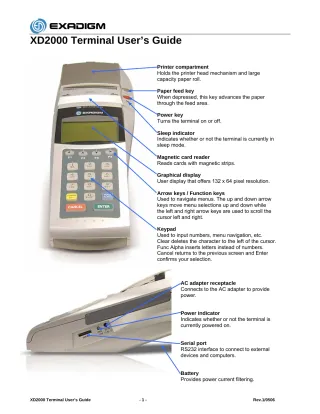
A six-page user's guide for the XD2000 credit card terminal. It identifies the parts of the terminal (printer, keypad, magnetic card reader, display, serial port), then gives step-by-step setup for each communication module: combo modem (Ethernet, dial-up, host USB), WiFi, CDMA, GSM/GPRS with a SIM card, and global dial-up. It ends with how to load a paper roll and a chart for entering special characters from the keypad.
Its parts
- Installing and Configuring
- Removing and Loading Paper
- Inputting Special Characters
From the manual · read page by page
Key facts from this manual
Each line names its page in the PDF.
Six-page user's guide for the ExaDigm XD2000 payment terminal. It names the keys and parts, walks through setting up each communication module (combo Ethernet and dial-up, WiFi, CDMA, GSM and global dial-up), and shows how to load paper and type special characters.
- Device
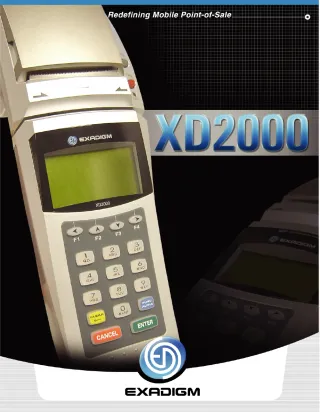
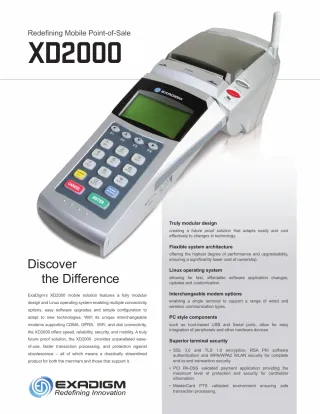
- Payment terminal with built-in printer, magnetic card reader and 132 x 64 pixel graphic display p. 1
- Serial port
- RS232 port for external devices and computers p. 1
- Communication modules
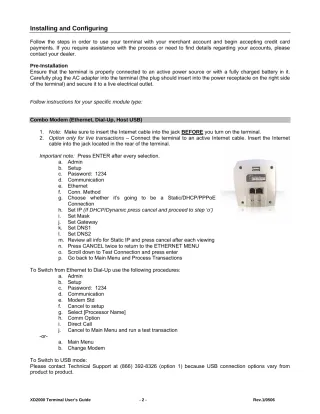
- Combo (Ethernet, Dial-Up, Host USB), WiFi 802.11 b/g, CDMA, GSM/GPRS, Global Dial-Up p. 2, 3, 4
- Ethernet setup
- Static, DHCP or PPPoE connection p. 2
- WiFi
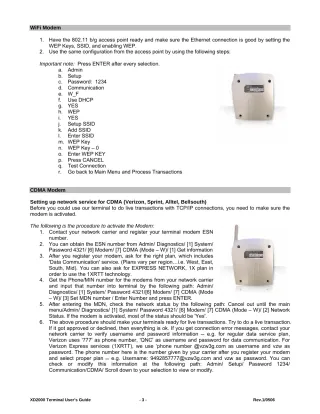
- 802.11 b/g access point with SSID and WEP key p. 3
- CDMA carriers
- Verizon, Sprint, Alltel, Bellsouth; 1XRTT supported p. 3
- GSM carriers
- Cingular or T-Mobile; SIM card goes in the module's back sliding tray p. 4
- Power
- AC adapter plugs into the receptacle on the right side; also runs on its battery p. 2
What this manual walks you through
- Identifying the keys, indicators and ports p. 1
- Setting up the Ethernet connection on the combo modem p. 2
- Switching from Ethernet to dial-up p. 2
- Setting up the WiFi modem p. 3
- Activating the CDMA modem with the carrier p. 3
- Fitting a SIM card in the GSM modem p. 4
- Checking a dial-up terminal p. 4
- Loading a paper roll p. 5
- Typing special characters p. 6
Good to know
- Plug in the Ethernet cable before turning the terminal on. p. 2
- Do not force paper through the printer by hand; it can damage the printer. p. 5
- Keep the gray support spindle when removing the old paper core. p. 5
- USB connection options vary from product to product. p. 2
- To print a single @ on a receipt, type @@. p. 6
Questions this manual answers
How do I load paper in the ExaDigm XD2000?
Open the compartment, remove the old core but keep the gray spindle, insert the roll so paper feeds from the bottom, close it and press FEED. p. 5
How do I type * or @ on the XD2000 keypad?
Press 0 and then the FUNC ALPHA key repeatedly; for * press it 24 times. The guide has a chart for each character. p. 6
How do I activate the XD2000 CDMA modem?
Register the modem's ESN number with the carrier, get a plan with data service, then enter the phone (MDN) number the carrier gives into the terminal. p. 3
Where does the SIM card go in the XD2000 GSM modem?
On the back sliding tray of the module, which comes out by pushing the right corner tab. p. 4
How do I turn on a dial-up XD2000?
Hold down the power button for 3 seconds. p. 4
The whole text · 1 part
Read the manual here as text
Its text as extracted from the PDF, unedited, in parts; each page opens the PDF at that page.
The file