Manual · DVTel
EV Series Multi-port Encoder Quick Installation Guide
Manual6 pagesPDF 774 KB
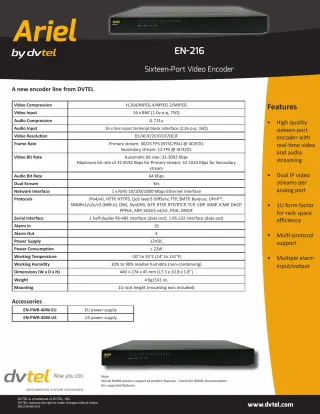
Quick installation guide for the DVTel EV Series multi-port H.264 video encoders, including the EV-216 and EV-216-A.
Covers · 1 model
The models it covers
Summary
What is in it
The quick installation guide for the DVTel EV Series multi-port video encoders (EV-116, EV-208, EV-208-A, EV-216 and EV-216-A). It lists package contents and optional power supplies, gives a hardware overview, and explains installing the encoder on a flat surface or in a 1U rack space, connecting video, network, power, PTZ serial and audio cables, finding or setting the IP address with SConfigurator, configuring audio on the -A models, setting the EV116 encoding mode and preparing the unit for the Latitude NVMS.
Its parts
- Introduction
- Package Contents
- Optional Accessories
- Hardware Overview
- Installing the DVTel EV Series Encoder
- Connecting the DVTel EV Series Encoder
- Obtaining the IP Address
- Configuring Audio on the EV-208-A and EV-216-A
- Setting the EV116 H.264 Encoding Mode
- Configuring the Encoder to Operate with Latitude NVMS
From the manual · read page by page
Key facts from this manual
Each line names its page in the PDF.
A six-page DVTel quick installation guide (printed February 2012) for the EV Series multi-port H.264 video encoders: EV-116, EV-208, EV-208-A, EV-216 and EV-216-A. It shows how to mount and cable the encoder, wire its 12V power, find or set its IP address with SConfigurator, set up audio on the -A models and change the EV116 encoding mode.
- Device
- 16-port multi-port video encoder with H.264 p. 1
- Video inputs
- BNC connectors on the rear for analog cameras p. 2
- Network
- LAN 1 RJ-45 on the front; LAN 2 is for DVTel support debugging p. 2
- Power
- Certified supply, 12V DC, 1.8A up to 3A, to a terminal block plug; 16-28 AWG wire p. 2
- Mounting
- Desktop or 1U rack space, with the supplied rack-mount brackets p. 2
- Audio
- Only the -A models (EV-208-A, EV-216-A) have audio inputs and outputs p. 1
- Package contents
- Encoder, rack-mount brackets with four Philips M3 x 6mm pan head screws, this guide p. 1
- Rack power supplies
- DVT-PWR-275RM1: 12VDC, 275W, up to 8 encoders; DVT-PWR-275RM2: dual, 550W total, up to 16 encoders p. 1
- Wiring harness
- DVT-WH-4UA, 8A fused, for up to three encoders p. 1
- PTZ control
- Serial ports connect to PTZ cameras p. 3
- IP address
- DHCP by default; an APIPA address starting 169.254 when no DHCP server p. 3, 4
- Software
- SConfigurator, with VSIP port 5510 p. 4
What this manual walks you through
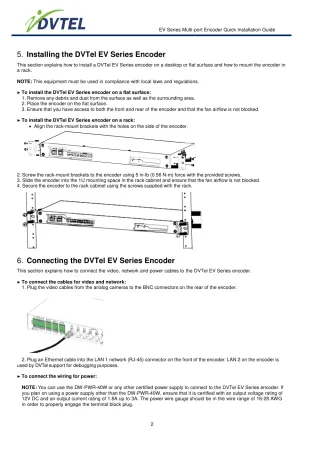
- Installing the encoder on a flat surface or in a rack p. 2
- Connecting the video, network and power cables p. 2
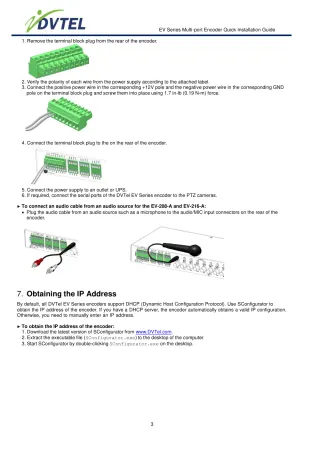
- Wiring the power supply to the terminal block plug p. 3
- Finding the encoder IP address with SConfigurator p. 3, 4
- Setting the IP address manually p. 4
- Configuring audio on the EV-208-A and EV-216-A p. 5
- Setting the EV116 H.264 encoding mode p. 5, 6
- Configuring the encoder to work with Latitude NVMS p. 6
Good to know
- Keep the fan airflow clear, whether on a desk or in a rack. p. 2
- Connect the PTZ camera RX to the encoder RX, and TX to TX for camera feedback. p. 1
- On the audio models, only the odd-numbered audio inputs can be used. p. 1
- Settings made in DVTel Latitude override those made in SConfigurator or the Web Interface. p. 5
Questions this manual answers
What power supply does the DVTel EV-216 need?
A certified 12V DC supply rated 1.8A up to 3A, wired with 16-28 AWG wire to the terminal block plug. p. 2
How do I find the IP address of a DVTel EV-216 encoder?
Run SConfigurator, open the Units tab and click Discover. With no DHCP server the unit shows as Unknown with a 169.254 address, which you can change under Network, IP. p. 4
Does the DVTel EV-216 support audio?
No. Only the EV-208-A and EV-216-A models have audio inputs and outputs. p. 1
The whole text · 1 part
Read the manual here as text
Its text as extracted from the PDF, unedited, in parts; each page opens the PDF at that page.
The file