Manual · Datalogic
Datalogic TC1100 Quick Guide
Manual2 pagesPDF 604 KB
Both pages are below, each with its text.
Covers · 1 model
The models it covers
From the manual · read page by page
Key facts from this manual
Each line names its page in the PDF.
This is the Datalogic quick guide for the TC1100, a linear CCD scan engine for OEM use, in versions TC1100-0100 and TC1100-0200. It gives technical specifications, readable codes, connectors, trigger and good-read wiring, and the serial commands and codes that change the default configuration.
- Device
- Linear CCD scan engine for OEM applications, in two versions: TC1100-0100 and TC1100-0200 p. 1
- Power
- 5 Vdc ± 5%, 1.5 W consumption p. 1
- Interfaces
- RS232, Wedge, Pen emulation p. 1
- Scan rate
- Up to 270 scans/sec; selectable 67, 135 or 270 p. 1, 2
- Max resolution
- 0,076 mm (3 mils) p. 1
- Readable codes
- EAN/UPC, Code 39, 2/5 family, Codabar, Code 128, EAN 128, ISBT 128, Code 93, Code 16K, Code 49 and others p. 1
- PDF417 version
- TC1100-0200: also reads PDF417, Codablock-A and Codablock-F p. 1
- Linear version
- TC1100-0100: also reads Telepen, MSI/Plessey and Pharmacode p. 1
- Connectors
- Hirose DF13-8p-1.25V p. 2
- Order numbers
- 939501000 and 939501010 p. 1
- RS232 baud rates
- 150 to 38400 baud, set by command p. 2
- Good-read output
- OUT+ and OUT- on J1, external voltage 40 Vdc max (NPN example) p. 2
- External trigger
- NPN or PNP input, using TC1100 power or external power (30 Vdc max) p. 2
- Keyboard languages
- Belgian, English, French, German, Italian, Spanish, Swedish, USA p. 2
What this manual walks you through
- Changing the configuration with commands over RS232 p. 2
- Wiring the external trigger input p. 2
- Wiring the good-read output p. 2
- Enabling bar code types, check digits and code lengths p. 1
- Reading range diagrams for both versions p. 1
- Choosing an operating mode p. 2
Good to know
- The minimum code length must not be more than the maximum. p. 1
- The full parameter list is in the TC1100 Reference Manual, not this guide. p. 1
- Settings sent between $+ and $- are stored permanently in flash memory. p. 2
Questions this manual answers
What is the difference between the TC1100-0100 and TC1100-0200?
The TC1100-0200 also reads PDF417 and Codablock; the TC1100-0100 also reads Telepen, MSI/Plessey and Pharmacode. p. 1
What power does the TC1100 scan engine need?
5 Vdc ± 5%, with a consumption of 1.5 W. p. 1
What connector does the TC1100 use?
The guide names the Hirose DF13-8p-1.25V connector. p. 2
How do I change TC1100 settings over serial?
Send commands over RS232 between $+ and $- followed by a carriage return; the new settings are stored in flash. p. 2
The file
Size and text
Every page · 2
Read it here
Each page as it is printed, and its words beside it, so a phone can search and copy them.
Page1of 2
Open in the PDF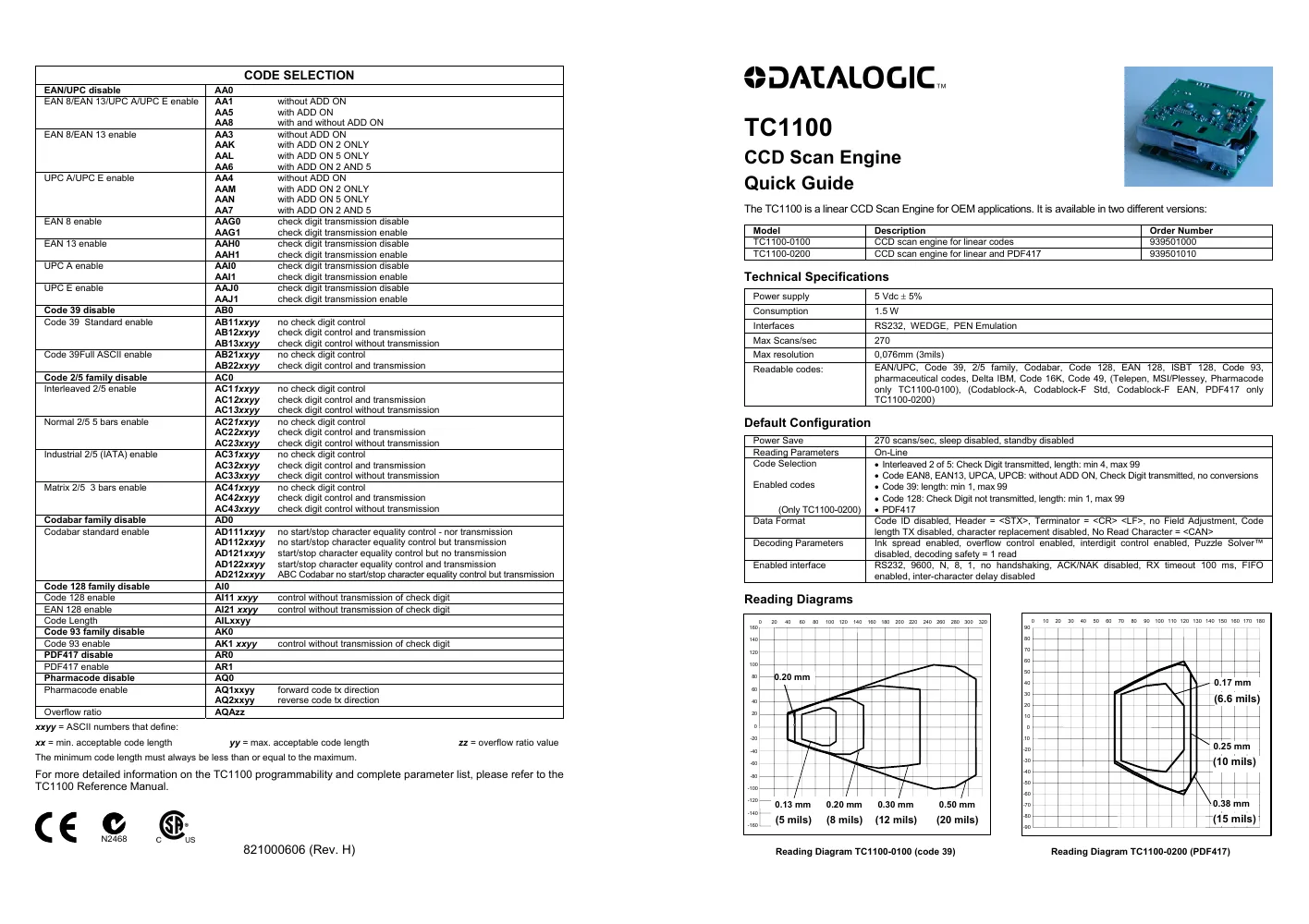
The text of page 1, from the PDF itself
CODE SELECTION EAN/UPC disable EAN 8/EAN 13/UPC A/UPC E enable EAN 8/EAN 13 enable
UPC A/UPC E enable
EAN 8 enable EAN 13 enable UPC A enable UPC E enable Code 39 disable Code 39 Standard enable Code 39Full ASCII enable Code 2/5 family disable Interleaved 2/5 enable Normal 2/5 5 bars enable Industrial 2/5 (IATA) enable Matrix 2/5 3 bars enable Codabar family disable Codabar standard enable
Code 128 family disable Code 128 enable EAN 128 enable Code Length Code 93 family disable Code 93 enable PDF417 disable PDF417 enable Pharmacode disable Pharmacode enable Overflow ratio
AA0 AA1 AA5 AA8 AA3 AAK AAL AA6 AA4 AAM AAN AA7 AAG0 AAG1 AAH0 AAH1 AAI0 AAI1 AAJ0 AAJ1 AB0 AB11xxyy AB12xxyy AB13xxyy AB21xxyy AB22xxyy AC0 AC11xxyy AC12xxyy AC13xxyy AC21xxyy AC22xxyy AC23xxyy AC31xxyy AC32xxyy AC33xxyy AC41xxyy AC42xxyy AC43xxyy AD0 AD111xxyy AD112xxyy AD121xxyy AD122xxyy AD212xxyy AI0 AI11 xxyy AI21 xxyy AILxxyy AK0 AK1 xxyy AR0 AR1 AQ0 AQ1xxyy AQ2xxyy AQAzz
without ADD ON with ADD ON with and without ADD ON without ADD ON with ADD ON 2 ONLY with ADD ON 5 ONLY with ADD ON 2 AND 5 without ADD ON with ADD ON 2 ONLY with ADD ON 5 ONLY with ADD ON 2 AND 5 check digit transmission disable check digit transmission enable check digit transmission disable check digit transmission enable check digit transmission disable check digit transmission enable check digit transmission disable check digit transmission enable
TC1100 CCD Scan Engine Quick Guide The TC1100 is a linear CCD Scan Engine for OEM applications. It is available in two different versions: Model TC1100-0100 TC1100-0200
no check digit control check digit control and transmission check digit control without transmission no check digit control check digit control and transmission
Power supply5 Vdc ± 5%Consumption1.5 WInterfaces
RS232, WEDGE, PEN Emulation
Max Scans/sec270Max resolution
0,076mm (3mils) EAN/UPC, Code 39, 2/5 family, Codabar, Code 128, EAN 128, ISBT 128, Code 93, pharmaceutical codes, Delta IBM, Code 16K, Code 49, (Telepen, MSI/Plessey, Pharmacode only TC1100-0100), (Codablock-A, Codablock-F Std, Codablock-F EAN, PDF417 only TC1100-0200)
- Readable codes
- no check digit control check digit control and transmission check digit control without transmission no check digit control check digit control and transmission check digit control without transmission no check digit control check digit control and transmission check digit control without transmission no check digit control check digit control and transmission check digit control without transmission
Default Configuration Power Save Reading Parameters Code Selection Enabled codes (Only TC1100-0200) Data Format
no start/stop character equality control - nor transmission no start/stop character equality control but transmission start/stop character equality control but no transmission start/stop character equality control and transmission ABC Codabar no start/stop character equality control but transmission
Decoding Parameters Enabled interface
160020406080100 120140160 180200 220240 260280 300
control without transmission of check digit
5060708090
100 110 120 130 140 150 160 170 180
400.17 mm30(6.6 mils)20201000-20-10-40-20 -30-600.25 mm(10 mils)-40-80-50-100-60 -120 -140 -160821000606 (Rev. H)405040
For more detailed information on the TC1100 programmability and complete parameter list, please refer to the TC1100 Reference Manual.
30600.20 mm60
zz = overflow ratio value
2070100
forward code tx direction reverse code tx direction
108012080032090140
The minimum code length must always be less than or equal to the maximum.
N2468
270 scans/sec, sleep disabled, standby disabled On-Line
- Interleaved 2 of 5: Check Digit transmitted, length: min 4, max 99
- Code EAN8, EAN13, UPCA, UPCB: without ADD ON, Check Digit transmitted, no conversions
- Code 39: length: min 1, max 99
- Code 128: Check Digit not transmitted, length: min 1, max 99
- PDF417 Code ID disabled, Header = <STX>, Terminator = <CR> <LF>, no Field Adjustment, Code length TX disabled, character replacement disabled, No Read Character = <CAN> Ink spread enabled, overflow control enabled, interdigit control enabled, Puzzle Solver™ disabled, decoding safety = 1 read RS232, 9600, N, 8, 1, no handshaking, ACK/NAK disabled, RX timeout 100 ms, FIFO enabled, inter-character delay disabled
Reading Diagrams
control without transmission of check digit control without transmission of check digit
yy = max. acceptable code length
Order Number 939501000 939501010
Technical Specifications
xxyy = ASCII numbers that define: xx = min. acceptable code length
Description CCD scan engine for linear codes CCD scan engine for linear and PDF417
0.13 mm0.20 mm0.30 mm0.50 mm-70(5 mils)(8 mils)(12 mils)(20 mils)-80
Reading Diagram TC1100-0100 (code 39)
-90
0.38 mm
(15 mils) Reading Diagram TC1100-0200 (PDF417)
Page2of 2
Open in the PDF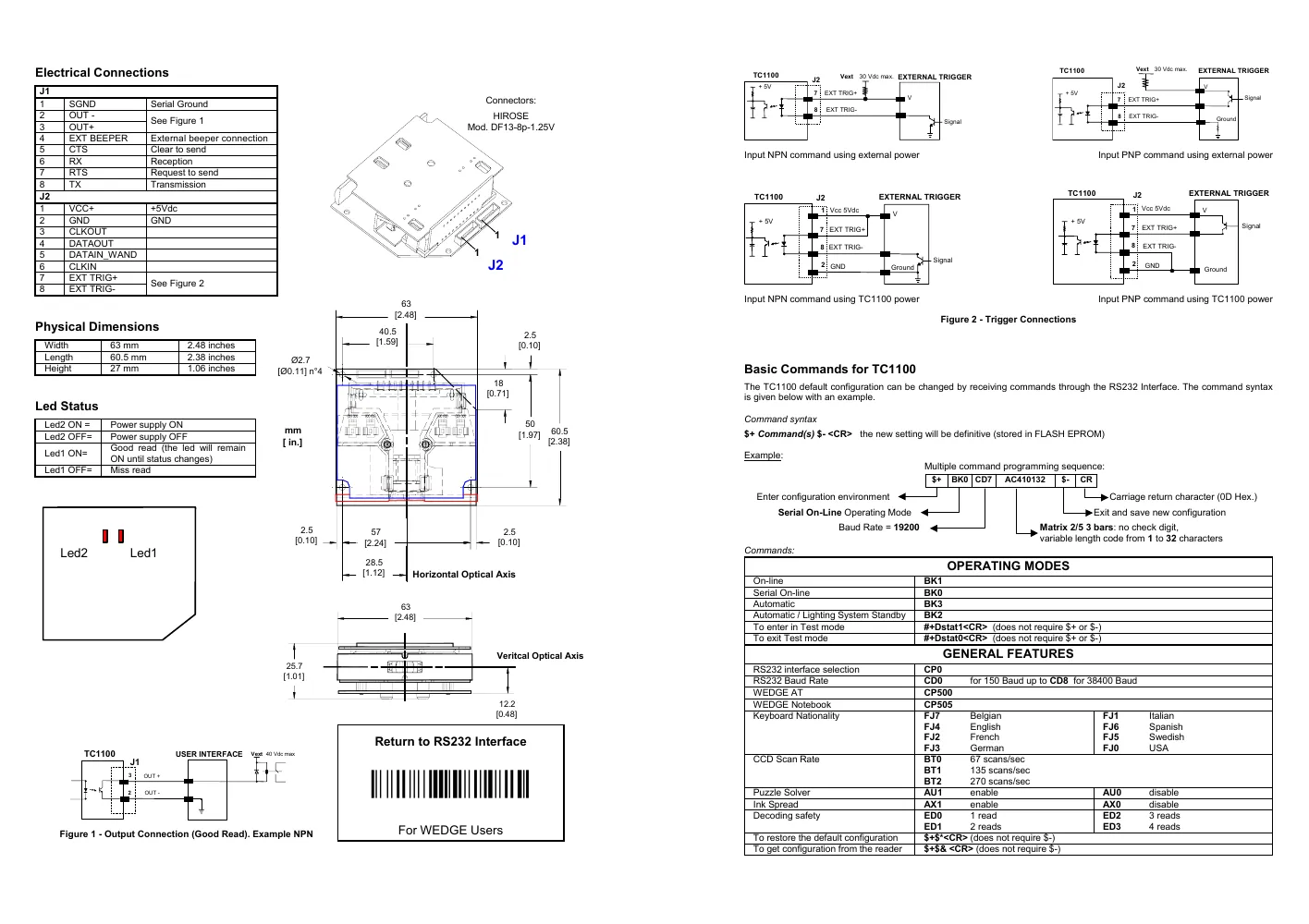
The text of page 2, from the PDF itself
Electrical Connections J1 1 2 3 4 5 6 7 8 J2 1 2 3 4 5 6 7 8
TC1100
- 5V
SGND OUT OUT+ EXT BEEPER CTS RX RTS TX
Serial Ground
- Connectors
- See Figure 1
HIROSE Mod. DF13-8p-1.25V
External beeper connection Clear to send Reception Request to send Transmission
7+5Vdc GNDSignal1TC1100EXTERNAL TRIGGERJ2J12 GNDGround
2.48 inches 2.38 inches 1.06 inches
Power supply ON Power supply OFF Good read (the led will remain ON until status changes) Miss read
8EXT TRIG-SignalGroundEXTERNAL TRIGGERJ2+ 5VV Signal7 EXT TRIG+Signal
Input NPN command using TC1100 power
8EXT TRIG-2GNDGround
Input PNP command using TC1100 power Figure 2 - Trigger Connections
40.5 [1.59]2.5 [0.10]Ø2.7 [Ø0.11] n°4
Basic Commands for TC1100 The TC1100 default configuration can be changed by receiving commands through the RS232 Interface. The command syntax is given below with an example. 50 [1.97]
mm [ in.]
Command syntax 60.5 [2.38]
$+ Command(s) $- <CR> the new setting will be definitive (stored in FLASH EPROM) Example:
Multiple command programming sequence: $+
BK0 CD7AC410132$-CR
Enter configuration environment
Carriage return character (0D Hex.) Exit and save new configuration
Serial On-Line Operating Mode 2.5 [0.10]
Led157 [2.24]2.5 [0.10]28.5 [1.12]
Horizontal Optical Axis 63 [2.48]
Baud Rate = 19200
12.2 [0.48]
OPERATING MODES On-line Serial On-line Automatic Automatic / Lighting System Standby To enter in Test mode To exit Test mode
BK1 BK0 BK3 BK2 #+Dstat1<CR> (does not require $+ or $-) #+Dstat0<CR> (does not require $+ or $-)
RS232 interface selection RS232 Baud Rate WEDGE AT WEDGE Notebook Keyboard Nationality
CP0 CD0 for 150 Baud up to CD8 for 38400 Baud CP500 CP505 FJ1 FJ7 Belgian FJ6 FJ4 English FJ5 FJ2 French FJ0 FJ3 German BT0 67 scans/sec BT1 135 scans/sec BT2 270 scans/sec AU1 enable AU0 AX1 enable AX0 ED0 1 read ED2 ED1 2 reads ED3 $+$*<CR> (does not require $-) $+$& <CR> (does not require $-)
GENERAL FEATURES
Return to RS232 Interface USER INTERFACE
J1 3OUT +2OUT -Vext 40 Vdc max
Figure 1 - Output Connection (Good Read). Example NPN
CCD Scan Rate
Ì$+CP0$-$Î For WEDGE Users
Matrix 2/5 3 bars: no check digit, variable length code from 1 to 32 characters
- Commands
- Veritcal Optical Axis 25.7 [1.01]
TC1100EXT TRIG+See Figure 2Led StatusLed2V71 Vcc 5VdcV8 EXT TRIG-J2EXTERNAL TRIGGER
Input PNP command using external power
7 EXT TRIG+18 [0.71]Led1 OFF=EXT TRIG-+ 5V163 mm 60.5 mm 27 mmLed1 ON=+ 5VV1 Vcc 5VdcPhysical DimensionsLed2 ON = Led2 OFF=EXT TRIG+
Input NPN command using external power
63 [2.48]Width Length HeightJ28TC1100
VCC+ GND CLKOUT DATAOUT DATAIN_WAND CLKIN EXT TRIG+ EXT TRIG-
Vext 30 Vdc max.
TC1100
Vext 30 Vdc max. EXTERNAL TRIGGER
J2
Puzzle Solver Ink Spread Decoding safety To restore the default configuration To get configuration from the reader
Italian Spanish Swedish USA
disable disable 3 reads 4 reads