Manual · Datalogic
Formula 8500 User Manual
Manual44 pagesPDF 2.4 MB
User manual for the Datalogic Formula 8500 hand-held PC with laser scanner and its F985 cradle: specifications, connections, use and maintenance.
Covers · 2 models
The models it covers
Summary
What is in it
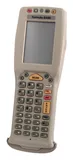
The user manual for the Datalogic Formula 8500, a DOS hand-held PC with an integrated 1D or optional 2D (PDF-417) laser scanner. It describes the terminal and its technical characteristics, safety rules, host connection over RS-232 and other links, the F985 cradle and F985 vehicle cradle with their connection cables, PCMCIA cards, turning on the terminal, bar code scanning and the keys, then charging and replacing batteries and cleaning. An appendix lists the products and accessories of the Formula 8500 line.
Its parts
- General Information
- Technical Information
- Safety Regulations
- Connections
- Use and Functioning
- Maintenance and Diagnostics
- Products and Accessories of the Formula 8500 Line
From the manual · read page by page
Key facts from this manual
Each line names its page in the PDF.
Datalogic's user manual (Ed. 01/99) for the Formula 8500 hand-held PC with integrated laser scanner and its F985 cradle, in standard and vehicle versions. It gives the terminal's specifications, the host connections and cable pinouts, PCMCIA card use, the keyboard modes, and battery charging and replacement.
- Terminal
- Formula 8500: hand-held PC with integrated laser scanner, running DOS 6.22 p. 8, 10
- Cradle
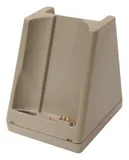
- F985: battery charger and serial interface between the host and the terminal's IrDA port; the only cradle for the Formula 8500 p. 20, 22
- Host interfaces
- F985 cradle to host: RS-232, RS-485, Eavesdrop; cradle to terminal via IrDA p. 11
- Vehicle cradle power
- F985 vehicle cradle: stabilized supply, 9 to 12 Vdc, min. 11W; coaxial plug 5.5 mm outside, 2.1 mm inside, positive external p. 23
- Terminal power
- Formula 8500: NiMH battery pack, 1350 mAh, or 3 AA alkaline batteries; full recharge about 2.5 hours p. 9, 39
- Display and keyboard
- Formula 8500: backlit 160 by 240 pixel graphic LCD; 41 keys plus reset key; optional touch screen p. 8, 10
- Processor and memory
- Formula 8500: 32 bit AMD 486; 512KB flash BIOS-DOS; 2/4/8 MB disk; 2/4 MB DRAM p. 9
- Scan engine
- Formula 8500: 1D laser VLD 670 nm, 36 ± 3 scan/sec, depth of field 30 ÷ 800 mm; 2D laser 570 ± 20 scan/sec p. 9
- Expansion
- Formula 8500: Type-II PCMCIA slot for modems, Ethernet and Token Ring adapters, solid state disk; IrDA port p. 8
- Radio
- Formula 8500 RF version: 2.4 GHz, 100 mW max, through the RF PCMCIA module p. 11, 19
- Size and weight
- Formula 8500: 212 x 74 x 50/34.5 mm; 370 grams with NiMH batteries, 1-D scanner, no radio p. 10
- Temperature
- Formula 8500: 0° to +45°C working; -20° to +60°C storage p. 10
- Cables
- RS-232 PC/AT C407900330; RS-232 PC/XT C407900310; RS-485 C407900300; modem or Eavesdrop to host C407900020; Eavesdrop to terminal C407900030 p. 24, 25
- Accessories
- NiMH Battery Pack; Formula One AP 7520 Ethernet and AP 7100 ISA; Development System for Formula 8500 and C Compiler p. 42
What this manual walks you through
- Connecting the cradle to a host PC over RS-232 p. 15, 16
- Eavesdrop and RS-485 Sysnet network connections p. 17, 18
- Connecting by radio through access points p. 19
- Reading the cradle battery LEDs p. 22
- Installing the F985 vehicle cradle p. 23
- Connection cable pinouts p. 24, 25
- Inserting and removing a PCMCIA card p. 26, 27, 28, 29
- Scanning bar codes p. 30
- Using the keyboard modes to emulate a PC keyboard p. 32, 33, 34, 35, 36, 37
- Charging and replacing the battery pack p. 39, 40, 41
Good to know
- Never wire the vehicle cradle straight to the vehicle battery: voltage surges can damage it. p. 23
- The vehicle cradle does not charge a spare battery. p. 23
- The protected reset button deletes all RAM data. p. 38
- Take the battery pack out if the terminal will sit unused for a few days, to avoid over-discharge. p. 39
- The manual states the terminal uses a class 2 IEC 825 laser emitter; keep the beam away from eyes. p. 12, 14
Questions this manual answers
Which cradle works with the Datalogic Formula 8500?
Only the F985 cradle, in a standard or a vehicle version; the vehicle version does not charge a spare battery. p. 20, 23
What batteries does the Formula 8500 use?
A 1350 mAh NiMH battery pack, or 3 AA alkaline batteries. p. 9
How long does a Formula 8500 battery pack take to charge?
About 2.5 hours from fully run down, in the terminal or charged by itself in the cradle. p. 39
What cable connects the F985 cradle to a PC?
For RS-232 to a PC/AT or compatible (DB 9), cable C407900330; to a PC/XT or compatible (DB 25), cable C407900310. p. 24
What power supply does the F985 vehicle cradle need?
A stabilized supply connected to the vehicle battery, giving 9 to 12 Vdc and at least 11W; never a direct battery connection. p. 23
The whole text · 5 parts
Read the manual here as text
Its text as extracted from the PDF, unedited, in parts; each page opens the PDF at that page.
The file