Manual · Citizen
Citizen User's Manual Dot Matrix Printer Model iDP-562
Manual35 pagesPDF 275 KB
User's manual for the Citizen iDP-562 compact dot matrix receipt printer: specifications, setup, serial and parallel interfaces and control codes.
Covers · 1 model
The models it covers
Summary
What is in it
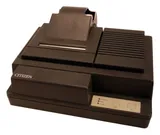
The user's manual for the Citizen iDP-562 series compact dot impact printer, made for receipts and data recording on plain and carbon roll paper and printing in red and black. It covers features and accessories, basic specifications, parts and controls, ribbon and paper loading, the self test, the serial interface (RS-232C, TTL and current loop) with DIP and slide switch settings, the parallel interface, control codes, initial settings, the character code table and maintenance.
Its parts
- Outline
- Basic Specifications
- Appearance and Parts Name
- Operation
- Serial Interface
- Parallel Interface
- Control Code
- Initial Setting
- Character Code Table
- Maintenance
From the manual · read page by page
Key facts from this manual
Some pages are scans or cannot be read; this says only what the readable text supports. Each line names its page in the PDF.
The Citizen user's manual for the iDP-562 dot matrix printer, a compact roll-paper printer for receipts and data recording. Its declaration lists the iDP-562RSL2, iDP-562RSL, iDP-562CNL, iDP-562RS and iDP-562CN. It covers loading ribbon and paper, the self-test, the serial and parallel interfaces with their switch and jumper settings, and the control codes.
- Device
- Compact serial dot matrix printer for receipts and data recording on plain or carbon roll paper p. 6, 7
- Interfaces
- Serial (RS-232C; TTL level and current loop as factory options) or 8 bit parallel p. 7
- Series models
- iDP-562RSL2, iDP-562RSL, iDP-562CNL, iDP-562RS, iDP-562CN p. 2
- Print speed
- About 74 lines per minute at 40 columns, 235 at 5 columns p. 7
- Printing
- 40 columns, 7 x 5 dot characters, in red and black p. 6, 7
- Paper
- Roll, width 69 ± 1 mm, outer diameter 80 mm or less p. 7
- Ribbon
- Red and black ink ribbon cassette, 13 mm wide p. 7
- Power
- 120V ± 10% 50/60 Hz (UL, CSA) or 230V ± 10% 50/60 Hz (EP); 35 W max. p. 7
- Dimensions
- 240 x 231.5 x 111.5 mm (W x D x H); 9.4 x 9.1 x 4.4 in. p. 7
- Weight
- About 2.3 Kg (5.1 lbs) p. 7
- Serial settings
- 150 to 9600 BPS; 7 or 8 data bits; odd, even or no parity; 1 or 2 stop bits p. 13
- Serial connector
- D-sub; printer 17LE-13250, cable side 17JE-23250 (AMPHENOL or equivalent) p. 15
- Parallel connector
- Printer side 57-40360, cable side 57-30360 (AMPHENOL or equivalent) p. 24
- Program memory
- iDP562-RSL: EPROM; iDP562-RSL2: masked ROM p. 7
What this manual walks you through
- Installing the ink ribbon cassette p. 10
- Loading roll paper p. 11
- Running the self-test and printing the switch settings p. 12
- Setting serial DIP and slide switches for CR/LF, character set, parity, data bits and baud rate p. 14
- Setting preset jumpers for RS-232C, current loop or TTL p. 17, 18
- Serial and parallel connector pin assignments and signals p. 15, 24
- Clearing parity, framing and other errors shown by the ALM lamp p. 20
- Using control codes for red, enlarged, reverse and graphic printing and paging p. 27, 28, 29, 30
- Cleaning the print mechanism p. 35
Good to know
- Printing without paper and an ink ribbon cassette may damage the print head. p. 12
- Do not pull the paper backward. p. 11
- Do not clean the case with organic solvents such as alcohol, thinner or benzine. p. 12
- Current loop signals must be held within 10 to 20 mA. p. 15
- After long printing the print head may be hot; disconnect power before changing the ribbon. p. 10
Questions this manual answers
What size paper roll does the Citizen iDP-562 take?
Roll paper 69 ± 1 mm wide with an outer diameter of 80 mm or less, plain or carbon. p. 6, 7
How do I run a self-test on the iDP-562?
Turn the power on while pressing the LF switch, then release it. It stops on its own after 9 lines. p. 12
How do I clear the ALM lamp on the iDP-562?
Remove the cause of the trouble, then press the SEL switch, or turn the power off and on again. p. 9, 20
What baud rates does the iDP-562 serial interface support?
150, 300, 600, 1200, 2400, 4800 and 9600 BPS, chosen with the DIP switches. p. 13, 14
Can the iDP-562 print in red?
Yes. The DC2 code sets red printing for one line; red and black cannot be mixed in the same line. p. 28
The whole text · 4 parts
Read the manual here as text
Its text as extracted from the PDF, unedited, in parts; each page opens the PDF at that page.
The file