Manual · Cisco
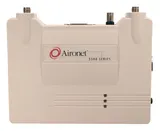
Aironet 3500 Series AP3500-E Ethernet Access Point User's Guide
Manual27 pagesPDF 232 KB
User's guide for the Aironet 3500 Series AP3500-E Ethernet access point: installation and first configuration.
Covers · 1 model
The models it covers
Summary
What is in it
A short user's guide for installing and first configuring the Aironet AP3500-E Ethernet Access Point, so that fixed stations, mobile stations or repeater access points can associate to it. It covers RF safety and antenna distances, package contents, wireless infrastructure terms (root unit, repeater, cell, association), installing the antennas, console cable, Ethernet and power pack, reading the indicator lights, and setting the SSID and IP address from the console.
Its parts
- Introduction
- Installation
- Configuration
- Technical Support
From the manual · read page by page
Key facts from this manual
Each line names its page in the PDF.
User's guide from Aironet Wireless Communications for the Aironet 3500 Series AP3500-E Ethernet access point. It walks through fitting the antennas, making the console, Ethernet and power connections, reading the indicators, and the first console setup of the SSID and IP address.
- Device
- Ethernet access point that serves as a root unit between an Ethernet network and wireless stations, or as a repeater p. 13, 14
- Ethernet ports
- 10Base2 (Thinnet) BNC, 10Base5 (Thicknet) AUI and 10BaseT (Twisted Pair) RJ-45 p. 17, 18
- Power
- AC/DC power pack, 120VAC/60Hz or 90-264VAC/47-63Hz in, 12-18VDC out, by country of use; On/Off button p. 10, 19
- Antennas
- Two standard 2dB dipole antennas included; antenna connectors are reverse polarity TNC p. 10, 15
- Console port
- Serial, 9-pin male to 9-pin female straight-through cable; 9600 baud, no parity, 8 data bits, 1 stop bit, ANSI p. 16
- Remote management
- Telnet, HTML browser or SNMP once an IP address is assigned p. 23
- Top panel indicators
- Ethernet, Status and Radio p. 20
- Back panel indicators
- 10BaseT polarity, 10BaseT active, Ethernet Rx, Ethernet Tx, 10Base2 active, Packet Collision p. 22
- SSID
- Up to 32 characters, set from the console p. 24
- Related manuals
- AP3500-E Technical Reference Manual #710-004021; Aironet Antenna Guide #710-003725 p. 14
- Document number
- DOC-710-004020-A1 p. 1
What this manual walks you through
- Installing the antennas p. 15
- Connecting the console port cable to a terminal or PC p. 16
- Connecting 10Base2, 10Base5 or 10BaseT Ethernet cabling p. 17, 18
- Attaching the power pack and powering on p. 19
- Reading the top and back panel indicators p. 20, 21, 22
- Accessing the console menus p. 23
- Setting the SSID p. 24
- Assigning an IP address and mask p. 25
- Verifying that stations have associated p. 25
- Root units, repeaters and other wireless terms p. 11
Good to know
- Do not transmit unless the antenna is connected, or the radio may be damaged. p. 8
- Keep a dipole antenna at least 15 cm (6 inches) from your body; high gain antennas are for professional installation, at least 30 cm (12 inches) away. p. 9
- Use only antennas and cables supplied by Aironet Wireless Communications; remote antennas and coaxial cables are ordered separately. p. 10, 15
- At the end of a 10Base2 cable, a 50-Ohm terminator must be fitted on the open end of the T-connector. p. 17
- Basic configuration on first power-up must be done through the console serial port. p. 23
Questions this manual answers
What are the console settings for the Aironet AP3500?
Use a 9-pin male to 9-pin female straight-through cable and set the terminal to 9600 baud, no parity, 8 data bits, 1 stop bit, ANSI compatible. p. 16
What does a solid red status light mean on the AP3500?
A power-on test failed, and the unit stops functioning. p. 20
Which Ethernet connections does the AP3500-E support?
10Base2 (Thinnet), 10Base5 (Thicknet) through an AUI connector, and 10BaseT (Twisted Pair). p. 17
How do I set the IP address on the AP3500?
From the console Main Menu choose Configuration, then Ident, and use INADDR for the IP address and INMASK for the mask. p. 25
What power supply does the AP3500-E use?
An AC/DC power pack, 120VAC/60Hz or 90-264VAC/47-63Hz to 12-18VDC depending on the country of use. p. 10
The whole text · 3 parts
Read the manual here as text
Its text as extracted from the PDF, unedited, in parts; each page opens the PDF at that page.
The file