Manual · Cisco
Quick Start Guide Cisco Aironet 340 Series Base Station
Manual12 pagesPDF 313 KB
Quick start guide for the Cisco Aironet 340 Series Base Station: connecting, power-on self-test and setup with the Base Station Client Utility.
What this file really is
The old site listed this file as “Quick Start” for the Cisco 340 Bridge. Filed as a quick start for the Cisco 340 Bridge, but it is the quick start guide for the Cisco Aironet 340 Series Base Station.
Filed with · 1 model
Also filed with these models on the old site
Summary
What is in it
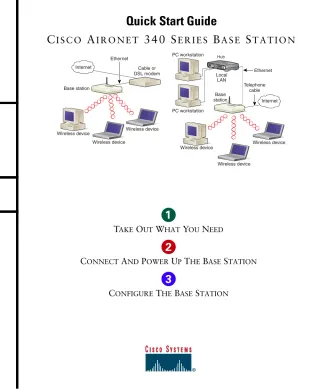
Cisco's quick start guide for the Aironet 340 Series Base Station. It lists what comes in the box and what else is needed, then shows how to connect the base station to a cable or DSL modem or a telephone line, power it up and read the power-on self-test LEDs. It explains installing the Base Station Client Utility (BSCU), configuring a radio card, and setting up the base station for cable or DSL modem or dial-up modem use, and ends with RF safety information.
Its parts
- Take Out What You Need
- Connect and Power Up the Base Station
- Configure the Base Station
- Safety Information for the Cisco Aironet 340 Series Base Station
From the manual · read page by page
Key facts from this manual
Each line names its page in the PDF.
Quick start guide (2001) for the Cisco Aironet 340 Series Base Station; it does not cover the 340 bridge it is filed under. It shows how to connect the base station to a cable or DSL modem or a telephone line, power it up, install the Base Station Client Utility (BSCU) and set it up for cable, DSL or dial-up Internet access.
- Device
- Cisco Aironet 340 Series Base Station, providing data communications for wireless devices over one network connection p. 4
- Connection modes
- Built-in 56K dial-up modem, cable or DSL modem (default), PPP over Ethernet, or Access Point p. 4
- Ports
- RJ-45 Ethernet port and RJ-11 TELCO modem connector on the back p. 4, 5
- Power
- AC to DC power adapter; no on/off switch p. 3, 5
- Default IP address
- 192.168.200.1 on the internal (wireless) network p. 6
- Setup requirement
- A wireless PC with an IEEE 802.11 DSSS radio card with 128-bit WEP p. 6
- Client card firmware
- Cisco Aironet 340 Series Client Radio Card firmware V4.02 or later to use the BSCU p. 3
- Setup software
- Base Station Client Utility (BSCU) for Windows 95, 98, NT, 2000 or ME, on the supplied CD p. 6
- Encryption
- Default 128-bit WEP with mixed-cell operation; key as up to 26 hexadecimal or 1 to 13 ASCII characters p. 8
- Modem
- Built-in 56K; tone or pulse dialing; Dial On Demand; no speaker p. 9, 10
- In the box
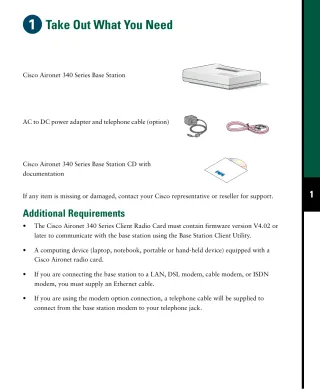
- Base station, AC to DC power adapter, telephone cable (option), CD with documentation p. 3
- SSID
- 1 to 32 printable ASCII characters p. 8
- Indicators
- Network/Modem, Status and Radio LEDs, showing red, amber and green p. 5
What this manual walks you through
- Connecting the base station to a cable or DSL modem p. 4
- Connecting the built-in modem to a telephone line p. 5
- Connecting the power adapter and reading the power-on self-test p. 5
- Installing the Base Station Client Utility p. 6, 7
- Configuring the PC radio card to talk to the base station p. 7
- Setting the SSID and WEP encryption key p. 8
- Setting up a cable or DSL modem connection p. 9
- Setting up a telephone dial-up connection p. 9, 10
Good to know
- Disconnect power before connecting a data cable, or the base station could be damaged. p. 4
- With a radio card having no encryption or 40-bit encryption (model PCM341), encryption is not available. p. 8
- PPP over Ethernet, Access Point mode and radio cards from other vendors are covered in the Hardware Installation Guide, not here. p. 4
- Do not operate the radio unless the antenna is connected, or the radio may be damaged. p. 11
- For FCC RF exposure limits, keep base station dipole antennas at least 7.9 inches (20 cm) from people. p. 11
Questions this manual answers
What is the default IP address of the Cisco Aironet 340 base station?
It uses 192.168.200.1 for its internal network in cable or DSL, PPP over Ethernet and dial-up modes. p. 6
What does a fast-flashing amber Status LED on the Aironet 340 base station mean?
The base station is at factory defaults and is waiting for a wireless device to send it configuration settings. p. 5
What client card firmware does the Aironet 340 base station need?
A Cisco Aironet 340 Series Client Radio Card needs firmware V4.02 or later to work with the base station through the BSCU. p. 3
Does the Aironet 340 base station have a power switch?
No. It powers on when the power adapter is plugged into the unit and the wall outlet. p. 5
Which Windows versions run the Base Station Client Utility?
Windows 95, 98, NT, 2000 and ME; on Windows 95 it also needs Internet Explorer 4.0 or later. p. 6
Contents
Chapters and sections
Each line opens the PDF at its page.
The whole text · 2 parts
Read the manual here as text
Its text as extracted from the PDF, unedited, in parts; each page opens the PDF at that page.
The file