Manual · CipherLab
CipherLab 8370 Terminal User's Guide
Manual16 pagesPDF 139 KB
User's guide for the CipherLab 8370 portable data terminal with laser or CCD scanner and 802.11b WLAN: specifications, setup and operation.
Covers · 1 model
The models it covers
Summary
What is in it
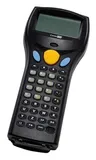
User's guide for the CipherLab 8370, a rugged portable data terminal with an integrated laser or CCD bar code reader and an 802.11b WLAN module. It lists electrical, environmental and physical specifications, CPU, memory, reader, display, keypad, communication and WLAN details, then explains the software architecture (kernel, Application Manager, system menu settings and tests, 802.11b network, WLAN and WEP/EAP security settings), keypad and operating modes, and troubleshooting.
Its parts
- Preface
- General Features and Characteristics
- Software Architecture
- Operations
- Troubleshooting
From the manual · read page by page
Key facts from this manual
Each line names its page in the PDF.
User's guide (version 1.00, 2003) for the CipherLab 8370 handheld data terminal with a laser or CCD barcode scanner and an 802.11b wireless LAN module. It lists the specifications and accessories, explains the kernel, system and application menus, the keypad, wireless and security settings, and ends with a troubleshooting list.
- Device
- Rugged handheld data terminal with an integrated laser or CCD barcode scanner and an 802.11b WLAN module p. 3
- Battery
- 3.7V Li-ion rechargeable, 1800mAH; 3.0V 7mAH rechargeable lithium backup battery for SRAM and calendar p. 4
- Memory
- 1 MB flash program memory; 256 KB SRAM data memory p. 4
- Display
- 128x64 dot FSTN graphic LCD with LED backlight p. 5
- Keypad
- 24 numeric or 39 alphanumeric rubber keys p. 5
- Communication
- RS-232, serial IR and standard IrDA 1.0, each up to 115200bps p. 5
- Wireless LAN
- 802.11b; works with standard IEEE 802.11b access points; WEP 64 or 128 bits; EAP-MD5 only p. 5, 12
- Laser scanner
- 8370L: visible laser diode at 670±15nm, 36±3 scans per second, 5 ~ 95 cm depth of field p. 4
- CCD scanner
- 8370C: long range CCD, 100 scans/sec, 2 ~ 20cm depth of field, 0.125mm ~ 1.00mm resolution p. 4, 5
- Size and weight
- 194mm x 77mm x 44mm; 250g including battery p. 4
- Operating temperature
- 0 to 50 °C (storage -20 to 70 °C) p. 4
- Ruggedness
- The manual states IP65 and a 1.2m drop onto concrete p. 4
- Software
- CipherLab proprietary OS; C compiler, BASIC compiler and Windows-based Application Generator p. 5
- Accessories
- Charging and communication cradle, RS-232 cable, keyboard wedge cable, power adapter, Li-ion battery pack, USB cable or cradle, modem cradle p. 5, 6
What this manual walks you through
- Downloading, activating, updating and deleting programs with the Application Manager p. 7, 8, 15
- Changing system settings such as clock, backlight, auto off and font p. 8
- Testing the reader, buzzer, display, keyboard and memory p. 9
- Setting up the 802.11b network and wireless settings p. 10, 11
- Configuring WEP and EAP security p. 11, 12
- Running echo tests and reading link quality to plan coverage p. 12, 13
- Using the special keys: SCAN, ALPHA, FN and POWER p. 14
- Programming the terminal and the communication cradle p. 13
- Troubleshooting access point, power, communication, keypad and scanner problems p. 16
Good to know
- After a kernel update, do not power off until the system restarts by itself. p. 7
- The memory test wipes the contents of the data memory. p. 9
- The communication cradle supports the serial IR interface only. p. 13
- Of the EAP types, only EAP-MD5 is supported. p. 12
- A Class A digital device under FCC Part 15; use in a residential area is likely to cause interference. p. 3
Questions this manual answers
What battery does the CipherLab 8370 use?
A 3.7V Li-ion rechargeable battery of 1800mAH, plus a 3.0V rechargeable lithium backup battery for SRAM and calendar. p. 4
Why won't my CipherLab 8370 connect to the access point?
Check that its SSID, authentication and WEP settings match the access point's. A Cisco AP needs Open System authentication, a Lucent AP a long preamble, and a Symbol AP power saving disabled. p. 16
Which program loads software onto the 8370?
Download.exe over direct RS-232 or standard IrDA, and IrLoad.exe through the cradle's IR link. p. 10
How many programs can the 8370 hold?
Up to 7: six resident locations plus the Active Memory, and only the program in Active Memory runs. p. 7
What scanner does the 8370 have?
Either a laser scanner (8370L) or a long range CCD scanner (8370C). p. 4
The whole text · 2 parts
Read the manual here as text
Its text as extracted from the PDF, unedited, in parts; each page opens the PDF at that page.
The file