Manual · Axiohm
TPSK Printer Series 24 & 12V User Manual
Manual67 pagesPDF 1.9 MB
User manual for the Axiohm TPSK 12 V and 24 V kiosk thermal ticket printers: specifications, paper loading, wiring and commands.
Covers · 1 model
The models it covers
Summary
What is in it
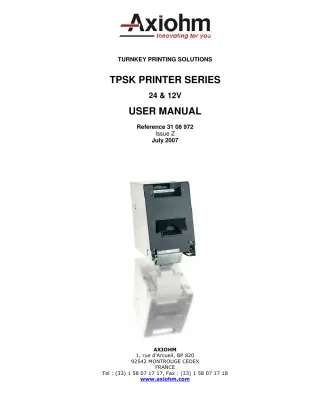
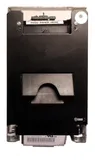
The user manual for Axiohm's TPSK series of 12 V and 24 V turnkey thermal printers for kiosks, units with print head, controller board, paper roll bucket and a cutter and paper chute. It gives the technical specifications and features, external dimensions, mounting, paper loading and self test, the power connector and serial HE10 pinout, a list of control codes and full command descriptions (printing, fonts, graphics, logos, status, bar codes, firmware download), plus recommendations and troubleshooting.
Its parts
- Technical Specifications
- Mechanical Features
- Interface Board Features
- List of Control Codes
- Command Description
- Recommendations
- Troubleshooting
From the manual
Key facts from this manual
Each line names its page in the PDF.
User manual (reference 31 08 972, issue Z, July 2007) for the Axiohm TPSK compact kiosk thermal printers in 12 V and 24 V versions. It covers mounting, paper loading, the self-test ticket, power and serial connections, the full list of control codes, care and troubleshooting. It does not apply to the TPSK2401, which has its own manual.
- What it is
- Turnkey kiosk thermal printer with print head, interface board, paper roll bucket and cutter and paper chute; 12V and 24V versions p. 1, 3
- Interface
- Serial RS232 on an HE10 connector at the rear; default 115200 Bauds, N, 8, 1 p. 14, 15
- Power supply
- 24V version: 24V 3A mean switching supply (peak 8.8A for 1.5ms); 12V version: 12V 6A mean (peak 10.8A); minimum 55VA p. 14
- Paper roll
- 59 to 60 mm wide, up to 102 mm diameter p. 11
- Cutter
- Ticket is cut when the user pulls it from the chute; chute optimized for 4 inch tickets p. 3, 13
- Flash memory
- 128kb, 1 Mb or 2Mb, with 48 kb for user storage p. 8
- Bar codes
- Code 39, UPC-A, UPC-E, JAN8 (EAN), JAN13 (EAN), Interleaved 2 of 5 (ITF), Codabar, Code 128 p. 8
- Code pages
- 437 and 858 p. 17
- Drivers
- Windows 98, 2000, XP p. 8
- Serial connector
- HE10, 10 points with locating and holding clips, 3M ref. 89110-0103HA or equivalent p. 16
- Mounting
- Fixed through four holes underneath and two above, or free to slide on guiding tabs; support must be U shaped p. 10
- Cleaning kit
- CK60000A p. 65
- Recommended paper
- KP440 KANZAN p. 66
What this manual walks you through
- Mounting the printer on a U shaped support p. 10
- Loading a new paper roll p. 11, 12
- Printing and reading the self-test ticket p. 12, 16, 17
- Power supply and serial HE10 connections p. 14, 15, 16
- List of control codes with their page references p. 19, 20
- Storage, duty cycle, grounding and print head cleaning p. 65
- Troubleshooting paper loading, blank tickets and printing that does not start p. 67
Good to know
- This manual does not apply to the TPSK2401, which uses a different command set and its own manual (ref 3109472/Z). p. 3
- Above 60°C print at most one ticket (5 inches max.) per minute; below 60°C up to 3; more can destroy the feed motor. p. 65
- Use the missing pin to locate the power connector; a reversed connection can destroy the board. p. 15
- When sealing the housing, keep pressure on the door below 6 lbs, applied around the ticket exit chute. p. 65
- The printer must be grounded, through a grounded metal support or its external chassis. p. 65
Questions this manual answers
What size paper roll does the TPSK printer take?
Paper 59 to 60 mm wide on a roll up to 102 mm in diameter; the manual recommends KP440 KANZAN paper. p. 11, 66
What is the default baud rate of the TPSK?
115200 Bauds, N, 8, 1 over RS232; the current rate is printed on the self-test ticket. p. 14, 67
What power supply does the TPSK 24V need?
A 24V switching supply of 3A mean, at least 55VA, able to deliver peaks of 8.8A for 1.5ms. p. 14
Why does my TPSK print blank tickets?
The paper end may not be tight enough, or the roll may be set upside down. p. 67
The whole text · 7 parts
Read the manual here as text
Its text as extracted from the PDF, unedited, in parts; each page opens the PDF at that page.
The file