Manual · AML
M8050 User's Guide
Manual55 pagesPDF 4.4 MB
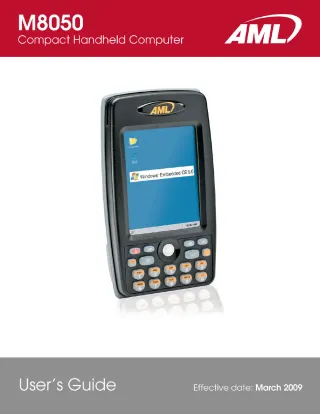
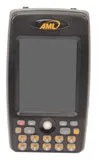
User's guide for the AML M8050 rugged wireless handheld computer with scanner, magnetic stripe reader and Windows CE 6.0.
Covers · 1 model
The models it covers
Summary
What is in it
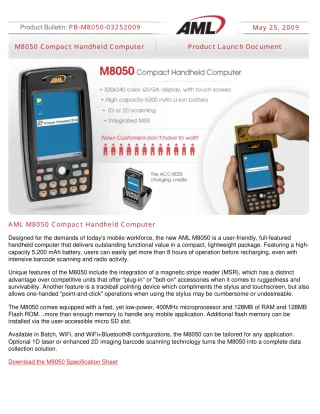
User's guide for the AML M8050 wireless handheld computer, a rugged data collection device for hospitality, retail and healthcare. It describes the unit, battery and keypad, the charging cradle and its USB connection, the micro SD slot, data collection with the laser scanner or imager and the magnetic stripe reader, the Windows Embedded CE 6.0 settings and applications, and the specifications.
Its parts
- Introduction
- M8050 Cradle
- M8050 MicroSD Slot
- Data Collection
- Windows Embedded CE 6.0
- Specifications
From the manual · read page by page
Key facts from this manual
Some pages are scans or cannot be read; this says only what the readable text supports. Each line names its page in the PDF.
The AML M8050 User's Guide, effective March 2009, for the M8050 compact handheld computer. It shows the parts of the unit and covers the battery, keypad, charging cradle, micro SD slot, laser or imager scanner and magnetic stripe reader, then walks through the Windows Embedded CE 6.0 settings screens. It ends with the specifications.
- Device
- Compact handheld computer sealed to IP54, with QVGA color touch screen, 802.11b/g radio, Bluetooth, backlit 18-key keypad with trackball and magnetic stripe reader p. 9
- Operating system
- Embedded Linux or Windows CE; the specifications list Windows CE 6.0 p. 9, 54
- Processor, memory
- Samsung S3C2440 at 400 MHz; 128MB RAM; 128MB Flash ROM; user accessible micro SD slot p. 54
- Display
- 3.5" QVGA 320 x 240 (Portrait), 65K colors; integrated resistive touchscreen p. 54
- Keypad
- 18 keys with an illuminated trackball; three user definable keys (plus, minus and escape by default); mode key for upper case, lower case and numeric p. 15, 16
- Battery
- Removable, rechargeable 3.7 VDC Li-Ion, 5200 mAh, 19.2 watt hours; internal 3.7VDC Li-Polymer backup battery runs the unit about 30 minutes p. 13, 54
- Scanner
- Motorola SE955 laser engine as standard; optional HHP IT5080 2D imager p. 29, 30, 54
- Card reader
- Integrated magnetic stripe reader (MSR), standard p. 31
- Data connection
- USB slave; the cradle's USB connector links to a PC with Microsoft ActiveSync p. 24, 54
- Size and weight
- 14.5 cm L x 8.3 cm W x 5.1 cm D; 0.81 lbs./363g p. 54
- Operating temperature
- 14° to 122° F (-10° to 50° C) p. 54
- Environment
- Humidity 5% to 95% RH non-condensing; ESD 15kVdc air, 8kVdc direct; IP54; multiple 4' (1.2m) drops to concrete p. 54
- Charging cradle
- Holds and charges the computer and a spare battery; green LED when the spare is full; use only the supplied DC power convertor p. 19, 20, 23
- In the box
- Computer, Li-Ion battery and 2 styluses; charging cradle and power convertor sold separately p. 9
What this manual walks you through
- Opening the battery compartment and installing the battery p. 12, 13
- Entering numbers and letters with the keypad and mode key p. 15, 16, 17
- Charging the computer and a spare battery in the cradle p. 19, 20, 21
- Connecting the cradle to power and to a PC by USB p. 22, 23, 24
- Installing a micro SD card p. 26, 27
- Swiping cards through the magnetic stripe reader p. 31
- Using the DataViewer application p. 32
- Pairing Bluetooth devices with the Bluetooth Manager p. 38
- Setting power timeouts to save battery life p. 45
- Calibrating the touch screen stylus p. 46, 47
Good to know
- Use the master reset switch only if the computer becomes unresponsive. p. 13
- Use only the DC power convertor supplied with the cradle. p. 23
- A correctly installed micro SD card does not stick out of the slot. p. 27
- The slot on the right hand side of the computer is unused. p. 26
Questions this manual answers
How do I reset a frozen AML M8050?
Use the Master Reset Switch inside the battery compartment, and only when the computer has become unresponsive. p. 13
Does the M8050 stay on while I change the battery?
Yes. An internal backup battery runs it for about 30 minutes while the main battery is replaced, and the main battery recharges the backup automatically. p. 13
Which scan engines does the M8050 use?
A Motorola SE955 laser engine comes standard; an HHP IT5080 2D imager is the option. p. 29, 30, 54
Where is the serial number on the M8050?
On a label inside the battery compartment. p. 13
How do I connect the M8050 to a PC?
Plug the cradle's USB connector into the PC's USB port; Microsoft ActiveSync starts automatically. p. 24
The whole text · 6 parts
Read the manual here as text
Its text as extracted from the PDF, unedited, in parts; each page opens the PDF at that page.
The file