Manual · AML
AML Model 1000/1002 Reader Setup Menu
Manual2 pagesPDF 163 KB
Both pages are below, each with its text.
Covers · 1 model
The models it covers
From the manual · read page by page
Key facts from this manual
Much of this manual is scanned with little readable text, so this says only what its text supports. Each line names its page in the PDF.
A two-page setup menu (version 3.2) of programming bar codes for the MODEL 1000/1002 reader, with a full ASCII chart on the second page. It lets the reader turn symbologies on or off, pick the computer and keyboard type, and set termination characters, preambles, beeps and bar code editing. The text comes from a scan, so only the clearly readable parts are summarized here.
- Document
- Programming bar code menu for the Model 1000/1002 reader, version 3.2 p. 1
- Symbologies
- Code 39, UPC, EAN with supplements, Interleaved 2 of 5, Codabar, Code 128, Code 93, MSI/Plessey, Code 11 p. 1
- Computer type
- IBM PS/2 models, including Models 30-286, 50, 55, 60, 70, 80 p. 1
- Keyboard types
- USA, French, German, Italian, Universal p. 1
- Termination
- Horizontal tab, carriage return, carriage return and line feed, or a user-defined character p. 1
- Preamble
- Preamble and postamble characters with a send delay of 0.0 - 9.9 sec p. 1
- Diagnostics
- Self-test that sends its status to the PC's display p. 1
What this manual walks you through
- Putting the reader in program mode, changing options and saving p. 1
- Setting the beep tone and length and the transmit speed p. 1
- Stripping leading or trailing characters with bar code editing p. 1
- Entering characters from the full ASCII chart p. 2
Good to know
- Scanning option 9 resets every option in the current category to its default. p. 1
- Every delay and fixed length entry needs two digits scanned. p. 1
- Scan ON after entering preamble and postamble characters. p. 1
Questions this manual answers
How do I program the Model 1000 bar code reader?
Scan START, then the category bar code, the option number, ON or OFF (or characters from the chart), and finally EXIT (SAVE CHANGES). p. 1
How do I reset the Model 1000/1002 reader to defaults?
The menu has a RESET ALL DEFAULTS bar code; scanning option 9 in a category resets just that category. p. 1
How do I leave program mode without saving changes?
Scan EXIT (IGNORE CHANGES). p. 1
The file
Size and text
Every page · 2
Read it here
Each page as it is printed, and its words beside it, so a phone can search and copy them.
Page1of 2
Open in the PDF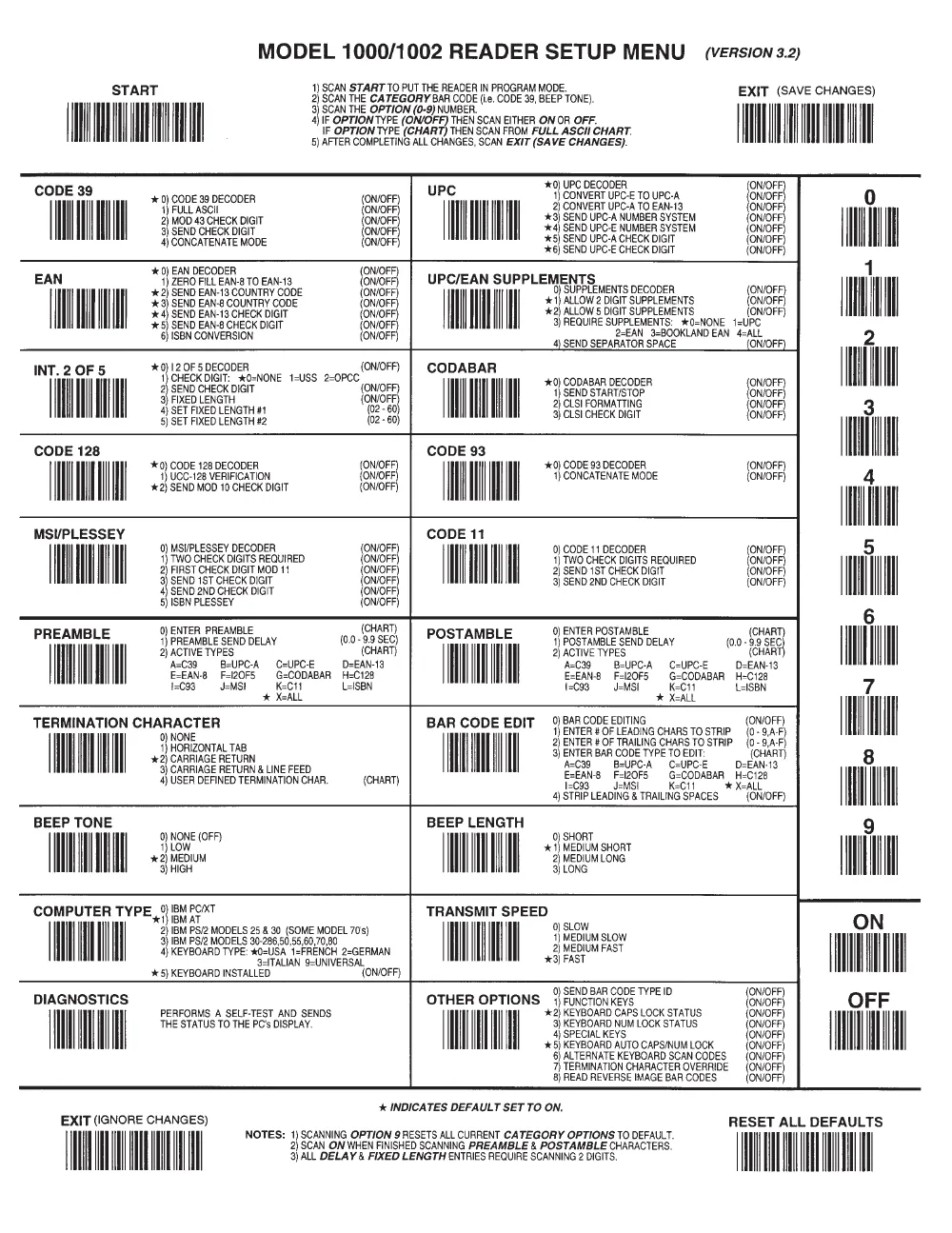
The text of page 1, read from a scan by OCR; it may hold reading errors
START
OL
MODEL 1000/1002 READER SETUP MENU
} SCAN START TO PUT THE READER IN PROGRAM MODE.
2) SCAN THE CATEGORY BAR CODE (i.e. CODE 39, BEEP TONE}.
3) SCAN THE OPTION (0-9) NUMBER.
4) |F OPTION TYPE (ON/OFF) THEN SCAN EITHER ON OR OFF.
IF OPTION TYPE (CHART) THEN SCAN FROM FULL ASCII CHART. 5) AFTER COMPLETING ALL CHANGES, SCAN EXIT (SAVE CHANGES).
(VERSION 3.2)
EXIT (SAVE CHANGES)
0) UPC DECODER (ON/OFF) CODE 39 + 0) CODE 99 DECODER ioworr) | UPC 1) CONVERT UPC-E TO UPC-A (ON/OFF) 1) FULL ASCII (ON/OFF} «| CONVERT UPC-A TO EAN 3 (ON/OFF) 3) SEND UPC-A M (ON/OFF} 4 NOD 43 HECK DIG (ON/OFF) * 4) SEND UPC-E NUMBER SYSTEM (ON/OFF) 4) CONCATENATE MODE (ON/OFF} 5) SEND UPC-A CHECK DIGIT (ON/OFF)
- 6) SEND UPC-E CHECK DIGIT (ON/OFF)
- 0) EAN DECODER ON/OFF} EAN ( ZERO FILL EAN-8 TO EAN-13 (ON/OFE UPC/EAN SUPPLEMENTS ) ( ) 2) SEND EAN-13 COUNTRY CODE (ON/OFF) 0) SUPPLEMENTS DECODER (ON/OFF)
- 3) SEND EAN-8 COUNTRY CODE (ON/OFF) *& 1} ALLOW 2 DIGIT SUPPLEMENTS (ON/OFF) 4) SEND EAN-13 CHECK DIGIT (ON/OFF) 2) ALLOW 5 DIGIT SUPPLEMENTS (ON/OFF) 5) SEND EAN-8 CHECK DIGIT (ON/OFF) 3) REQUIRE SUPPLEMENTS: *0=NONE 1=UPC 6) ISBN CONVERSION (ON/OFF) 2=EAN 3=BOOKLAND EAN 4=ALL 4) SEND SEPARATOR SPACE (ON/OFF) INT. 2 OF 5 * 0) 12 OF 5 DECODER (ON/OFF) | CODABAR : 1) CHECK DIGIT: *0=NONE 1=USS 2-OPCC 4-0) CODABAR DECODER (ON/OFF) 2) SEND CHECK DIGIT (ON/OFF) END START. 3) FIXED LENGTH (ON/OFF 1) SEND STARTISTOP (ON/OFF) 2 SET FIXED LENGTH #1 (02- Bch 2) CLSI FORMATTING (ON/OFF} ) 3) CLSI CHECK DIGIT (ON/OFF} 5) SET FIXED LENGTH #2 (02 - 60} CODE 128 CODE 93
- 0) CODE 128 DECODER (ON/OFF) 0) CODE 93 DECODER (ON/OFF) 1) UCC-128 VERIFICATION (ON/OFF) 1) CONCATENATE MODE (ON/OFF)
- 2) SEND MOD 10 CHECK DIGIT (ON/OFF) MSI/PLESSEY CODE 11 0} MSI/PLESSEY DECODER (ON/OFF) 0) CODE 11 DECODER (ON/OFF) 1) TWO CHECK DIGITS REQUIRED (ON/OFF) 1) TWO CHECK DIGITS REQUIRED (ON/OFF) 2) FIRST CHECK DIGIT MOD 11 (ON/OFF) 2) SEND 1ST CHECK DIGIT (ON/OFF) 3) SEND 1ST CHECK DIGIT (ON/OFF) 3) SEND 2ND CHECK DIGIT (ON/OFF) 4) SEND 2ND CHECK DIGIT (ON/OFF) 5} ISBN PLESSEY (ON/OFF) 0) ENTER PREAMBLE (CHART) 0) ENTER POSTAMBLE (CHART) PREAMBLE 1) PREAMBLE SEND DELAY (0.0 - 9.9 SEC) POSTAMBLE 1) POSTAMBLE SEND DELAY (0.0 - ; 9 aed 2) ACTIVE TYPES (CHART) 2) ACTIVE TYPES A=C39_- B=UPC-A- C=UPC-E D=EAN-13 A=C39- B=UPC-A C=UPC-E D-EAN. 13 E=EAN-8 F=I20F5 G=CODABAR H=C128 EsEAN-8 F=I20F5 G=CODABAR H=C128 1=C93. ss JEMSI K=Ci1 L=ISBN \=C93., - J=MSI K=C11 L=ISBN
- XeALL *& X=ALL 0) BAR CODE EDITING (ON/OFF) TERMINATION CHARACT ER BAR CODE EDIT 1) ENTER # OF LEADING CHARS TO STRIP (0- 9,A-F) ) 1) HORIZONTAL TAB 2} ENTER # OF TRAILING CHARS TO STRIP (0 - 9,A-F) re CARRIAGE RETURN 3) ENTER BAR CODE TYPE TO EDIT: (CHART) 3) CARRIAGE RETURN & LINE FEED ee Co TEAR DnAN'S 4) USER DEFINED TERMINATION CHAR. (CHART) = = = =
1=C93 J=MSI K=C11 & X=ALL 4) STRIP LEADING & TRAILING SPACES (ON/OFF)
BEEP TONE
BEEP LENGTH
4 NONE ( (OFF) 0) SHORT
- 1 MEDIUM SHORT *2 MEDIUM 2 MEDIUM LONG 3) HIGH 3) LONG COMPUTER TYPE +1} BM IBM ROOT TRANSMIT SPEED 2) IBM Ps/D MODELS 25 & 30 (SOME MODEL 70's) 0 9) stow 3) IBM PS/2 MODELS 30-286,50,55,60,70,80 ) MEDIUM SLOW 4) KEYBOARD TYPE: x0=USA 1=FRENCH 2-GERMAN 2) MEDIUM FAST 3=ITALIAN 9=UNIVERSAL 3) FAST
- 5) KEYBOARD INSTALLED (ON/OFF)
0 MM 1 lu 2 NT 3 IMI 4 I 5 MN 6 Mh 7 IL 8 Ml 9 MN
DIAGNOSTICS
PERFORMS A SELF-TEST AND SENDS THE STATUS TO THE PC's DISPLAY.
0) SEND BAR CODE TYPE ID OTHER OPTIONS | FUNCTION KEYS ON/OFF}
| | l| | | +3} KEYBOARD CAPS LOCK STATUS ON/OFF)
ON/OFF)
{ 3) KEYBOARD NUM LOCK STATUS (ONOFE| 4) SPECIAL KEYS (ON/OFF) { { { (
- pee AUTO CAPS/NUM vost ON/OFF) ATE KEYBOARD SCAN CODES ON/OFF}
- TERMINATION CHARACTER OVERRIDE (ON/OFF) 8) READ REVERSE IMAGE BAR CODES ON/OFF}
ON NN
OFF
- INDICATES DEFAULT SET TO ON.
EXIT (IGNORE CHANGES)
NOTES: 1) SCANNING OPTION 9 RESETS ALL CURRENT CATEGORY OPTIONS TO DEFAULT.
RESET ALL DEFAULTS
2) SCAN ON WHEN FINISHED SCANNING PREAMBLE & POSTAMBLE CHARACTERS. 3) ALL DELAY & FIXED LENGTH ENTRIES REQUIRE SCANNING 2 DIGITS.
Page2of 2
Open in the PDF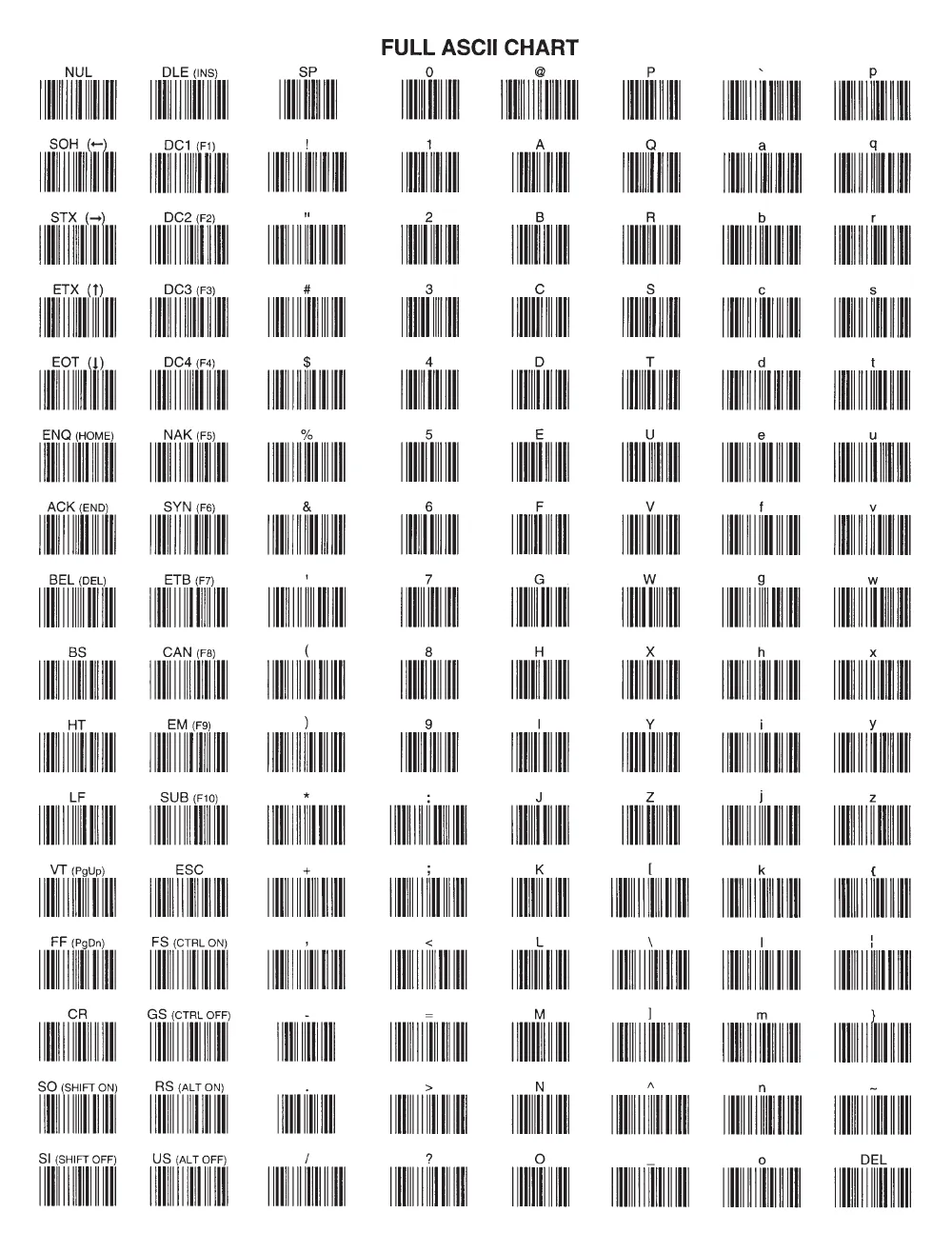
The text of page 2, read from a scan by OCR; it may hold reading errors
FULL ASCII CHART
ve VV wii il, _ - - - ~ se, mm DC4 (F4)
t) $ 4 D T d t VMN IAIN TIMUR RTI ENQ (HOME) NAK (F5) y 5 E U e ) MMT KATMAI ACK (END) SYN (F6) & 6 F Vv f Vv MYVIMO IIMA RII BEL (DEL) ETB (F7) ' 7 G. WwW g Ww MONI VINER IMITATE BS CAN (F8) ( 8 H x h x ATTIC MUA INIA HT EM (F9) ) 9 | Y y AIIM NTI INIT TMT LF SUB (F10) : J Z j z MIMIC NIT AIIM TTI VT (PgUp) ESC + ; K [ k { NVM ATOMIC FF (PgDn) FS (CTRL ON) , < L \ | { a a a CR GS (CT - = M ] m WANNA l
Li
SHIFT OFF) US (ALT OFF) / ? O fo) DEL
00