Manual · Allen-Bradley
MobileView Tablet T750 Quick Start
Manual12 pagesPDF 598 KB
Quick start for the Allen-Bradley MobileView Tablet T750 (2727-T7P30D1Fxx): controls, battery, wireless setup and terminal services.
Covers · 1 model
The models it covers
Summary
What is in it
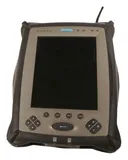
The quick start guide for the Allen-Bradley MobileView Tablet T750 (Cat. No. 2727-T7P30D1Fxx), a Windows CE tablet with a built-in Cisco wireless LAN adapter. It explains the controls, indicators and I/O ports, installing the battery, powering on and charging, configuring the RF network and IP address, confirming the wireless link, connecting to a terminal server as a CE client, shutting down, cleaning, and lists specifications, accessories and related publications.
Its parts
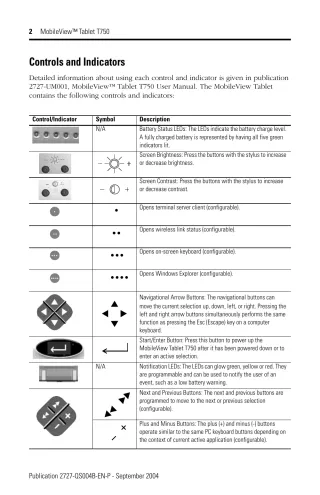
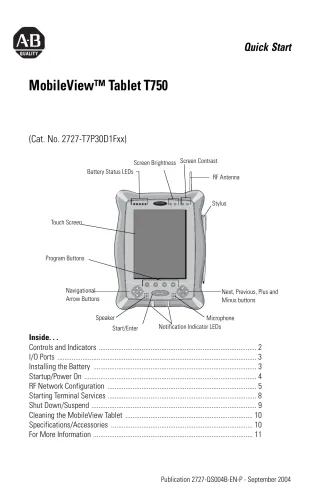
- Controls and Indicators
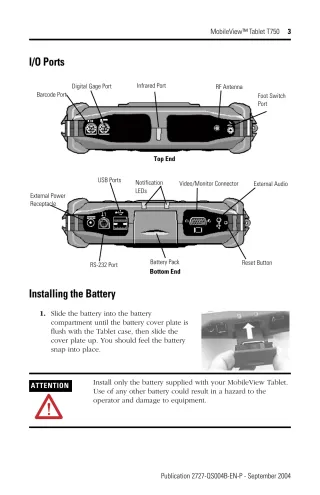
- I/O Ports
- Installing the Battery
- Startup/Power On
- RF Network Configuration
- Starting Terminal Services
- Shut Down/Suspend
- Cleaning the MobileView Tablet
- Specifications/Accessories
- For More Information
From the manual · read page by page
Key facts from this manual
Each line names its page in the PDF.
The Allen-Bradley quick start guide (publication 2727-QS004B-EN-P, September 2004) for the MobileView Tablet T750 (2727-T7P30D1Fxx), a Windows CE tablet with built-in wireless LAN. It shows the controls and ports, how to fit the battery and power up, how to set up the wireless network and a terminal server session, and lists the specifications and accessories.
- Processor and OS
- Hitachi SH-4 RISC (SH-7750); Microsoft Windows CE p. 10
- Memory
- 32 MB Flash, 32 MB SDRAM, 32 MB RAM back-up and file storage p. 10
- Display
- Passive LCD, 7.7 inch, 640 x 480, 256 colors; 7.7 inch analog resistive touch screen p. 10
- Wireless
- 802.11b, internal Cisco wireless LAN adapter p. 5, 10
- Battery
- Lithium Ion 4000 mAh, 8 hours typical operation; replacement 2727-TRB7 p. 10, 11
- Ports
- USB, RS-232, barcode, digital gage, foot switch, infrared, video/monitor, external audio, external power p. 3
- Size and weight
- 28 cm x 22 cm x 5 cm (11 in x 8.4 in x 2 in); 1.36 kg (4 lbs) p. 10
- Operating temperature
- +0°C to +45°C (+32°F to +113°F); 95% humidity non-condensing p. 10
- AC adapter/charger
- 2727-TRA7, 2727-TRA7IT, 2727-TRA7EU, 2727-TRA7UK (North American, Italian, European or UK power cable) p. 11
- Power kit
- Battery, single charging station, power supply and power cable: 2727-TRSP1, 2727-TRSP1IT, 2727-TRSP1EU, 2727-TRSP1UK p. 11
- Quad charger
- Quad charging station with power supply: 2727-TRSP4, 2727-TRSP4IT, 2727-TRSP4EU, 2727-TRSP4UK p. 11
- PC serial cable
- 2727-TRC1 p. 11
- Stylus and overlay
- Stylus with tether 2727-RY1 (qty. 5); anti-glare protective overlay 2727-TRG7 (qty. 10) p. 11
- Power save
- Suspends when idle beyond the suspend timer; default 5 minutes p. 4
What this manual walks you through
- Identifying the controls, indicators and ports p. 2, 3
- Installing the battery p. 3, 4
- Powering on and charging from the AC adapter p. 4
- Setting a DHCP or fixed IP address p. 5, 6
- Setting up the wireless adapter and confirming the link p. 7, 8
- Connecting to a terminal server as a CE client p. 8, 9
- Logging off and suspending the tablet p. 9
- Cleaning the touch screen and case p. 10
Good to know
- Install only the battery supplied with the tablet; another battery could be a hazard and damage the equipment. p. 3
- Use only the AC adapter supplied with the tablet; another adapter may cause a malfunction or damage the battery pack. p. 4
- Holding the Reset button for more than a second starts a full reset that deletes all data on the tablet. p. 6
- Do not use detergents or harsh cleaning additives on the touch screen. p. 10
Questions this manual answers
What battery does the MobileView T750 tablet use?
A Lithium Ion 4000 mAh battery, about 8 hours of typical operation. The replacement battery is 2727-TRB7. p. 10, 11
How do I restart the T750 without erasing it?
Press and quickly release the Reset button with the stylus. Holding it for more than a second starts a full reset that deletes all data. p. 6
What operating system does the T750 run?
Microsoft Windows CE, on a Hitachi SH-4 RISC (SH-7750) processor. p. 10
How do I wake the T750 from power save?
Press any program, navigational or start/enter button. With the AC adapter connected, tapping the touch screen also wakes it. p. 4, 5
What cable connects the T750 to a PC?
The serial cable for PC interface, 2727-TRC1. p. 11
Contents
Chapters and sections
Each line opens the PDF at its page.
The whole text · 2 parts
Read the manual here as text
Its text as extracted from the PDF, unedited, in parts; each page opens the PDF at that page.
The file