Manual · Alien
Hardware Setup Guide ALR-9800
Manual24 pagesPDF 712 KB
Hardware setup guide for the Alien ALR-9800 UHF RFID reader: specifications, I/O and RS-232 wiring, bench test and installation.
Covers · 1 model
The models it covers
Summary
What is in it
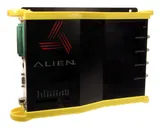
The hardware setup guide for the Alien ALR-9800, a multi-port fixed UHF RFID reader that reads and programs EPC Class 1 Generation 1 and 2 tags and reports events to a host over RS-232 or a network. It gives the reader and antenna specifications, the physical size, the optically isolated I/O port and RS-232 pinouts, system architecture, the kit contents, the I/O and antenna panels, a bench test, the installation procedure and pointers to the control software. It is written for RFID system integrators and software developers.
Its parts
- Introduction
- Reader Hardware Installation and Operation
From the manual · read page by page
Key facts from this manual
Each line names its page in the PDF.
The Hardware Setup Guide (February 2008) for the Alien ALR-9800 RFID reader. It gives the reader and antenna specifications, the I/O terminal and RS-232 pinouts, the panel connections and LEDs. It walks through a bench test, permanent installation of reader and antennas, and control over the Alien Reader Protocol.
- Device
- Multi-port general purpose RFID reader that reads and programs EPC Class 1 Generation 1 or 2 tags p. 6, 7
- Frequency
- 902.75 MHz to 927.25 MHz, 50 hopping channels, 500 KHz spacing, dwell under 0.4 seconds p. 7
- RF transmitter
- Under 30 dBm at the end of 6 m LMR-195 cable; PR-ASK modulation p. 7
- Power
- 45 Watts (120 VAC at 600 mA); standard 120 or 220 VAC outlet p. 7, 16
- Connections
- 14-pin female I/O terminal block, LAN TCP/IP port, 9-pin D female RS-232 port, power connector, four reverse-polarity TNC antenna ports p. 14, 15
- I/O terminal
- Pin 1 V+ (5-24 VDC); pins 2 to 9 outputs 0 to 7 (optically isolated, 500 mA max); pins 10 to 13 inputs 0 to 3 (10 V max); pin 14 V- p. 10
- RS-232 settings
- 115200 bits per second, 8 data bits, no parity, 1 stop bit, no flow control p. 17
- RS-232 pinout
- Pin 2 transmit data, pin 3 receive data, pin 5 ground, pin 9 not connected p. 12
- Network default
- Looks for a DHCP server; without one it uses IP 192.168.1.100, mask 255.255.255.0, gateway 192.168.1.1 p. 17
- Antennas
- ALR-9610-BC circular polarized, 5.73 dBi; ALR-9610-AL linear polarized, 6.0 dBi; both 902-928 MHz with 6 m LMR-195 cable and Reverse-Polarity TNC p. 8
- Dimensions
- (L) 9.0" (22.9 cm) x (W) 11" (28 cm) x (D) 2.22" (5.6 cm); approximately 1.8 kg (4 lb) p. 7
- Operating temperature
- 0°C to +50°C (+32 °F to +122°F) p. 7
- In the box
- Reader, RS-232 serial cable, power supply and cord, SDK and documentation CD-ROM, Alien RFID Gateway application p. 6
- Developer's kit
- Adds two circular or linear antennas with 6 meter coaxial cables, an Ethernet cable, software APIs and example code, and Class 1 UHF tags p. 13
What this manual walks you through
- Checking the shipment contents p. 13
- Wiring the I/O port and protecting the inputs p. 10, 11
- Reading the diagnostic LEDs p. 14
- Setting up a bench test with RS-232, LAN, power and antennas p. 16, 17, 18
- Reading the network settings from the boot trace p. 18
- Running the bench test with a tag p. 19
- Mounting the antennas and the reader p. 20, 21
- Controlling the reader with the Alien Reader Protocol or the Gateway demo p. 22
Good to know
- Antennas work in pairs: 0 with 1 and 2 with 3, one transmitting while the other receives. p. 18
- Place antennas so people nearby for long periods stay at least 23 cm (9 in) from the antenna surface. p. 20
- To stay within FCC rules, use only antennas and cables supplied with the unit or by Alien Technology for the ALR-9800. p. 20
- The power supply shuts off on an abnormal AC line; unplug and replug the cord to reset it. p. 17
- A direct reader-to-PC network link needs an Ethernet cross-over cable, and the PC must be on the reader's subnet. p. 18, 21
Questions this manual answers
What are the serial port settings for the Alien ALR-9800?
115200 bits per second, 8 data bits, no parity, 1 stop bit and no flow control. p. 17
What is the default IP address of the ALR-9800?
It looks for DHCP first; without a DHCP server it uses 192.168.1.100 with mask 255.255.255.0 and gateway 192.168.1.1. p. 17
The green LED on the ALR-9800 power supply is off
The supply has shut itself off after an abnormal AC line condition; unplug the AC cord and plug it back in. p. 17
What resistor does a 24 V photo eye need on an ALR-9800 input?
A 3.9 kΩ resistor in series between the sensor's SOURCE and the reader input; any input over 5 Volts needs a series resistor. p. 11
How do I find the ALR-9800's network settings?
Watch the boot trace on the RS-232 port in terminal software; near the end it prints the MAC address, IP address and other network settings. p. 18
The whole text · 3 parts
Read the manual here as text
Its text as extracted from the PDF, unedited, in parts; each page opens the PDF at that page.
The file