


Ficha técnica · Computerwise
Ficha técnica de la terminal de datos Computerwise TransTerm 5
Ficha técnica2 páginasPDF 173 KB
Las dos páginas están más abajo, cada una con su texto.
Abarca · 1 modelo
Los modelos que abarca
De la ficha técnica · leída página por página
Datos clave de esta ficha
Cada línea indica su página en el PDF.
Una hoja de producto de Computerwise de dos páginas sobre la terminal de datos TransTerm 5 (TT5), en modelos de escritorio y para montaje en pared, para la captura de datos en planta, como el control de horarios y asistencia y el seguimiento del trabajo en proceso (WIP). Describe el teclado, la pantalla, las interfaces serie y de red TNET, los modos de operación, las opciones adicionales y los accesorios, con dimensiones y pesos.
- Dispositivo
- Pequeña terminal de aluminio para captura de datos en planta, en modelos de escritorio y para montaje en pared, presentada en 1985 pág. 1
- Pantalla
- LCD super-twist, dos líneas de 24 columnas (48 caracteres), fuente de matriz de puntos de 5 x 7 pág. 2
- Teclado
- Teclado de membrana sellado de 24 teclas con ocho teclas de función programables F1-F8 pág. 1
- Interfaz host
- Serie RS-232C, conector DB25F estándar, XON/XOFF, búfer de recepción de 100 bytes pág. 2
- Redes
- La interfaz RS-422 TNET opcional enlaza hasta 250 terminales a un controlador de red en el puerto RS-232 del host pág. 1
- Modos de operación
- TTY, Block Send y TNET Multidrop pág. 2
- Opción de código de barras
- Decodificador con un puerto DIN de 5 pines para un lápiz de contacto, un escáner láser o un escáner CCD; lee Code 39, Extended Code 39, UPC-A, UPC-E, EAN-8, EAN-13, Codabar, I2of5, Code 128 pág. 2
- Opción de tarjeta magnética
- Interfaz para el lector de deslizamiento manual MR-211, que lee la pista 2 de las tarjetas ABA pág. 2
- Otras opciones
- Puerto serie auxiliar, salida de pulsos (cerradura eléctrica de puerta o cajón de dinero), entrada de contador para un interruptor de contacto seco pág. 2
- Accesorios
- Escáner CCD CF-1KB, lector de tarjetas MR-211, lápices de contacto HBCS-A300 y WA6100, escáner láser Q-SCAN, soporte para lápiz 910219, lector de ranura SL-1003I, soporte de pared pág. 2
- Dimensiones
- Escritorio 5.75" alto x 6.9" ancho x 1.75" profundidad; montaje en pared 9.25" alto x 8.5" ancho x 2.0" profundidad pág. 2
- Peso
- Escritorio 1.9 lb (.87 kg); montaje en pared 2.5 lb (1.1 kg); adaptador de corriente .5 lb pág. 2
- Construcción
- Aluminio y plástico ABS; teclado de membrana al que no afectan la grasa ni la mayoría de los productos químicos y solventes pág. 1, 2
Lo que esta ficha le explica
- Elegir entre los modos TTY, Block Send y TNET pág. 2
- Agregar las opciones de código de barras, tarjeta magnética, serie, pulsos y contador pág. 2
- Conectar en red muchas terminales mediante TNET pág. 1
Conviene saber
- En el modo TNET, una terminal solo recibe o envía datos cuando se la selecciona por su dirección. pág. 2
- Las teclas de función contienen de 1 a 4 caracteres cada una, o de 1 a 14 en los modelos 5A, 5B y 5C. pág. 2
Preguntas que responde esta ficha
¿Qué pantalla tiene la TransTerm 5?
Una LCD super-twist con dos líneas de 24 columnas, 48 caracteres en total. pág. 1, 2
¿Cómo se conecta la TransTerm 5 a una computadora?
Mediante su puerto serie RS-232C estándar en un conector DB25F, o por la red RS-422 TNET opcional. pág. 1, 2
¿Puedo conectar un escáner de códigos de barras a la TransTerm 5?
Sí, con la opción de decodificación de códigos de barras, que agrega un puerto DIN de 5 pines para un lápiz de contacto, un escáner láser o un escáner CCD. pág. 2
¿Cuántas terminales TransTerm 5 pueden compartir una red?
Hasta 250 en la red RS-422 TNET opcional. pág. 1
El archivo
Tamaño y texto
Todas las páginas · 2
Léalo aquí
Cada página tal como está impresa, y su texto al lado, para que en un teléfono se pueda buscar y copiar.
Página1de 2
Abrir en el PDF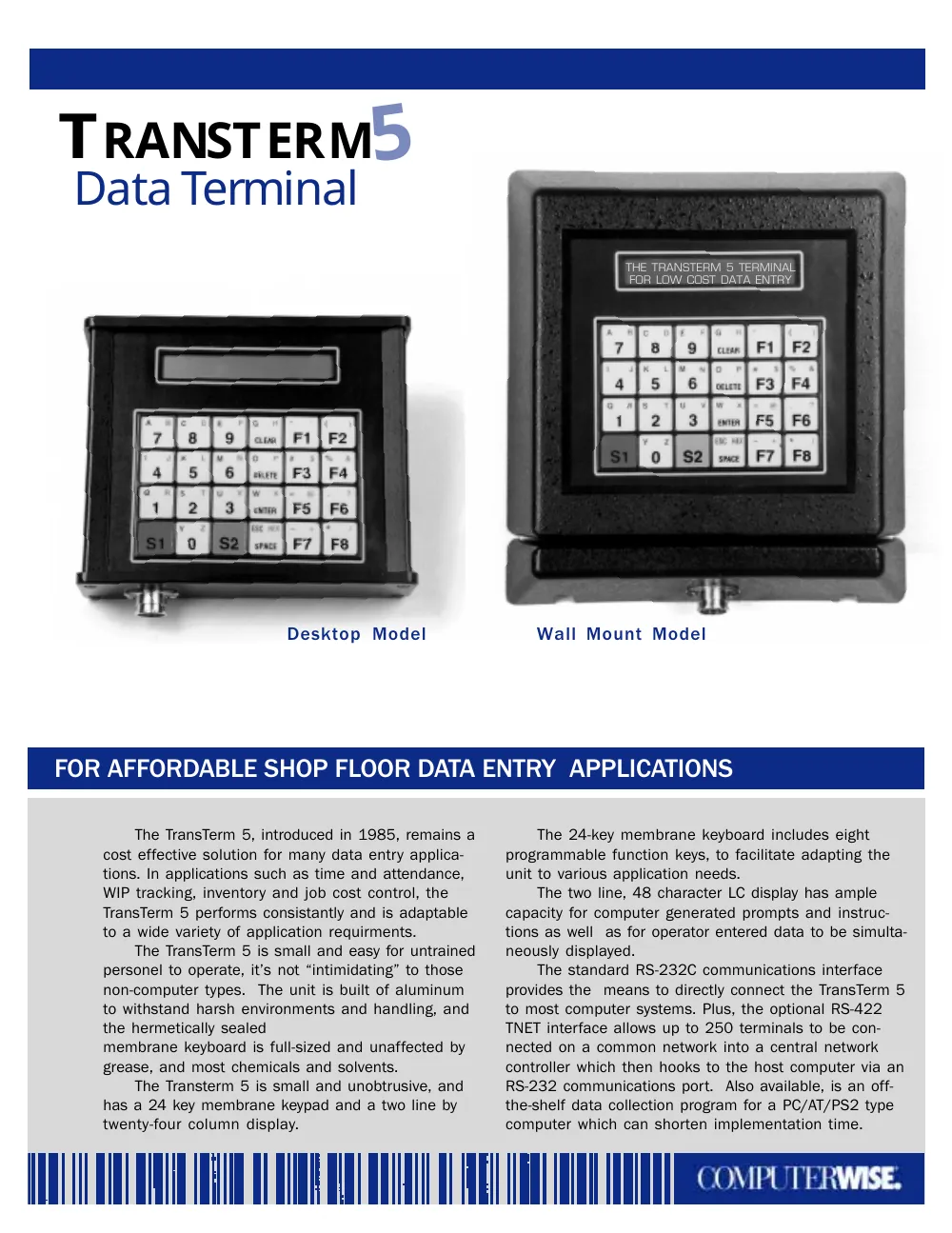
El texto de la página 1, del propio PDF
TRANSTERM5 Data Terminal
THE TRANSTERM 5 TERMINAL FOR LOW COST DATA ENTRY
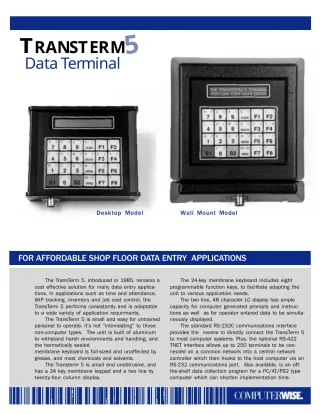
Desktop Model
Wall Mount Model
FOR AFFORDABLE SHOP FLOOR DATA ENTRY APPLICATIONS The TransTerm 5, introduced in 1985, remains a cost effective solution for many data entry applications. In applications such as time and attendance, WIP tracking, inventory and job cost control, the TransTerm 5 performs consistantly and is adaptable to a wide variety of application requirments. The TransTerm 5 is small and easy for untrained personel to operate, it’s not “intimidating” to those non-computer types. The unit is built of aluminum to withstand harsh environments and handling, and the hermetically sealed membrane keyboard is full-sized and unaffected by grease, and most chemicals and solvents. The Transterm 5 is small and unobtrusive, and has a 24 key membrane keypad and a two line by twenty-four column display.
The 24-key membrane keyboard includes eight programmable function keys, to facilitate adapting the unit to various application needs. The two line, 48 character LC display has ample capacity for computer generated prompts and instructions as well as for operator entered data to be simultaneously displayed. The standard RS-232C communications interface provides the means to directly connect the TransTerm 5 to most computer systems. Plus, the optional RS-422 TNET interface allows up to 250 terminals to be connected on a common network into a central network controller which then hooks to the host computer via an RS-232 communications port. Also available, is an offthe-shelf data collection program for a PC/AT/PS2 type computer which can shorten implementation time.
Página2de 2
Abrir en el PDF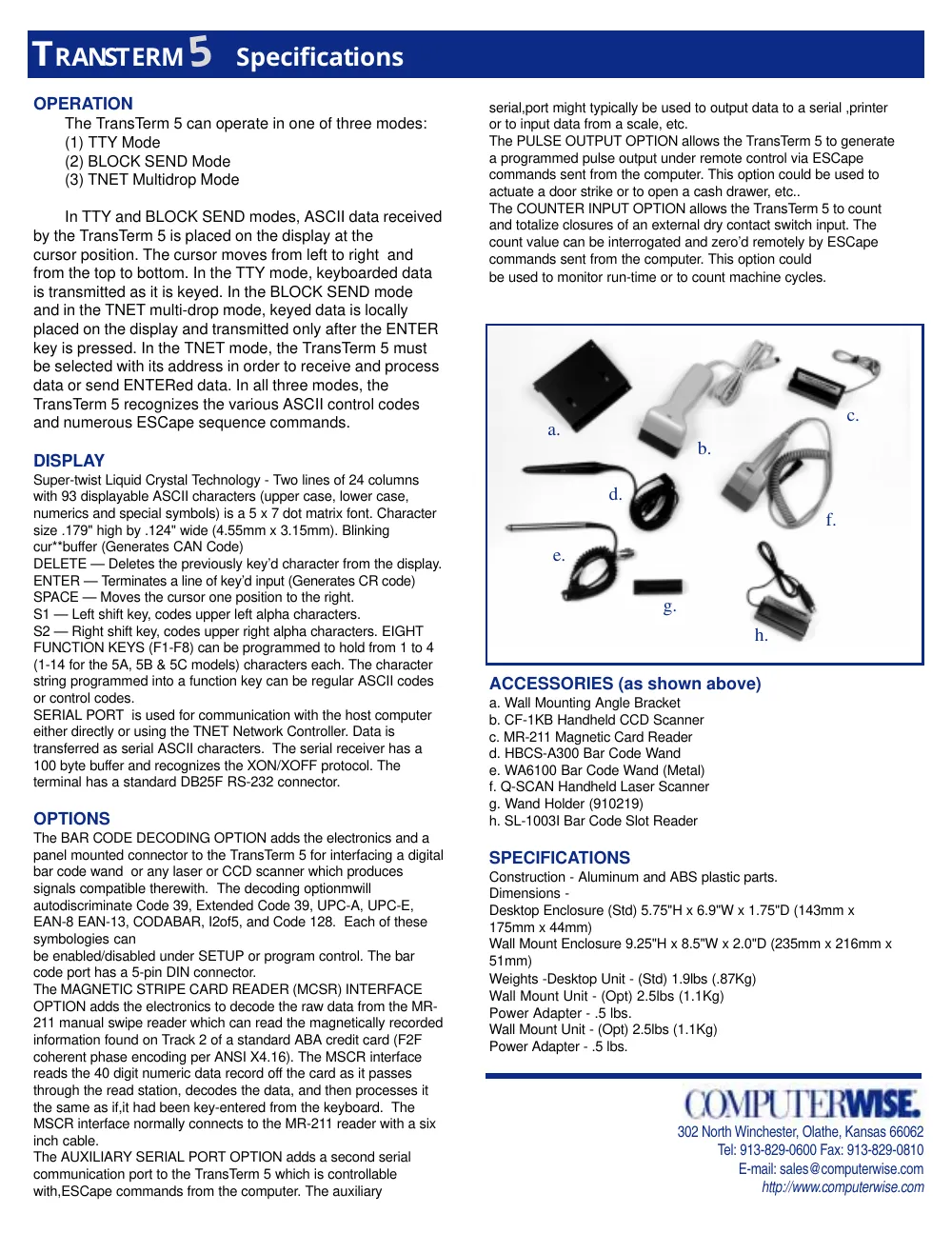
El texto de la página 2, del propio PDF
TRANSTERM 5 Specifications OPERATION The TransTerm 5 can operate in one of three modes: (1) TTY Mode (2) BLOCK SEND Mode (3) TNET Multidrop Mode In TTY and BLOCK SEND modes, ASCII data received by the TransTerm 5 is placed on the display at the cursor position. The cursor moves from left to right and from the top to bottom. In the TTY mode, keyboarded data is transmitted as it is keyed. In the BLOCK SEND mode and in the TNET multi-drop mode, keyed data is locally placed on the display and transmitted only after the ENTER key is pressed. In the TNET mode, the TransTerm 5 must be selected with its address in order to receive and process data or send ENTERed data. In all three modes, the TransTerm 5 recognizes the various ASCII control codes and numerous ESCape sequence commands.
serial,port might typically be used to output data to a serial ,printer or to input data from a scale, etc. The PULSE OUTPUT OPTION allows the TransTerm 5 to generate a programmed pulse output under remote control via ESCape commands sent from the computer. This option could be used to actuate a door strike or to open a cash drawer, etc.. The COUNTER INPUT OPTION allows the TransTerm 5 to count and totalize closures of an external dry contact switch input. The count value can be interrogated and zero’d remotely by ESCape commands sent from the computer. This option could be used to monitor run-time or to count machine cycles.
c.
a. b.
DISPLAY Super-twist Liquid Crystal Technology - Two lines of 24 columns with 93 displayable ASCII characters (upper case, lower case, numerics and special symbols) is a 5 x 7 dot matrix font. Character size .179" high by .124" wide (4.55mm x 3.15mm). Blinking cur**buffer (Generates CAN Code) DELETE, Deletes the previously key’d character from the display. ENTER, Terminates a line of key’d input (Generates CR code) SPACE, Moves the cursor one position to the right. S1, Left shift key, codes upper left alpha characters. S2, Right shift key, codes upper right alpha characters. EIGHT FUNCTION KEYS (F1-F8) can be programmed to hold from 1 to 4 (1-14 for the 5A, 5B & 5C models) characters each. The character string programmed into a function key can be regular ASCII codes or control codes. SERIAL PORT is used for communication with the host computer either directly or using the TNET Network Controller. Data is transferred as serial ASCII characters. The serial receiver has a 100 byte buffer and recognizes the XON/XOFF protocol. The terminal has a standard DB25F RS-232 connector.
OPTIONS The BAR CODE DECODING OPTION adds the electronics and a panel mounted connector to the TransTerm 5 for interfacing a digital bar code wand or any laser or CCD scanner which produces signals compatible therewith. The decoding optionmwill autodiscriminate Code 39, Extended Code 39, UPC-A, UPC-E, EAN-8 EAN-13, CODABAR, I2of5, and Code 128. Each of these symbologies can be enabled/disabled under SETUP or program control. The bar code port has a 5-pin DIN connector. The MAGNETIC STRIPE CARD READER (MCSR) INTERFACE OPTION adds the electronics to decode the raw data from the MR211 manual swipe reader which can read the magnetically recorded information found on Track 2 of a standard ABA credit card (F2F coherent phase encoding per ANSI X4.16). The MSCR interface reads the 40 digit numeric data record off the card as it passes through the read station, decodes the data, and then processes it the same as if,it had been key-entered from the keyboard. The MSCR interface normally connects to the MR-211 reader with a six inch cable. The AUXILIARY SERIAL PORT OPTION adds a second serial communication port to the TransTerm 5 which is controllable with,ESCape commands from the computer. The auxiliary
d. f. e. g. h. ACCESSORIES (as shown above) a. Wall Mounting Angle Bracket b. CF-1KB Handheld CCD Scanner c. MR-211 Magnetic Card Reader d. HBCS-A300 Bar Code Wand e. WA6100 Bar Code Wand (Metal) f. Q-SCAN Handheld Laser Scanner g. Wand Holder (910219) h. SL-1003I Bar Code Slot Reader
SPECIFICATIONS Construction - Aluminum and ABS plastic parts. Dimensions Desktop Enclosure (Std) 5.75"H x 6.9"W x 1.75"D (143mm x 175mm x 44mm) Wall Mount Enclosure 9.25"H x 8.5"W x 2.0"D (235mm x 216mm x 51mm) Weights -Desktop Unit - (Std) 1.9lbs (.87Kg) Wall Mount Unit - (Opt) 2.5lbs (1.1Kg) Power Adapter - .5 lbs. Wall Mount Unit - (Opt) 2.5lbs (1.1Kg) Power Adapter - .5 lbs.
302 North Winchester, Olathe, Kansas 66062 Tel: 913-829-0600 Fax: 913-829-0810 E-mail: sales@computerwise.com http://www.computerwise.com