Manual · Zebex
Zebex Z-1070 & Z-1071 Portable Data Terminal User Manual
Manual9 pagesPDF 799 KB
Short user manual for the Zebex Z-1070 and Z-1071 portable data terminals: batteries, scanning, data and uploading.
Covers · 1 model
The models it covers
Summary
What is in it
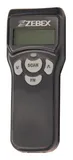
A short illustrated user manual for the Zebex Z-1070 and Z-1071 portable data terminals (personal data collectors). It shows the keys and power on and off, installing and charging NiMH batteries, and step by step menus to store scanned barcodes, view and check them, clear the memory, and upload data to a computer through the cradle with the WinTaskGen program, saving it as a text file.
From the manual · read page by page
Key facts from this manual
Some pages are scans or cannot be read; this says only what the readable text supports. Each line names its page in the PDF.
Short illustrated user guide for the Zebex Z-1070 and Z-1071 portable data terminals. It shows how to fit and charge batteries, scan, view, check and clear stored barcodes, and upload the data to a computer with WinTaskGen.
- Device
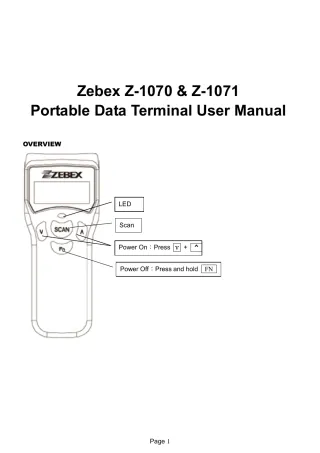
- Portable data terminal (Z-1070 and Z-1071) p. 1
- Batteries
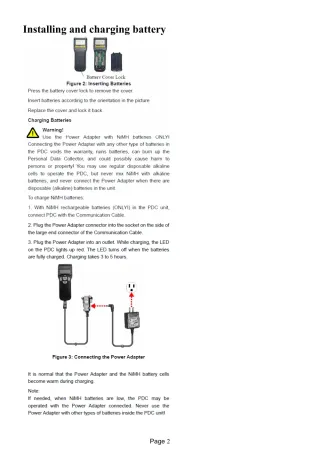
- NiMH rechargeable or disposable alkaline cells, never mixed p. 2
- Charge time
- 3 to 5 hours, NiMH only p. 2
- Charging LED
- Red while charging; off when fully charged p. 2
- Charging hookup
- Power Adapter plugs into the large end connector of the Communication Cable p. 2
- Main menu
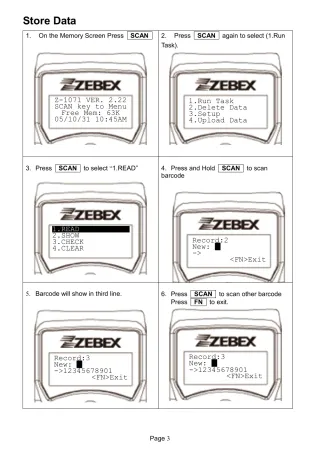
- Run Task, Delete Data, Setup, Upload Data p. 3
- Task functions
- READ, SHOW, CHECK, CLEAR p. 3
- PC software
- WinTaskGen p. 8
- Serial defaults
- Com1, 9600, None, 8, 1 p. 8
- Computer link
- Cradle and adapter to a COM port, or USB through a USB-Serial Converter Cable and its CP210x driver p. 7
- Upload file
- Saved as a Text (.TXT) file p. 9
What this manual walks you through
- Installing the batteries p. 2
- Charging NiMH batteries p. 2
- Scanning and storing barcodes p. 3
- Viewing barcodes in memory p. 4
- Checking a barcode without saving it p. 5
- Clearing all data from memory p. 6
- Uploading data to a computer with WinTaskGen p. 7, 8, 9
Good to know
- Use the Power Adapter only with NiMH batteries; with other batteries it can ruin them and burn up the unit. p. 2
- Never connect the Power Adapter with alkaline batteries in the unit. p. 2
- The adapter and NiMH cells getting warm during charging is normal. p. 2
- With low NiMH batteries the unit may run with the Power Adapter connected. p. 2
Questions this manual answers
How long does the Zebex Z-1071 take to charge?
3 to 5 hours with NiMH batteries; the LED is red while charging and goes off when full. p. 2
Can I use alkaline batteries in the Z-1071?
Yes, to run it, but never mix them with NiMH cells and never connect the Power Adapter while alkalines are inside. p. 2
How do I upload scanned data from the Z-1071 to a PC?
Connect the cradle and adapter, run WinTaskGen, choose Upload Data, click Connect, pick DATAFORM, click Upload, then save as a .TXT file. p. 7, 8, 9
What are the Z-1071 default COM port settings?
The guide gives the default as Com1, 9600, None, 8, 1. p. 8
How do I delete all data on the Z-1071?
Use the clear function under Run Task, then press SCAN to confirm or FN to exit. p. 6
The whole text · 1 part
Read the manual here as text
Its text as extracted from the PDF, unedited, in parts; each page opens the PDF at that page.
The file