Manual · Worth
Worth LZ-310 Program Manual
Manual2 pagesPDF 54 KB
Both pages are below, each with its text.
Filed with · 1 model
Also filed with these models on the old site

From the manual · read page by page
Key facts from this manual
Each line names its page in the PDF.
Two-page WDP Reader Setup Menu from Worth Data, a sheet of bar codes scanned to configure a Worth Data reader, with a Full ASCII chart for preamble and postamble characters. It does not name the LZ-310 itself; it lets the reader turn bar code types on or off and set the computer interface, keyboard country, terminator, beep tone and stand mode.
- Document
- Bar code setup menu for a WDP reader, dated 8/06 p. 1
- Setup steps
- Scan START SETUP, the parameter, values from the Barpad Table (0-9, A-F), then END SETUP p. 1
- Computer interface
- PC keyboard and USB Wedge Saver (default), or PC learned timing p. 1
- Bar codes
- Code 39, UPC/EAN, 2 of 5, Interleaved 2 of 5, Codabar, Code 128, MSI/Plessey, Labelcode 4 and 5, Code 93, RSS-14 p. 1
- Defaults on
- Code 39 and UPC/EAN are enabled by default; Codabar is disabled by default p. 1
- Keyboard countries
- USA (default), French, German, Belgian, French Canadian, Danish, Dutch, Italian, Latin American, Norwegian, Portuguese, Spanish, Swedish, Swiss, U.K. p. 1
- Preamble and postamble
- Up to 15 characters each from the Full ASCII Menu p. 1
- Magstripe
- None (default), track 1, 2 or 3, or tracks 1 and 2, 2 and 3 p. 1
- Stand mode
- Hands-free mode for the S20, S21, S10 and S11 stands p. 1
- Transmission timing
- None (default), short, short medium, medium or long, for differences in BIOS and clock speeds p. 1
What this manual walks you through
- Changing a reader setting with the setup bar codes p. 1
- Adding a preamble or postamble from the Full ASCII chart p. 1, 2
- Resetting all settings to defaults p. 1
- Switching the reader into hands-free stand mode p. 1
Good to know
- Scanning RESET after START SETUP returns every parameter to its default and erases all setup changes. p. 1
- Do not scan START SETUP and END SETUP around the stand mode bar code. p. 1
Questions this manual answers
How do I program a Worth Data WDP reader?
Scan START SETUP, then the parameter's bar code, then values from the Barpad Table, and finish with END SETUP. p. 1
How do I reset the reader to factory defaults?
Scan START SETUP and then RESET; this returns all parameters to their default settings. p. 1
Which stands work with stand mode?
The S20, S21, S10 and S11 stands. p. 1
The file
Size and text
Every page · 2
Read it here
Each page as it is printed, and its words beside it, so a phone can search and copy them.
Page1of 2
Open in the PDF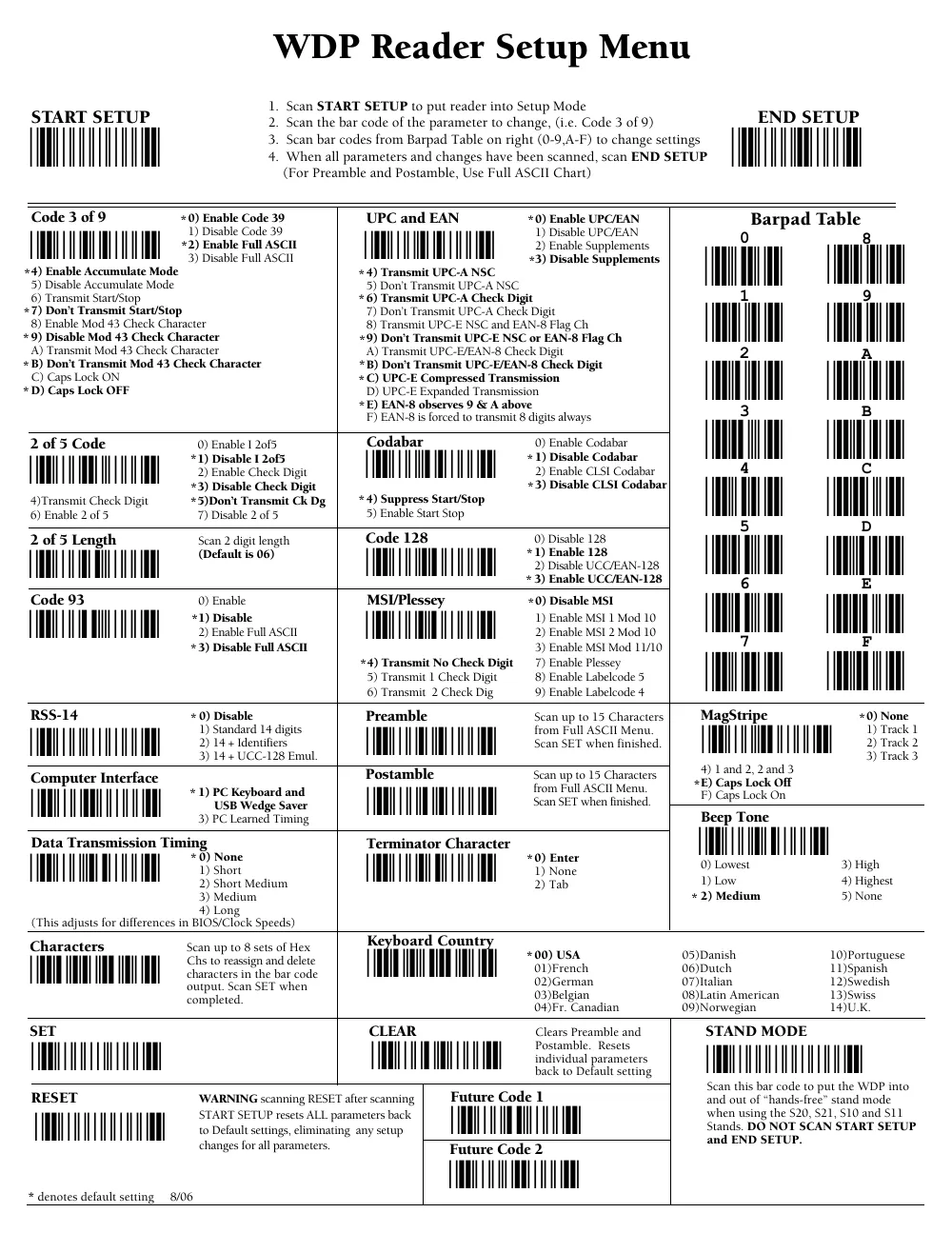
The text of page 1, from the PDF itself
WDP Reader Setup Menu 1. Scan START SETUP to put reader into Setup Mode 2. Scan the bar code of the parameter to change, (i.e. Code 3 of 9) 3. Scan bar codes from Barpad Table on right (0-9,A-F) to change settings 4. When all parameters and changes have been scanned, scan END SETUP (For Preamble and Postamble, Use Full ASCII Chart)
START SETUP*/+/* Code 3 of 9*/A/*
- 0) Enable Code 39 1) Disable Code 39
- 2) Enable Full ASCII 3) Disable Full ASCII
UPC and EAN
*/B/*
- 0) Enable UPC/EAN 1) Disable UPC/EAN 2) Enable Supplements *3) Disable Supplements
- 4) Enable Accumulate Mode 5) Disable Accumulate Mode 6) Transmit Start/Stop
- 7) Don’t Transmit Start/Stop 8) Enable Mod 43 Check Character
- 9) Disable Mod 43 Check Character A) Transmit Mod 43 Check Character
- B) Don’t Transmit Mod 43 Check Character C) Caps Lock ON
- D) Caps Lock OFF
- 4) Transmit UPC-A NSC 5) Don’t Transmit UPC-A NSC
- 6) Transmit UPC-A Check Digit 7) Don’t Transmit UPC-A Check Digit 8) Transmit UPC-E NSC and EAN-8 Flag Ch
- 9) Don’t Transmit UPC-E NSC or EAN-8 Flag Ch A) Transmit UPC-E/EAN-8 Check Digit
- B) Don’t Transmit UPC-E/EAN-8 Check Digit
- C) UPC-E Compressed Transmission D) UPC-E Expanded Transmission
- E) EAN-8 observes 9 & A above F) EAN-8 is forced to transmit 8 digits always
2 of 5 Code
Codabar
*/C/* 4)Transmit Check Digit 6) Enable 2 of 5
0) Enable I 2of5
- 1) Disable I 2of5 2) Enable Check Digit
- 3) Disable Check Digit
- 5)Don’t Transmit Ck Dg 7) Disable 2 of 5
Code 128
0) Enable
- 1) Disable 2) Enable Full ASCII
- 3) Disable Full ASCII
MSI/Plessey
*/5/* */W/*
- 4) Suppress Start/Stop 5) Enable Start Stop
Scan 2 digit length (Default is 06)
2 of 5 Length
Code 93
*/D/* */S/* */R/*
- 4) Transmit No Check Digit 5) Transmit 1 Check Digit 6) Transmit 2 Check Dig
RSS-14
*/%/*
- 0) Disable 1) Standard 14 digits 2) 14 + Identifiers 3) 14 + UCC-128 Emul.
*/M/*
- 1) PC Keyboard and USB Wedge Saver 3) PC Learned Timing
Data Transmission Timing
- 0) None 1) Short 2) Short Medium 3) Medium 4) Long (This adjusts for differences in BIOS/Clock Speeds)
*/N/* CharactersPreamble*/1/* PostambleComputer Interface
Scan up to 8 sets of Hex Chs to reassign and delete characters in the bar code output. Scan SET when completed.
0) Enable Codabar
- 1) Disable Codabar 2) Enable CLSI Codabar
- 3) Disable CLSI Codabar
*/2/*
0) Disable 128
- 1) Enable 128 2) Disable UCC/EAN-128
- 3) Enable UCC/EAN-128
- 0) Disable MSI 1) Enable MSI 1 Mod 10 2) Enable MSI 2 Mod 10 3) Enable MSI Mod 11/10 7) Enable Plessey 8) Enable Labelcode 5 9) Enable Labelcode 4 Scan up to 15 Characters from Full ASCII Menu. Scan SET when finished. Scan up to 15 Characters from Full ASCII Menu. Scan SET when finished.
- 0) Enter 1) None 2) Tab
- 00) USA 01)French 02)German 03)Belgian 04)Fr. Canadian
SETCLEAR*/$/**/./*
Clears Preamble and Postamble. Resets individual parameters back to Default setting
RESET
WARNING scanning RESET after scanning START SETUP resets ALL parameters back to Default settings, eliminating any setup changes for all parameters.
*///*
- denotes default setting
8/06
Barpad Table 0
*0* 1 *1* 2 *2* 3 *3* 4 *4* 5 *5* 6 *6* 7 *7*
8
*8* 9 *9* A *A* B *B* C *C* D *D* E *E* F *F*
MagStripe
*/T/*
- 0) None 1) Track 1 2) Track 2 3) Track 3
4) 1 and 2, 2 and 3
- E) Caps Lock Off F) Caps Lock On
*/L/* 0) Lowest 3) High 1) Low
- 2) Medium
4) Highest 5) None
05)Danish 06)Dutch 07)Italian 08)Latin American 09)Norwegian
10)Portuguese 11)Spanish 12)Swedish 13)Swiss 14)U.K.
Keyboard Country*.4.**.1.**/-/*Beep ToneTerminator Character*/H/*END SETUPFuture Code 1*/6/*Future Code 2*/7/*STAND MODE*/++/*
Scan this bar code to put the WDP into and out of “hands-free” stand mode when using the S20, S21, S10 and S11 Stands. DO NOT SCAN START SETUP and END SETUP.
Page2of 2
Open in the PDF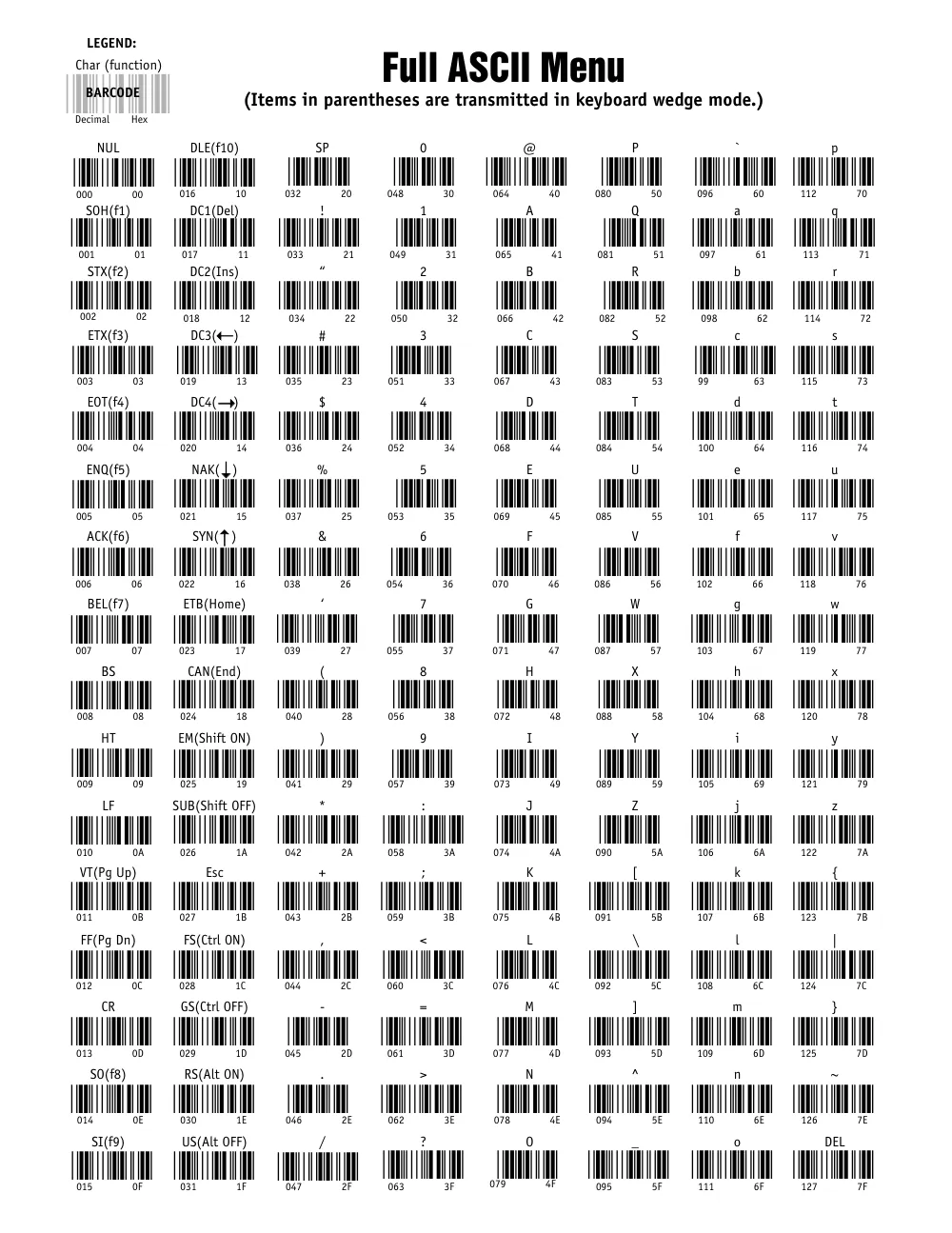
The text of page 2, from the PDF itself
- LEGEND
- Full ASCII Menu
Char (function)*%U* BARCODEDecimal
(Items in parentheses are transmitted in keyboard wedge mode.)
HexNULDLE(f10)SP*%U* *$P* 00000SOH(f1)016100*¯*032DC1(Del)2000101STX(f2)01711033DC2(Ins)2102ETX(f3)01812➝002DC3( 03019034)2213035230402014036➝ENQ(f5)NAK( )2402115037ACK(f6)SYN( )00606BEL(f7)02216038ETB(Home)07BS0231726039CAN(End) 08HT024182809LF02519SUB(Shift OFF)3738390A026VT(Pg Up)1A042Esc2A058+0BFF(Pg Dn)0271B043FS(Ctrl ON)2B059,0CCR0281CGS(Ctrl OFF)*$M* *%C* 0130DSO(f8)0291D0ESI(f9)0301E2C060-3C.>0613D*%I*/?US(Alt OFF)2E0623E0F0311F0472F0633F4E4F75v6611876w*+G* *+W* 1036711977x*+H* *+X* 1046812078y*+I* *+Y* 1056912179z*+J* *+Z* 1066A122k 5B1077A{ 6B123l7B|*%L* *+L* *%Q* 0925C1086C124m7C}*%M* *+M* *%R* 0935D1096D125n7D~*%N* *+N* *%S* 0945E110_*O*079102^*N*0785A091O
*$O* *%E* */O* *%J* 015
4D117*+F* *+V*]*M*65*%K* *+K* *%P*N*.*0464C077101j*Z*M*%H*5974ui*Y*090116*+E* *+U*\*L*= 2D4B0765808964h*X*L*-*045RS(Alt ON)*$N* *%D* 014044100[*K*<
*$L* *%B* */L* *%G* 012
4A0755773tg*W*K 3B56088115f*V*08763*+D* *+T*Z*J*;
*$K* *%A* */K* *%F* 011
490745572se*U*J 3A54086114d*T*0856299Y*I*073
- *$J* *$Z* */J* */Z* 010
4871r*+C* *+S*X*H*07253084I*9***S*H*8*05747113cW*G*0719 294661098V*F*07052083G*7*) 041360564570qbU*E*069112*R* *+B* *+R*F*6*0554460097T*D*8*$I* *$Y* */I* 0093505443068096a 51082E*5*(EM(Shift ON)34*%W* *+P*S*C*p*Q* *+A* *+Q*081D*4*0534206772704033052‘*$H* *$X* */H* 008*3*6*$G* *$W* */G* 007C06650R3&*$F* *$V* */F*41*B*051*P*080B 32`Q*A*0655 2540*2*050%➝05310644*$E* *$U* */E* 005*1*049$*$D* *$T* */D* 004A#DC4( ➝)EOT(f4)1302*$C* *$S* */C* 003*%V*“*$B* *$R* */B*P*0*048!*$A* *$Q* */A*@6E126o7EDEL*%O* *+O* *%T* 0955F1116F1277F