


Spec sheet · Unitech
Unitech PT500 Spec Sheet
Spec sheet2 pagesPDF 333 KB
Both pages are below, each with its text.
Covers · 1 model
The models it covers
From the sheet · read page by page
Key facts from this sheet
Each line names its page in the PDF.
Unitech spec sheet (2001) for the PT500 Portable Terminal, a hand-held data collection terminal with a CCD scan engine, a 36-key keyboard and a graphic LCD. It gives the performance, power, scanner, communication, docking station and software details.
- Device
- Portable data collection terminal with 36 alphanumeric keys and a CCD scan engine p. 1
- Battery
- Rechargeable 3.6V 1450 mAH Ni-MH pack or 3 AA alkaline batteries; 20 hours of operation per charge p. 1, 2
- Power input
- 9VDC / 1A via power cable p. 2
- Terminal ports
- One DB9 port and one IR port; CTS / RTS handshaking; multi-point protocol for multi-drop installation p. 2
- Docking station
- Serial infra-red link to the PT500; RS232 port for point-to-point, RS485 port for multi-protocol; optional modem; soft-contact pads p. 2
- CPU and RAM
- 80C32 CPU; 256KB, 512KB or 1MB RAM p. 2
- Display
- 122 x 32 graphic LCD or 20 x 4 text mode p. 2
- Keyboard
- 36 alphanumeric rubber keys with one trigger switch p. 2
- Bar codes
- UPC/EAN, Code 39 (includes Full Code 39), CODABAR, MSI, Code 128, Code 93, Code 32, China Postal Code p. 2
- Size and weight
- 190mm (L) x 30mm (W) x 40mm (H), 7.48 x 1.18 x 1.57 in.; 350 grams p. 2
- Charging
- Docking station quick charging, typically 3 hours; main pack in the front slot first, then spare pack in the rear slot p. 2
- Backup battery
- Rechargeable lithium battery p. 2
- Software
- EasyJob built-in application; Data Master with 11 pre-configured applications; C language tool kit; PT Comm Manager p. 1, 2
- Data transfer
- By RS232 or modem through PT Comm Manager software to a PC p. 2
What this sheet walks you through
- Adapting the Data Master pre-configured applications with function boxes and pull-down menus p. 1
- Transferring collected data to a PC with PT Comm Manager p. 1, 2
- Writing PT500 applications in C p. 2
Good to know
- A flashing warning message appears when the main battery is low. p. 2
- AA alkaline batteries can stand in for the NiMH pack. p. 1
- The sheet states its specifications are subject to change without notice. p. 2
Questions this sheet answers
What battery does the Unitech PT500 use?
A rechargeable 3.6V 1450 mAH Ni-MH pack, or 3 AA disposable alkaline batteries. p. 2
What power supply does the PT500 take?
9VDC at 1A through a power cable. p. 2
How long does a PT500 run on one charge?
About 20 hours of operation per charge of the NiMH pack. p. 1
How does the PT500 send data to a PC?
By RS232 or modem through PT Comm Manager software; the docking station also has an RS485 port. p. 2
The file
Size and text
Every page · 2
Read it here
Each page as it is printed, and its words beside it, so a phone can search and copy them.
Page1of 2
Open in the PDF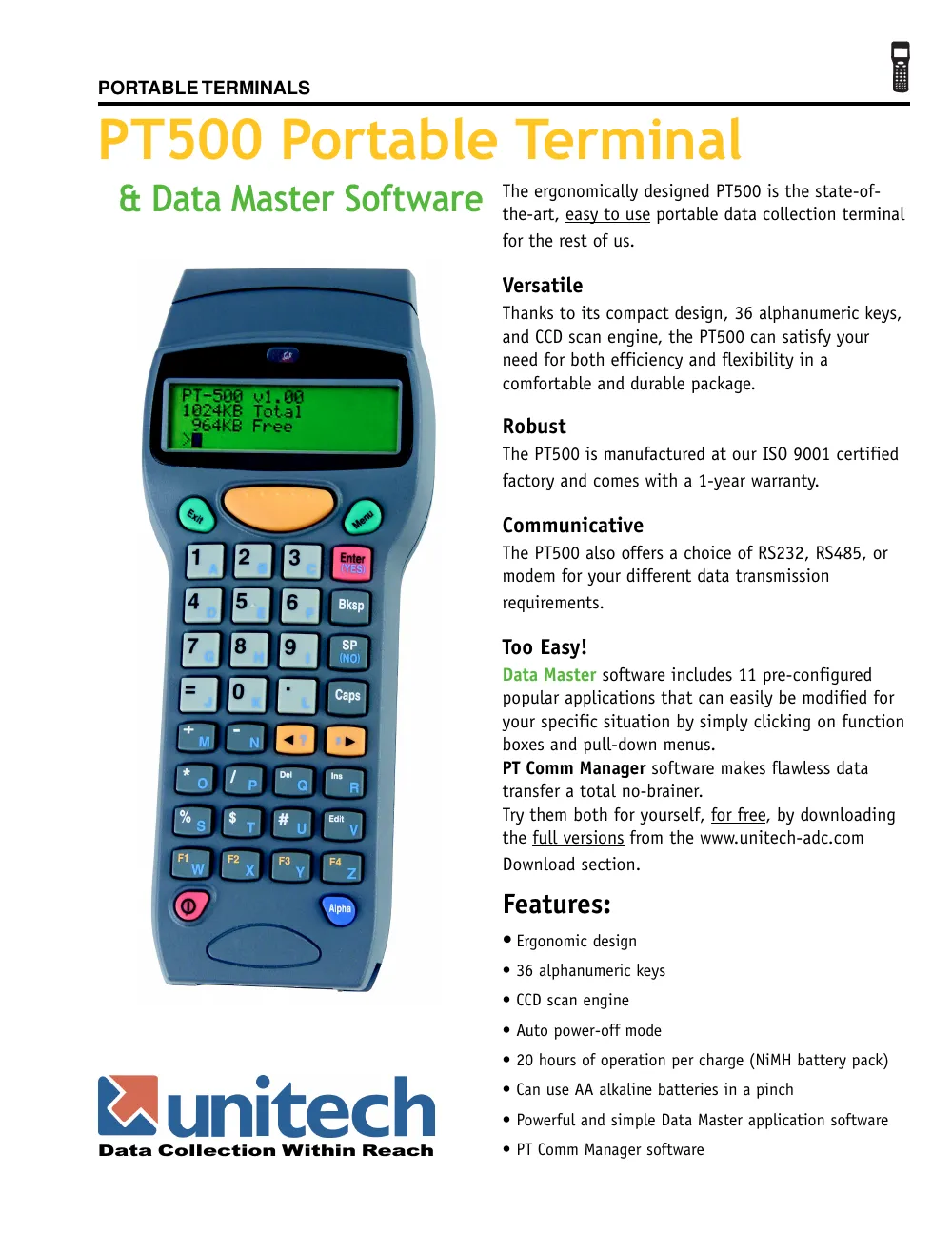
The text of page 1, from the PDF itself
PORTABLE TERMINALS
PT500 Portable Terminal
ergonomically designed PT500 is the state-of& Data Master Software The the-art, easy to use portable data collection terminal for the rest of us.
Versatile Thanks to its compact design, 36 alphanumeric keys, and CCD scan engine, the PT500 can satisfy your need for both efficiency and flexibility in a comfortable and durable package.
Robust The PT500 is manufactured at our ISO 9001 certified factory and comes with a 1-year warranty.
Communicative The PT500 also offers a choice of RS232, RS485, or modem for your different data transmission requirements.
Too Easy! Data Master software includes 11 pre-configured popular applications that can easily be modified for your specific situation by simply clicking on function boxes and pull-down menus. PT Comm Manager software makes flawless data transfer a total no-brainer. Try them both for yourself, for free, by downloading the full versions from the www.unitech-adc.com Download section.
Features:
- Ergonomic design
- 36 alphanumeric keys
- CCD scan engine
- Auto power-off mode
- 20 hours of operation per charge (NiMH battery pack)
- Can use AA alkaline batteries in a pinch
- Powerful and simple Data Master application software Data Collection Within Reach
- PT Comm Manager software
Page2of 2
Open in the PDF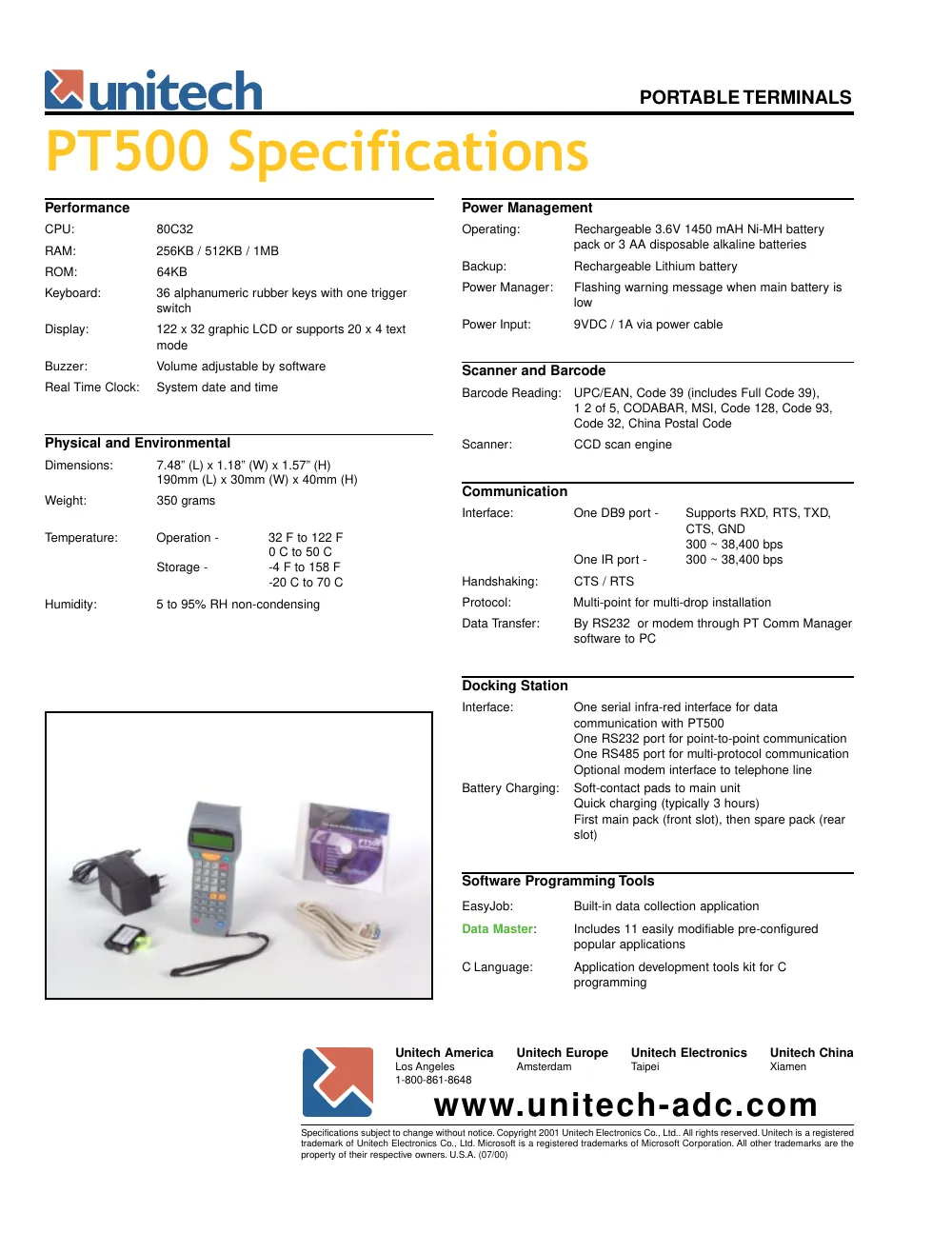
The text of page 2, from the PDF itself
PORTABLE TERMINALS
PT500 Specifications Performance
- Power Management Operating
- Rechargeable 3.6V 1450 mAH Ni-MH battery pack or 3 AA disposable alkaline batteries
64KB
- Backup
- Rechargeable Lithium battery
- Keyboard
- 36 alphanumeric rubber keys with one trigger switch
- Power Manager
- Flashing warning message when main battery is low
- Display
- 122 x 32 graphic LCD or supports 20 x 4 text mode
- Power Input
- 9VDC / 1A via power cable
- Buzzer
- Volume adjustable by software
Scanner and Barcode
- Real Time Clock
- System date and time
- Barcode Reading
- UPC/EAN, Code 39 (includes Full Code 39), 1 2 of 5, CODABAR, MSI, Code 128, Code 93, Code 32, China Postal Code
- Scanner
- CCD scan engine
- CPU
- 80C32
- RAM
- 256KB / 512KB / 1MB
ROM:
Physical and Environmental Dimensions:
7.48” (L) x 1.18” (W) x 1.57” (H) 190mm (L) x 30mm (W) x 40mm (H)
- Weight
- 350 grams
Communication Interface:
- Temperature
- Operation Storage -
- Humidity
- 32 F to 122 F 0 C to 50 C -4 F to 158 F -20 C to 70 C
5 to 95% RH non-condensing
One DB9 port -
One IR port -
Supports RXD, RTS, TXD, CTS, GND 300 ~ 38,400 bps 300 ~ 38,400 bps
- Handshaking
- CTS / RTS
- Protocol
- Multi-point for multi-drop installation
- Data Transfer
- By RS232 or modem through PT Comm Manager software to PC
Docking Station Interface:
- Battery Charging
- One serial infra-red interface for data communication with PT500 One RS232 port for point-to-point communication One RS485 port for multi-protocol communication Optional modem interface to telephone line Soft-contact pads to main unit Quick charging (typically 3 hours) First main pack (front slot), then spare pack (rear slot)
Software Programming Tools EasyJob:
Built-in data collection application
- Data Master
- Includes 11 easily modifiable pre-configured popular applications
- C Language
- Application development tools kit for C programming
Unitech AmericaUnitech EuropeUnitech ElectronicsUnitech China
Los Angeles 1-800-861-8648
AmsterdamTaipeiXiamen
www.unitech-adc.com Specifications subject to change without notice. Copyright 2001 Unitech Electronics Co., Ltd.. All rights reserved. Unitech is a registered trademark of Unitech Electronics Co., Ltd. Microsoft is a registered trademarks of Microsoft Corporation. All other trademarks are the property of their respective owners. U.S.A. (07/00)