Spec sheet · Teklogix
Teklogix Accessory Catalogue
Spec sheet41 pagesPDF 878 KB
Teklogix accessory catalog: cases, cradles, mounts, cables, antennas, power and scanner accessories for its hand-held and vehicle-mount terminals.
What this file really is
The old site listed this file as a spec sheet for the Metrologic MS4520, Psion MS-4520 and Teklogix MS-4520. Filed as an MS-4520 spec sheet, this is a Teklogix accessory catalog for its 7025, 7030 and vehicle-mount terminals; it does not name the MS-4520.
Filed with · 3 models
Also filed with these models on the old site
Summary
What is in it
Accessory catalog from Teklogix listing part numbers and short descriptions of accessories for its 7025 and 7030 hand-held terminals and 8025, 8045, 8050, 8055 and 8060 vehicle-mount terminals. It covers carrying accessories (handstraps, leather cases, holsters, harnesses), picker cradles and mounting hardware, covers, cables, antennas, power accessories, scanners with a cable selection guide, and other accessories, with a list of worldwide offices at the end.
Its parts
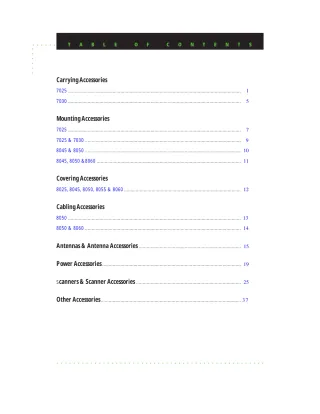
- Carrying Accessories
- Mounting Accessories
- Covering Accessories
- Cabling Accessories
- Antennas & Antenna Accessories
- Power Accessories
- Scanners & Scanner Accessories
- Other Accessories
From the sheet
Key facts from this sheet
Each line names its page in the PDF.
This is a Teklogix accessory catalogue for the 7025 and 7030 hand-held terminals and the 8045, 8050, 8055 and 8060 vehicle-mount terminals. It lists part numbers for carrying cases, mounts, antennas, batteries, chargers, power supplies, scanners and scanner cables. It does not mention the MS-4520 it is filed under.
- Accessories for
- 7025, 7030, 8025, 8045, 8050, 8055 and 8060 units p. 2
- 7025 batteries
- 17870-200 battery pack; 17870-201 high capacity; 17870-302 severe service for freezer/outdoor use p. 21
- 7025 chargers
- Dual unit: 17859 fast, 110 VAC, 5 hour cycle; 17859-001 fast, 220 VAC; 18115 standard, 110 VAC, 15 hour cycle; 18115-001 standard, 220 VAC p. 21
- 7030 batteries, charger
- 19505 battery pack, 2100 mAhr; 19515 battery pack, 1200 mAhr; 30005 charger, 110/250 VAC p. 22
- Vehicle-mount power
- 13985 power extension cable; 19873 pre-regulator (40-80 VDC in, 32 VDC out); 17642 converter (48 VDC max in, 12 VDC out); 19894 power supply, 100-240 VAC input p. 23
- 5300IP laser scanners
- 19114 5300-50IP long range; 18758 5300-70IP extra long range; 30174 5300-IP90 autoranging; 18753 5310IP; 18754 5320IP; 18757 5360IP; -30C to 50C p. 27
- LS3200 laser scanners
- 19419 LS3200 standard range; 93991 LS3200ER extended range; -30C to 50C p. 30
- Nomad wireless scanner
- Cableless, up to 50 feet from a vehicle-mount terminal; cradle is a 2-hour charger; cables 19400 D-15 (8045/8050) or 19738 28-Pin Honda (8055/8060) p. 31
- LS3x00 scanner cables
- 7025, 8045 & 8050: 30086 6 foot DIN, 18485 8 foot DIN; 7030, 8055 & 8060: 30087 6 foot 28-pin Honda, 19736 8 foot, 19737 23 foot p. 36, 37
- 5300-IP scanner cables
- DIN: 18760 6 foot, 18761 8 foot, 18762 15 foot; 28-pin Honda: 19732 6 foot, 19733 8 foot, 19734 15 foot p. 36, 37
- Adapter cables
- 19729 28-pin male Honda to 8-pin male DIN; 19726 28-pin female Honda to 8-pin female DIN; 20097 36-pin female Honda to 9-pin D-Sub male (RS-232) p. 34
- Wand scanners
- A10X, A30X, A50X DIN wands (with 19348); HP 28-pin Honda versions 20057-001, 20058-001, 20059-001 p. 33
- Back-of-hand scanners
- 30106 Scan-See with 2x10 LED screen, 4.5 ounces; 30107-001 Scan-Key with 2x20 LCD screen p. 32
- Heated scanner holders
- For 5300IP scanners: 93980 24 VDC, 93978 36 VDC, 93979 48 VDC p. 29
What this sheet walks you through
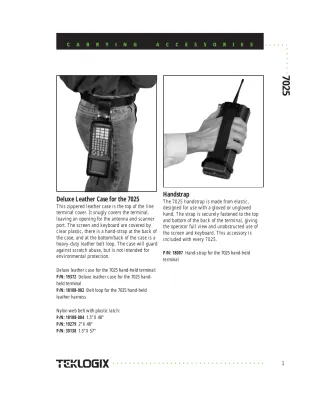
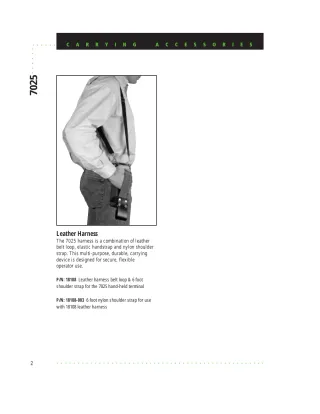
- Choosing a hand-strap, leather case and belt for the 7025 p. 3
- Choosing gateway antennas p. 19
- Choosing batteries and chargers for the 7025 and 7030 p. 21, 22
- Powering vehicle-mount terminals from a forklift or an AC outlet p. 23
- Choosing laser scanners and their boots, holsters and holders p. 27, 28, 29, 30
- Choosing scanner cables for each terminal p. 36, 37
- Choosing adapter and Y cables p. 34, 35
- Quick reference guide for scanner and cable selection p. 38
Good to know
- The 7025 leather case guards against scratches but is not meant for environmental protection. p. 3
- The Nomad RF scanner works only with the Teklogix vehicle-mount terminals. p. 31
- With the heated holder, every 5-30 seconds of scanner exposure needs at least 120 seconds of heating. p. 29
- The A50X infrared wand is for carbon based inks only. p. 33
- One battery conditioner/analyzer is recommended for every ten hand-held terminals. p. 25
Questions this sheet answers
What battery fits the Teklogix 7030?
The 19505 pack (2100 mAhr) or the 19515 pack (1200 mAhr); the 30005 charger takes 110/250 VAC. p. 22
Which cable connects an LS3x00 scanner to a Teklogix 7030?
A 28-pin Honda cable: 30087 (6 foot), 19736 (8 foot) or 19737 (23 foot). p. 37
How far can the Nomad wireless scanner be from the terminal?
Up to 50 feet, and it works only with the Teklogix vehicle-mount terminals. p. 31
How do I run a Teklogix vehicle-mount terminal on a forklift above 48V?
Use the 19873 pre-regulator, which takes 40-80 VDC and puts out 32 VDC. p. 23
How long does a 7025 battery take to charge?
The 17859 fast dual charger has a 5 hour cycle and the 18115 standard dual charger a 15 hour cycle. p. 21
Contents
Chapters and sections
Each line opens the PDF at its page.
The whole text · 5 parts
Read the sheet here as text
Its text as extracted from the PDF, unedited, in parts; each page opens the PDF at that page.
The file