Manual · Symbol
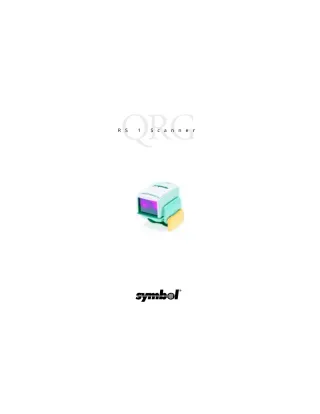
RS 1 Scanner Quick Reference
Manual52 pagesPDF 384 KB
Quick reference for the Symbol RS 1 ring scanner, a wearable laser scanner: fitting the mount, wearing, scanning and cleaning.
Covers · 1 model
The models it covers
Summary
What is in it
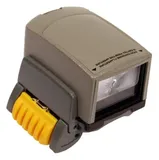
A short multilingual quick reference for the Symbol RS 1 ring scanner, a wearable laser bar code scanner worn on the index and middle fingers with a thumb trigger, used with the WSS 1000 wearable scanning system and the WWC 1000 or other host terminals. In English, French, German, Italian and Spanish it shows the parts of the scanner, adjusting the mount strap, fitting the scanner for right or left hand, scanning and the decode zone, scanning tips and cleaning, followed by ergonomic recommendations, regulatory information and the warranty.
Its parts
- Introduction
- Parts of the Ring Scanner
- Scanner Setup
- Wearing the RS 1 Scanner
- Using the Scanner
- Scanning Tips
- Cleaning
- Ergonomic Recommendations
- Regulatory Information
From the manual
Key facts from this manual
Each line names its page in the PDF.
This is the Symbol RS 1 Scanner Quick Reference for the RS 1 ring scanner, a laser scanner worn on the hand. It shows how to fit the ring mount, connect the scanner to the WWC 1000 or another host terminal, scan, and clean the window. The guide repeats in several languages and ends with laser safety and service information.
- What it is
- Modular, wearable laser ring scanner with a thumb-operated trigger p. 3
- Host
- WSS 1000 wearable scanning system or other host terminals; cabled to the WWC 1000, which supplies power p. 3
- Connector
- Interface port on the back of the scanner; cable plugs in arrow side up p. 4, 7
- Fit
- Ring mount with adjustable strap for the right or left index and middle fingers p. 5
- Scanning distance
- 4 to 10 inches (10 to 25 cm) generally works; varies with bar code density p. 10
- Decode zone
- Charted for 7.5, 15, 20, 40 and 55 mil bar codes; typical at 68°F (20°C) p. 9
- Scan LED
- Red when the scanner is on; green after a successful decode p. 8
- Laser label
- 680 nm laser, 1.0 milliwatt maximum output, labeled Class II laser product p. 46
- Parts
- Scan window, trigger, mount release button, scan LED, interface port, ring mount straps p. 4
- Guide number
- 70-16190-04 Revision C, December 2001 p. 52
What this manual walks you through
- Adjusting the ring mount strap p. 5
- Fitting the scanner in the mount for right- or left-handed use p. 6
- Wearing the scanner and connecting the host cable p. 7
- Scanning a bar code p. 8
- Reading the decode zone chart p. 9
- Scanning tips and cleaning the window p. 10
- Ergonomic recommendations p. 45
Good to know
- Do not hold the scanner exactly perpendicular to the bar code; reflected light can prevent a decode. p. 10
- Do not pour, spray or spill liquid on the scanner. p. 10
- Do not stare into the laser beam. p. 46
- Controls, adjustments or procedures other than those in the guide may cause hazardous laser light exposure. p. 46
Questions this manual answers
Can the Symbol RS 1 ring scanner be worn on the left hand?
Yes. The mount fits the right or left index and middle fingers, and the scanner is turned in the mount so the trigger sits by the thumb. p. 5, 6
What does the RS 1 scanner connect to?
An interface cable to the WWC 1000, which powers it and collects the data, or to another host terminal. p. 3, 7
How far from the bar code should I hold the RS 1?
About 4 to 10 inches (10 to 25 cm) generally works; hold larger symbols farther away and dense ones closer. p. 10
What does the green light on the RS 1 mean?
The LED turns green when a bar code decodes successfully; it is red while the scanner is on. p. 8
How do I turn on the RS 1 scanner?
Press the trigger to power it on. p. 8
Contents
Chapters and sections
Each line opens the PDF at its page.
- Introduction3
- Parts of the Ring Scanner4
- Scanner Setup5
- Wearing the RS 1 Scanner7
- Using the Scanner8
- Scanning Tips10
- Cleaning10
- Introduction11
- Composants du lecteur en forme de bague12
- Réglage du lecteur13
- Port du lecteur RS 115
- Utilisation du lecteur16
- Nettoyage18
- Einführung19
- Teile des Ring-Scanners20
- Scanner-Einstellung21
- Tragen des RS 1 Scanners23
- Benutzung des Scanners24
- Reinigung27
- Introduzione29
- Componenti del lettore ad anello30
- Configurazione dello scanner31
- Come indossare lo scanner RS 133
- Utilizzo dello scanner34
The whole text · 6 parts
Read the manual here as text
Its text as extracted from the PDF, unedited, in parts; each page opens the PDF at that page.
The file