Manual · Symbol
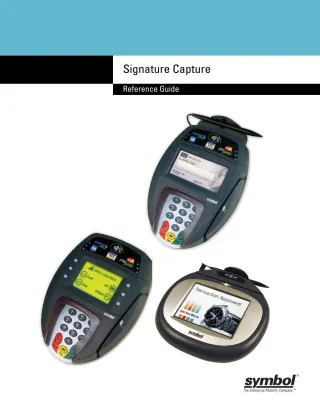
Signature Capture Reference Guide
Manual22 pagesPDF 474 KB
Reference guide to Symbol signature capture data formats and the SigCapDisplay ActiveX control, for PIN pads such as the PD8700.
What this file really is
The old site listed this file as a manual for the Symbol PD8700. Filed as a PD8700 user guide, this is a developer reference on Symbol signature capture data formats and the SigCapDisplay ActiveX control, naming the PD8700 only as one example device.
Filed with · 1 model
Also filed with these models on the old site
Summary
What is in it
A short reference guide for developers who handle signature data from Symbol signature capture products. It explains the legacy format (640 x 128 scaling, with its reproduction and resolution problems) and the enhanced format (up to 1024 x 1024, with a header giving the scaled resolution), the move and draw records of the vector data, and the Symbol SigCapDisplay ActiveX Control Object that displays signatures from touch screen PIN pads like the PD8700 and converts them to bitmaps.
Its parts
- About This Guide
- Using and Rendering Signature Capture Data
From the manual · read page by page
Key facts from this manual
Some pages are scans or cannot be read; this says only what the readable text supports. Each line names its page in the PDF.
Signature Capture Reference Guide (72E-86291-01 Revision A, November 2006) from Symbol Technologies, filed here under the PD8700. It explains the legacy and enhanced formats in which Symbol signature capture products store signatures, naming the ICE 4000, ICE 5500, ICE 6000 and ICE 6500, and the SigCapDisplay ActiveX control that shows signatures from touch screen PIN pads such as the PD8700. It lets a developer decode signature data and save it as a bitmap image.
- Document
- Signature Capture Reference Guide, 72E-86291-01 Revision A, November 2006 p. 22
- Signature storage
- Vector graphics: a series of lines, each with a starting point and a destination point p. 15
- Legacy resolution
- 640 x 128 pixels (coordinates 0 to 639 and 0 to 127) p. 15
- Enhanced resolution
- Up to 1024 x 1024 pixels, set by the application p. 17
- Enhanced mode products
- Current versions of the ICE 4000, ICE 5500, ICE 6000 and ICE 6500 p. 17
- Enhanced header
- Ten bytes: ID, header length, X and Y scaled resolution, X and Y pad size in .01 mm units p. 17, 18
- Sequence lengths
- Legacy: Move 18 bits, Draw 13 bits; enhanced: Move 21 bits, Draw 13 bits p. 16, 18
- Draw step range
- Signed change of -31 to +31 in X and in Y p. 16
- Format detection
- First bit of the data is 1 in the legacy format and 0 in the enhanced format p. 16, 18
- ICE 5500 pad width
- 67.17 mm (6717 in the header) p. 18
- Display software
- Symbol SigCapDisplay ActiveX Control Object, which displays signatures and converts them into bitmap images p. 19
- Control methods
- ResetSignature, SetSigCapData, DisplaySignature, SetOPOSSigCapRawData, GenerateBMPFile, ConvertIntoBmp p. 19, 20
- OPOS data conversion
- BinaryConversion must be OPOS_BC_NIBBLE or OPOS_BC_DECIMAL p. 20
What this manual walks you through
- Telling legacy signature data from enhanced signature data p. 16, 18
- Decoding legacy Move and Draw sequences p. 16
- Reading the enhanced signature header p. 17, 18
- Decoding enhanced signature binary data p. 18
- Displaying a signature in a POS application with the SigCapDisplay control p. 19
- Saving a captured signature as a bitmap file p. 20
- Getting service from the Symbol Global Customer Interaction Center p. 11
Good to know
- In the legacy format, an application must know the pad dimensions to scale the signature correctly. p. 15
- Up to seven extra bits can follow the end of a signature and should be discarded. p. 16
- DisplaySignature must be called before GenerateBMPFile. p. 20
- Hypercom names in the guide refer to hardware and software Hypercom made for Symbol. p. 9
Questions this manual answers
What is the resolution of Symbol legacy signature capture data?
A legacy signature is 640 x 128 pixels, with the full pad width mapped to 640 and the full height to 128. p. 15
How do I tell whether signature data is in the legacy or the enhanced format?
Look at the first bit of the first byte: it is always 1 in the legacy format and always 0 in the enhanced format. p. 16, 18
How do I convert PD8700 signature data into a bitmap?
The guide's SigCapDisplay ActiveX control converts raw signature data into a bitmap; its ConvertIntoBmp method writes a bitmap file from the binary vector data. p. 19, 20
Which Symbol signature pads have the enhanced resolution mode?
The guide names current versions of the ICE 4000, ICE 5500, ICE 6000 and ICE 6500, with coordinates up to 1024 in each direction. p. 17
Contents
Chapters and sections
Each line opens the PDF at its page.
The whole text · 4 parts
Read the manual here as text
Its text as extracted from the PDF, unedited, in parts; each page opens the PDF at that page.
The file