Manual · Symbol
RS 2200/3200 Series LL 425 Quick Reference
Manual16 pagesPDF 235 KB
Quick reference for the Symbol LL 425 interface controller: setup, power, default parameters, host selection and host type bar codes.
Covers · 1 model
The models it covers
Summary
What is in it
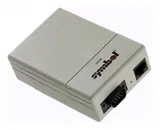
A short quick reference for the Symbol LL 425, which connects a scanner and a magstripe reader to a host. It covers setup and power options, a table of programmable parameters and their defaults, the default host for each interface cable assembly, a bar code sequence to append Enter to all data, beep meanings, a troubleshooting table and host type bar codes for IBM, Fujitsu and NCR terminals and keyboard wedges, followed by regulatory and warranty information.
Its parts
- Set Up
- Programmable Parameters and Defaults
- Host Selection
- Customizing the Data
- What Does The Beep Mean?
- What If...
- Host Types
- Regulatory Information
- Warranty Information
From the manual · read page by page
Key facts from this manual
Each line names its page in the PDF.
This is the Symbol quick reference for the LL 425 (RS 2200/3200 Series), which links a bar code scanner and a magstripe reader to a host through an interface cable assembly. It covers setup and power, the programmable parameters, host selection by scanning bar codes, appending an Enter to data, beeps and a what-if table for problems. It does not use the name OmniLink.
- Device
- LL 425, RS 2200/3200 Series: connects scanner and magstripe input devices to a host through an interface cable assembly p. 1, 3
- Power
- From the host through the Power Selection Plug, or from an external power supply with the plug removed p. 3
- Scanner port voltage
- Factory set to 5V on the I000A model and 12V on the I000B p. 3
- Interface cable assemblies
- IK-010X, IK-0200, IK-0300, IK-040X, IK-0500, IK-0600, IK-0700, IK-080X, IK-090X, IK-100X, IK-1100; each sets a default host p. 6
- Host types
- IBM PC/AT and PS2 wedges, IBM 4683/4684 ports, IBM 3683/3684 wedges, NCR 2151, 2152 and 7052 wedges, OCR and OCIA hosts, Standard RS-232C, ICL and Nixdorf RS-232C p. 10, 11, 12, 13, 14
- Good decode signal
- 1 short high beep p. 8
- Related guides
- LL 425 User's Guide; LL 425 Interface Guide p. 3
- Document number
- 70-10423-01Q, Revision C, October 1998 p. 16
What this manual walks you through
- Connecting input devices and the interface cable assembly p. 3
- Powering the LL 425 from the host or an external supply p. 3
- Programmable parameters and their defaults p. 4, 5
- Default host for each interface cable assembly p. 6
- Selecting a host type by scanning its bar code p. 10, 11, 12, 13, 14
- Appending an Enter to all scanned data p. 7
- Checking causes when nothing happens, using the What If table p. 8, 9
Good to know
- Scanning the append-Enter bar codes deletes all previously stored ADF rules. p. 7
- If your host type is not in the cable assembly list, select it by scanning its bar code. p. 6
- The manual states it is a Class A digital device; residential use is likely to cause harmful interference. p. 15
Questions this manual answers
How do I make the Symbol LL 425 send Enter after each scan?
Scan the five bar codes on the Customizing the Data page from top to bottom; this deletes any previously stored ADF rules. p. 7
How is the LL 425 powered?
From the host through the Power Selection Plug when the host has enough power, or from an external power supply after removing that plug. p. 3
What voltage does the LL 425 scanner port supply?
It is set at the factory to 5V on the I000A model and 12V on the I000B; the LL 425 User's Guide explains how to change it. p. 3
What does one beep mean on the LL 425?
One short high beep means the data was decoded successfully. p. 8
Contents
Chapters and sections
Each line opens the PDF at its page.
The whole text · 2 parts
Read the manual here as text
Its text as extracted from the PDF, unedited, in parts; each page opens the PDF at that page.
The file