Manual · Symbol
MDM9000 Modem For MC9000 Mobile Computers Quick Reference Guide
Manual16 pagesPDF 719 KB
Quick reference guide for the Symbol MDM9000 modem for MC9000 mobile computers: connection, LEDs, troubleshooting, specifications.
Covers · 1 model
The models it covers
Summary
What is in it
The quick reference guide for the MDM9000 Modem, which lets an MC9000 mobile computer exchange data with a host computer over phone lines. It lists the parts and what you need (dial-in account, RJ11 cable, the CAM adapter or serial adapter cable, Microsoft ActiveSync), shows how to connect the modem to the MC9000 or to the single-slot serial cradle, explains the LED indicators, gives a troubleshooting table for communication, ActiveSync and dial-out problems, and lists technical specifications and regulatory notices.
Its parts
- Introduction
- Parts
- Requirements
- Connecting the MDM9000 Modem
- Configuring the MC9000 for the Modem
- Modem LED Indicators
- Troubleshooting
- Technical Specifications
- Regulatory Information
- Waste Electrical and Electronic Equipment (WEEE)
From the manual · read page by page
Key facts from this manual
Each line names its page in the PDF.
This is the September 2007 quick reference guide for the MDM9000 modem for MC9000 mobile computers, which links the computer to a host over phone lines. It lists what is needed and shows how to connect the modem to the MC9000 or to its single-slot serial cradle. It also explains the LEDs, troubleshooting and the technical specifications.
- Device
- Phone line modem module for MC9000 Series mobile computers p. 3, 4
- Line speed
- Up to 33,600 bps; V.42bis compression and V.42 LAPM error correction p. 10
- Terminal to modem speed
- Up to 57,600 bps p. 10
- Adapter needed
- Cable Adapter Module (CAM), Symbol p/n ADP9000-100R p. 4
- Cradle cable
- Serial Adapter Cable, Symbol p/n 25-63856-01R, for use through the cradle p. 4
- Ports
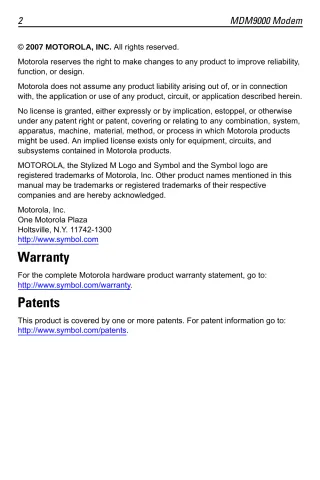
- Line In port, Phone port, serial port (15-pin modem cable) and LEDs p. 3, 4
- Chipset
- Conexant SCM p. 9
- Standards
- Bell 103, Bell 212A, Hayes AT command set; ITU V.22bis, V.32bis, V.42bis and others p. 10
- Dialing
- Tone and rotary pulse p. 9
- Current draw
- 100 mA active, under 10 mA sleep p. 10
- Temperature
- Operating 32 to 122°F / 0 to 50°C; storage -40 to 158°F / -40 to 70°C p. 10
- Ringer equivalence
- 0.2 p. 10
- Line type
- Public switched telephone network, including international connections; standard analog line p. 5, 9
- LEDs
- Green: connected and powered; solid amber: communicating with the host; off: not connected or no power p. 7
What this manual walks you through
- Connecting the modem to the MC9000 through the Cable Adapter Module p. 4, 5
- Connecting the modem to the MC9000 Single-Slot Serial Cradle p. 6
- Choosing the right telephone line p. 5
- Reading the modem LEDs p. 7
- Troubleshooting connection, ActiveSync and dial-out problems p. 7, 8, 9
Good to know
- Do not plug the modem's 15-pin connector into a host computer's VGA port. p. 4
- Disconnect the telecommunications network voltage before opening the unit for servicing. p. 6
- To reduce fire risk, use only No. 26 AWG or larger UL listed or CSA certified line cord. p. 11
- The modem must not be used on party lines. p. 12
- A low or discharged MC9000 battery shuts off power to the modem. p. 7
Questions this manual answers
What do I need to connect the MDM9000 to an MC9000?
The Cable Adapter Module (CAM), Symbol p/n ADP9000-100R, which plugs onto the MC9000; the modem cable connects to its 15-pin port. p. 4
How fast is the MDM9000 modem?
Line speed is up to 33,600 bps, and the computer to modem speed is up to 57,600 bps. p. 10
Can the MDM9000 be used through the MC9000 cradle?
Yes, through the Single-Slot Serial Cradle with the Serial Adapter Cable, Symbol p/n 25-63856-01R. p. 4, 6
What do the MDM9000 LEDs mean?
Green means the modem is connected and powered; solid amber means the computer is communicating with the host. p. 7
Why does the MDM9000 dial-out fail with a no answer message?
The modem may need power before the port opens. The guide says to set External5VoltPower to ActiveOn in Symbol Settings. p. 9
Contents
Chapters and sections
Each line opens the PDF at its page.
The whole text · 2 parts
Read the manual here as text
Its text as extracted from the PDF, unedited, in parts; each page opens the PDF at that page.
The file