Manual · Symbol
RS 2200/3200 Series LS 5300/LS 5400 Quick Reference
Manual44 pagesPDF 482 KB
Quick reference guide for the Symbol LS 5300 countertop laser scanner and LS 5400 in-counter version: operation, lights, sleep mode and beeper codes.
Covers · 1 model
The models it covers
Summary
What is in it
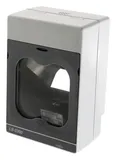
A short quick reference guide for routine use of the Symbol LS 5300 checkstand laser scanner and the LS 5400, its in-counter version with a stainless steel top. It describes turning the scanner on, what the red and green indicator lights mean, programming, how to pass an item through the scan pattern, sleep mode and what to do if the scanner misbehaves. It is repeated in French, German, Italian and Spanish and ends with bar codes for beeper volume and frequency, a test bar code and regulatory, warranty and patent information.
Its parts
- Quick Reference Guide
- Guide utilisateur
- Kurzübersicht
- Guida rapida
- Guía rapida
- Regulatory Information
- Warranty Information
- Patent Information
From the manual
Key facts from this manual
Each line names its page in the PDF.
Quick reference guide (70-17675-01 Revision A, March 1996) for the Symbol LS 5300 and LS 5400 checkstand laser scanners, with the operating text repeated in four other languages. It explains the indicator lights, scanning through the scan pattern and sleep mode, and gives bar codes to set beeper volume and tone and a test bar code.
- Device
- Laser bar code scanner, usually mounted on the checkstand counter top or built into the checkstand p. 3
- LS 5400 version
- LS 5400: in-counter version of the LS 5300 with a stainless steel top and scratch resistant glass, otherwise identical p. 4
- Power switch
- None; the scanner is ready to scan as soon as it is plugged in p. 5
- Indicator lights
- Red and green lights below the scan window: green on = ready; green off briefly = decoded; both on = asleep p. 5
- Sleep mode
- Enters sleep after a selectable idle period; wakes when a bar coded item passes the scan window p. 7
- Beeper settings
- Volume low, medium or high; tone low, medium or high frequency, set by bar codes p. 33, 34, 35, 36, 37, 38
- Laser label
- US Class IIa laser product; IEC Class 1 laser product p. 40
- FCC class
- Class A digital device under FCC Part 15 p. 41
- Guide part number
- 70-17675-01 Revision A p. 44
What this manual walks you through
- Reading the red and green indicator lights p. 5
- Scanning an item through the scan pattern p. 6
- How sleep mode works p. 7
- Setting the beeper volume p. 33, 34, 35
- Setting the beeper tone p. 36, 37, 38
- Checking the scanner with a test bar code p. 39
Good to know
- The counter area under the scan pattern should be free of stripes or patterns, ideally a light solid color. p. 6
- A steady or blinking red light, or a blinking green light, means the scanner is not operating normally. p. 5
- Installation, specifications, troubleshooting and the programming bar codes are in the separate LS 5300 Product Reference Guide. p. 3, 6
- As a Class A device, using it in a residential area is likely to cause harmful interference. p. 41
Questions this manual answers
How do I turn on a Symbol LS 5300 scanner?
It has no on/off switch. It is ready to scan as soon as it is plugged in. p. 5
What does it mean when both lights are on on the LS 5300?
Green and red on together mean the scanner is asleep; it wakes when a bar coded item passes the window. p. 5, 7
What is the difference between the LS 5300 and LS 5400?
The LS 5400 is an in-counter version with a stainless steel top and scratch resistant glass for scanning hard goods such as cans and bottles. Otherwise it is identical. p. 4
How do I change the beep volume on an LS 5300?
Scan the low, medium or high volume bar code in the quick reference guide. p. 33, 34, 35
How can I test that my LS 5300 is working?
Scan the UPC-A test bar code printed in the guide. p. 39
Contents
Chapters and sections
Each line opens the PDF at its page.
The whole text · 5 parts
Read the manual here as text
Its text as extracted from the PDF, unedited, in parts; each page opens the PDF at that page.
The file