Manual · Symbol
LRT 3840 Quick Reference
Manual82 pagesPDF 560 KB
Quick reference guide for the Symbol LRT 3840 laser radio terminal: battery, Spectrum24 network setup, scanning and troubleshooting.
Covers · 1 model
The models it covers
Summary
What is in it
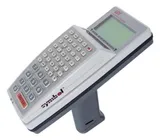
Multilingual quick reference guide (English, French, German, Italian and Spanish) for the Symbol LRT 3840 laser radio terminal, a hand-held data collection device that works on a Spectrum24 radio network. It lists the package contents and required and optional accessories, labels the terminal's parts, and walks through installing and charging the NiCd battery, cold booting, entering a Net ID in the Configurator and associating with an access point. It also covers scanning technique and troubleshooting, with regulatory and warranty information at the end.
Its parts
- Quick Reference
- Guide utilisateur
- Kurzübersicht
- Guida rapida
- Guía rápida
From the manual
Key facts from this manual
Each line names its page in the PDF.
Quick reference guide for the Symbol LRT 3840 laser radio terminal, a hand-held data collection terminal that works in a Spectrum24 radio network. It walks the reader through installing and charging the battery, setting the Net ID, joining an access point, scanning, and basic troubleshooting. The same guide repeats in French, German, Italian, and Spanish.
- Device
- Hand-held laser terminal with an integrated Spectrum24 radio p. 3
- Battery
- NiCd battery pack, fitted in the handle p. 6, 7
- Operating system
- DR-DOS with TCP/IP drivers p. 9
- Software loading
- Application and operating software download from the Spectrum24 network (BOOTP server) p. 3, 12
- Charging accessory
- One required: charging and communications module (CCM), one-slot cradle base unit, four-slot cradle base module, or PC Adapter with printer interface module (PIM) p. 4
- Printers
- Symbol PS 1000 and PS 200 (optional) p. 4
- Scan distance
- 3 to 6 inches, at a 45-degree angle to the bar code p. 14
- Laser
- 680 nm, 1.0 milliwatt maximum output p. 78
- Net ID range
- 102 to 1FE (hex) p. 10
- Setup utility
- Configurator, started with CFG24 at the DOS prompt p. 11
- Related guides
- 3865 Cradle Base Unit QRG (P/N 59042-01-82), 3866 Cradle Base Module QRG (P/N 59042-02-82), 3860 Charging and Communications Module QRG (P/N 58694-00-82), Series 3800 Product Reference Guide (P/N 59042-00-90) p. 8
- Document number
- 70-15918-02 Revision A, November 1996 p. 82
What this manual walks you through
- Installing the NiCd battery p. 6, 7
- Charging the battery p. 8
- Cold booting the terminal p. 9
- Entering a new Net ID in the Configurator p. 9, 10
- Recovering when the terminal cannot associate with an access point p. 10, 11
- Handling a failed download from the BOOTP server p. 12, 13
- Scanning bar codes with the laser scanner p. 14
- Troubleshooting boot, download, battery, and radio problems p. 15, 16
Good to know
- The terminal loses its software when power is lost; it must be cold booted and the Net ID entered again. p. 16
- Moving the terminal while it boots or downloads can take it out of access point range. p. 15
- The terminal should be off before a cold boot. p. 9
- Scanning straight on may blind the scanner; hold it at a slight angle. p. 14
- The manual states the laser label reads Class II laser product, do not stare into beam. p. 78
Questions this manual answers
How do I cold boot the LRT 3840?
With the terminal off, press and hold A, B, and D, press PWR, then release A, B, and D. It boots DR-DOS and loads the TCP/IP drivers. p. 9
What does NOT Associated mean on an LRT 3840?
The terminal could not associate with an access point, usually because the Net ID is wrong or forgotten. Press Ctrl+C, run CFG24, and enter the correct Net ID. p. 10, 11
How far from the bar code should the LRT 3840 be held?
From 3 to 6 inches away, at a 45-degree angle to the bar code. p. 14
What happens when the LRT 3840 battery goes dead?
The terminal loses its software. Replace the battery, cold boot, enter the Net ID manually, and download the boot files again. p. 16
Contents
Chapters and sections
Each line opens the PDF at its page.
The whole text · 9 parts
Read the manual here as text
Its text as extracted from the PDF, unedited, in parts; each page opens the PDF at that page.
The file