Manual · Symbol
Spectrum One Release 2 & 3, 385x Transceiver Quick Reference
Manual8 pagesPDF 1.3 MB
Quick reference for the Symbol 385x Spectrum One transceiver (Release 2 and 3): mounting, indicators, cabling and network setup.
Covers · 1 model
The models it covers
Summary
What is in it
An eight-page quick reference for the Symbol 385x Spectrum One transceiver, which links a network control unit (NCU) or serial access bridge (SAB) with Symbol remote terminals and wireless point-of-sale units. It explains Release 2 and Release 3 network topologies, what comes in the box, flat and wall mounting, reading the LED indicators, the rear cable connections, clearing a Release 2 transceiver's memory and setting its ID, and connecting primary and additional transceivers on the coaxial link.
From the manual · read page by page
Key facts from this manual
Some pages are scans or cannot be read; this says only what the readable text supports. Each line names its page in the PDF.
A short quick reference (70-20312-01, October 1997) for the Symbol 385x Spectrum One transceiver, Release 2 and Release 3, which links a network control unit or serial access bridge with Symbol remote terminals. It shows how to mount the unit, read its lights, clear and set transceiver IDs, and cable transceivers on the coaxial link.
- What it is
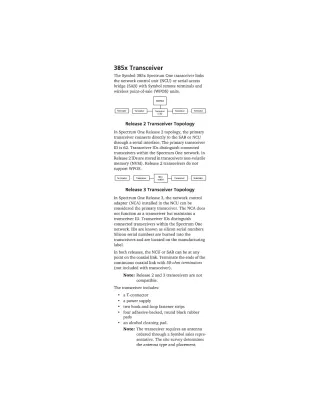
- Spectrum One transceiver linking the NCU or SAB with Symbol remote terminals and wireless point-of-sale (WPOS) units p. 2
- Versions
- Spectrum One Release 2 and Release 3; the two are not compatible p. 2
- Rear connectors
- BASE TO BASE COAX, POWER INPUT, SERIAL I/O (Release 2 only), REMOTE ANTENNA p. 4, 5
- Serial interface
- Release 2: RS-232 or RS-422 to the NCU or SAB, or a loopback connector p. 5
- Serial cable
- Release 2 primary: DB-25 serial cable from the NCU or SAB p. 6
- Coaxial link
- Both ends terminated with 50-ohm terminators (not included) p. 2
- Power
- AC power through the transceiver power supply p. 4
- In the box
- T-connector, power supply, two hook-and-loop fastener strips, four adhesive-backed rubber pads, alcohol cleaning pad p. 2
- Antenna
- Ordered separately through a Symbol sales representative; the site survey sets type and placement p. 2
- Transceiver IDs
- Release 2: stored in NVM, primary is ID 62; Release 3: silicon serial number on the manufacturing label p. 2
- Indicators
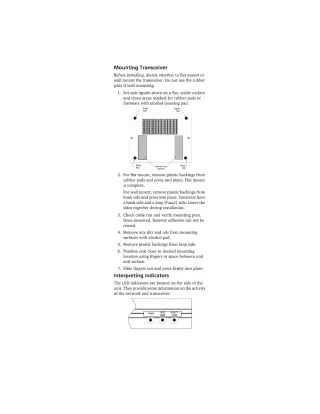
- POWER, BASE COMM and REMOTE COMM LEDs on the side of the unit p. 3
- Document
- 70-20312-01, October 1997 p. 1
What this manual walks you through
- Flat mounting or wall mounting the transceiver p. 3
- Reading the LED indicators on Release 2 and Release 3 units p. 3, 4
- Clearing a Release 2 transceiver's NVM to ID 00 p. 5
- Setting a Release 2 transceiver as the primary, ID 62 p. 5
- Connecting the Release 2 primary transceiver p. 6
- Adding Release 2 transceivers to a new or existing network p. 6, 7
- Connecting Release 3 transceivers to the NCA in the NCU p. 7
- Adding more Release 3 transceivers to the coaxial link p. 7
Good to know
- Release 2 and Release 3 transceivers are not compatible with each other. p. 2
- Release 2 transceivers do not support wireless point-of-sale (WPOS) units. p. 2
- Skip the rubber pads when wall mounting; the fastener adhesive cannot be reused once mounted. p. 3
- One end of the coaxial link must be properly grounded. p. 6
Questions this manual answers
What is the primary transceiver ID on a Spectrum One Release 2 network?
ID 62. The Release 2 primary transceiver connects directly to the SAB or NCU through a serial interface. p. 2
Can Release 2 and Release 3 385x transceivers be mixed?
No. The guide states that Release 2 and Release 3 transceivers are not compatible. p. 2
How do I clear the NVM on a Release 2 385x transceiver?
Power it down, attach a loopback connector to the serial port, then power it on, off and on again. The lights flash and the NVM clears to ID 00. p. 5
What terminators does a 385x transceiver network need?
50-ohm terminators on both ends of the coaxial link. They are not included with the transceiver. p. 2
Does the 385x transceiver come with an antenna?
No. The antenna is ordered through a Symbol sales representative, and the site survey decides its type and placement. p. 2
The whole text · 1 part
Read the manual here as text
Its text as extracted from the PDF, unedited, in parts; each page opens the PDF at that page.
The file