Manual · Paxar
Monarch 939 Keyboard
Manual44 pagesPDF 1.3 MB
Operator's manual for the Monarch 939 keyboard used with Monarch 9855 and 9860 printers: connecting, keys, batch options and batch entry.
Covers · 1 model
The models it covers
Summary
What is in it
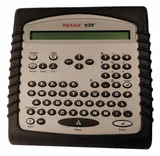
The operator's manual for the Monarch 939 Keyboard, which plugs into Monarch 9855 and 9860 printers to configure the printer and enter batch data. It covers unpacking, connecting the keyboard cable, the control keys, setting batch options (which prompts appear and their defaults), entering batch data with examples, troubleshooting, specifications and accessories such as flat surface and wall mounts, and the supported character sets and code pages.
Its parts
- Getting Started
- Setting Batch Options
- Entering Batch Data
- Troubleshooting
From the manual · read page by page
Key facts from this manual
Some pages are scans or cannot be read; this says only what the readable text supports. Each line names its page in the PDF.
Operator manual for the Monarch 939 keyboard, a plug-in keyboard that sets up Monarch 9855 and 9860 printers and enters batch data. It explains connecting the keyboard, setting batch options and cut modes, entering batch data, troubleshooting and mounting the optional stand. The character set charts in the appendix are scanned and not readable as text.
- Device
- Keyboard for configuring the printer and entering batch data p. 5
- Compatible printers
- Monarch 9855 and Monarch 9860 p. 5
- Connection
- 9-pin keyboard cable into the back of the printer p. 7
- Power
- Supplied by the printer p. 7, 31
- Keys
- Full QWERTY layout, 10 numeric keys, 5 function keys, 4 arrow keys and special keys p. 8
- Dimensions
- 4.0 in (102 mm) high, 8.25 in (210 mm) wide, 8.75 in (222 mm) deep p. 31
- Weight
- 2.33 lbs. (1.06 kg); shipping weight 3.4 lbs. (1.5 kg) p. 31
- Operating limits
- Thermal transfer (ribbon) 40° to 95° F (4° to 35° C); thermal direct 40° to 104° F (4° to 40° C) p. 31
- Accessory
- Optional stand for a flat surface or wall mount p. 31
- Batch quantity range
- Quantity, cut multiple and print multiple from 1 to 32000 p. 13, 15
- Number of parts
- 1 to 5 parts printed across the supply p. 12
- Cut modes
- Five: cut after tag, cut after batch, cut last ticket, no cut before, cut in strips p. 22
- Character sets
- Internal, ANSI, and DOS Code Pages 437 and 850 p. 35
What this manual walks you through
- Unpacking the keyboard and routing the cable p. 6
- Connecting the keyboard to the printer p. 7
- What each control key does p. 9
- Choosing which batch prompts appear and their defaults p. 12, 13, 14, 15, 16
- Understanding number of parts, cut multiple and print multiple p. 16, 17
- Entering a batch and printing it p. 20, 21, 22, 23, 24
- Printing tags without cutting p. 25
- Using print multiple with incrementing or decrementing fields p. 26
- Troubleshooting keyboard and data entry problems p. 29
- Mounting the stand on a flat surface or a wall p. 32, 33
Good to know
- Turn the printer off before connecting the keyboard cable. p. 7
- Formats must be downloaded to the printer before batch entry. p. 20
- With cut last ticket, up to two tags may be lost after the last batch, depending on supply length. p. 23
- The keyboard display may not match the character printed. p. 35
- Not all fonts support lower-case letters. p. 19
Questions this manual answers
Which printers does the Monarch 939 keyboard work with?
The manual says it works with the Monarch 9855 and Monarch 9860 printers. p. 5
Does the 939 keyboard need its own power supply?
No. It takes its power from the printer through the 9-pin keyboard cable. p. 7
Why is the 939 keyboard display blank?
Check that the printer is on and the cable is firmly attached. If the keyboard was plugged in with the printer on, turn the printer off and on again. p. 29
How do I type an international character on the 939 keyboard?
Hold the character key and enter a three-digit character code on the numeric keys. p. 35
The whole text · 5 parts
Read the manual here as text
Its text as extracted from the PDF, unedited, in parts; each page opens the PDF at that page.
The file