Manual · Partner Tech
KB18LD2-xx Pin-pad Terminal User's manual
Manual8 pagesPDF 40 KB
User's manual for the KB18LD2 pin-pad terminal with LCD, magnetic stripe reader and Code 39 barcode reader options.
Covers · 1 model
The models it covers
Summary
What is in it
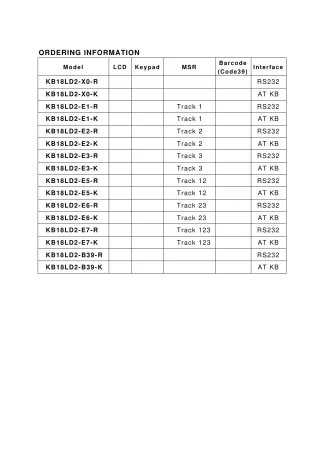
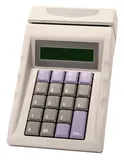
A short user's manual for the KB18LD2-xx pin-pad terminal, a programmable keypad with a two-line LCD, optional manual swipe magnetic stripe reader and Code 39 barcode reader, and an RS-232 or AT keyboard interface. It gives the features, the ordering table of model variants by card track and interface, general specifications, RS-232 and AT keyboard connector pinouts, the host command set for the display, beeper, key codes, baud rate and MSR settings, and worked command examples.
Its parts
- Features
- Ordering Information
- General Specifications
- Interface Specifications
- Command
From the manual · read page by page
Key facts from this manual
Each line names its page in the PDF.
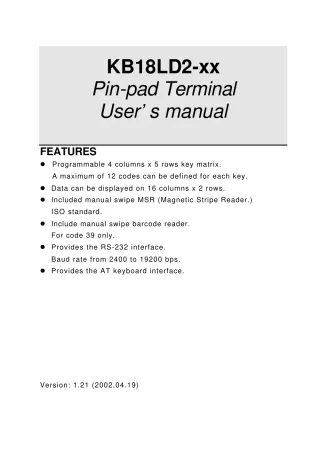
This is the user's manual (version 1.21) for the KB18LD2-xx pin-pad terminal, a programmable keypad with a two-line LCD, magnetic stripe reader and Code 39 barcode reader. It lists the ordering variants, specifications and connector pinouts, and the host commands for the display, beeps, key codes, baud rate and card track settings.
- Device
- Pin-pad terminal with programmable keypad, 16 x 2 LCD, manual swipe MSR and Code 39 barcode reader p. 1
- Interfaces
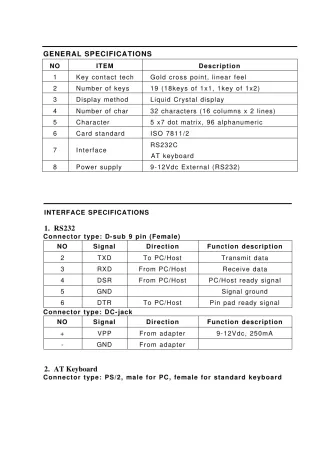
- RS-232 (D-sub 9 pin female) or AT keyboard (PS/2), by model p. 2, 3
- Power
- 9-12Vdc, 250mA external adapter through a DC jack (RS232 models) p. 3
- Keypad
- 19 keys (18 of 1x1, 1 of 1x2), gold cross point contacts; up to 12 codes per key p. 1, 3
- Display
- LCD, 32 characters (16 columns x 2 lines), 5 x 7 dot matrix p. 3
- Card reader
- Manual swipe MSR, ISO 7811/2; track 1, 2 or 3 or combinations, set by command p. 1, 3, 6
- Barcode reader
- Manual swipe, Code 39 only p. 1
- Baud rate
- 2400, 4800, 9600 or 19200 bps, saved to EEPROM p. 1, 6
- Model suffixes
- -R models use RS232, -K models AT KB; E1 to E7 differ by MSR tracks (Track 1, 2, 3, 12, 23, 123) p. 2
- RS232 pinout
- Pin 2 TXD, 3 RXD, 4 DSR, 5 GND, 6 DTR p. 3
- Manual version
- 1.21 (2002.04.19) p. 1
What this manual walks you through
- Choosing a model by card tracks and interface p. 2
- RS232, power and AT keyboard connector pinouts p. 3
- Host commands for the cursor, display and beeper p. 4, 5, 6
- Defining custom key codes and null keys p. 5, 7, 8
- Setting the baud rate and MSR track type p. 6
- Setting the card and barcode data format sent to the host p. 4, 7
- Clearing the EEPROM and resetting the pin-pad p. 5, 8
Good to know
- Several commands, such as baud rate setting and user defined key codes, do not apply to the KB18LD-X0. p. 5, 6
- After the clear EEPROM command, wait 15 seconds. p. 5
- A barcode checksum character is not shown on the LCD. p. 7
Questions this manual answers
What power supply does the KB18LD pin pad need?
RS232 models take an external 9-12Vdc, 250mA adapter through the DC jack. p. 3
Does the KB18LD connect by RS232 or keyboard wedge?
Both exist: models ending -R use RS232 and models ending -K use the AT keyboard interface. p. 2
What barcodes can the KB18LD read?
Its manual swipe barcode reader reads Code 39 only. p. 1
How do I change the KB18LD baud rate?
Send ESC b n from the host, with n of 30h to 33h for 9600, 4800, 2400 or 19200 bps; the setting is saved to EEPROM. p. 6
The whole text · 1 part
Read the manual here as text
Its text as extracted from the PDF, unedited, in parts; each page opens the PDF at that page.
The file