Manual · Nordic ID
Nordic ID Quick Guide
Manual12 pagesPDF 4.7 MB
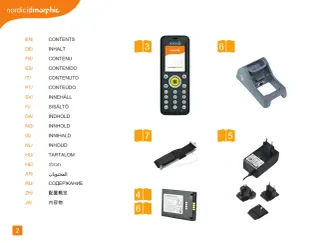
Picture-based multilingual quick guide for the Nordic ID Morphic handheld: keys, battery, charging, docking cradle, SIM/SD card and grip.
Covers · 1 model
The models it covers
Summary
What is in it
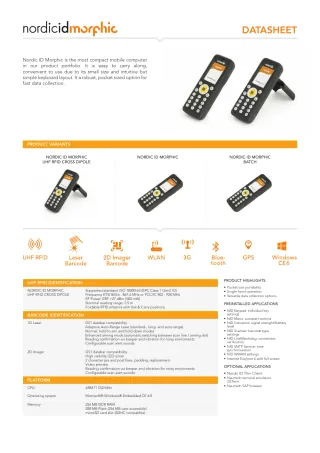
A short, mostly pictorial quick guide in many languages for the Nordic ID Morphic handheld computer, including the Morphic UHF RFID, Morphic UHF RFID Cross Dipole and Morphic Batch versions. Its pages show the keys and features, installing the battery, charging, the docking cradle, attaching the handstrap, inserting SIM and SD cards, scan direction, the correct grip and ergonomics, followed by warranty and repair center contacts.
Its parts
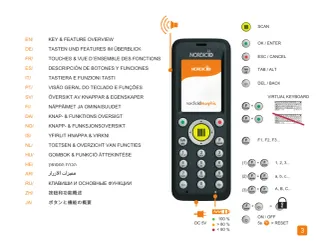
- Key & Feature Overview
- Installing Battery
- Charging
- Docking Cradle
- Handstrap
- SIM / SD Card
- Scan Direction
- Correct Grip
- Ergonomics
From the manual · read page by page
Key facts from this manual
Each line names its page in the PDF.
This is the multilingual quick guide for the Nordic ID Morphic, told almost entirely in pictures with section titles in many languages. It shows the keys, installing the battery, charging, the docking cradle, the hand strap, SIM and SD cards, scan direction, and correct grip. Scan direction and grip are shown for the Morphic, Morphic UHF RFID, Morphic UHF RFID Cross Dipole, and Batch versions.
- Versions shown
- Nordic ID Morphic, Morphic UHF RFID, Morphic UHF RFID Cross Dipole, and a Batch version p. 9
- Docking cradle
- Ethernet 10/100 and USB ports, DC 5V input p. 6
- Power input
- DC 5V p. 3
- Keys
- ESC / CANCEL, TAB / ALT, OK / ENTER, DEL / BACK, and a virtual keyboard p. 3
- Card slots
- SIM card and SD card p. 8
What this manual walks you through
- Key and feature overview p. 3
- Installing the battery p. 4
- Charging p. 5
- Using the docking cradle p. 6
- Fitting the hand strap p. 7
- Inserting SIM and SD cards p. 8
- Scan direction for each version p. 9
- Correct grip and ergonomics p. 10, 11
Good to know
- The guide carries a Class 2 laser warning: do not stare into the beam. p. 12
- The guide carries the EU directive 2002/96/EC (WEEE) mark for electronic waste. p. 12
Questions this manual answers
What ports does the Nordic ID Morphic docking cradle have?
The quick guide shows Ethernet 10/100 and USB ports and a DC 5V input on the cradle. p. 6
Does the Nordic ID Morphic take a SIM card?
Yes. The quick guide shows how to insert a SIM card and an SD card. p. 8
Which Morphic versions does the quick guide cover?
It shows the Morphic, Morphic UHF RFID, Morphic UHF RFID Cross Dipole, and a Batch version. p. 9
The whole text · 2 parts
Read the manual here as text
Its text as extracted from the PDF, unedited, in parts; each page opens the PDF at that page.
The file