Manual · NCR
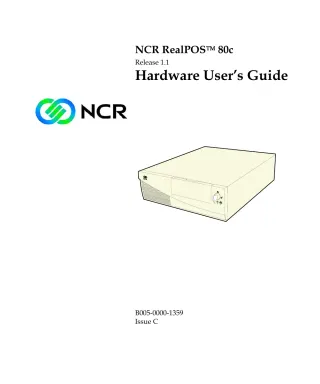
NCR RealPOS 80c Release 1.1 Hardware User's Guide
Manual157 pagesPDF 2.4 MB
Hardware user's guide for the NCR RealPOS 80c (7456) POS terminal and its peripherals, including the NCR 5952 Wedge DynaKey.
What this file really is
The old site listed this file as a manual for the NCR 5952. This is the hardware user's guide for the NCR RealPOS 80c terminal, not a manual for the 5952 alone; the 5952 Wedge DynaKey appears in it as one of the terminal's peripherals.
Filed under · 1 model
Filed under these models in the old catalog
Summary
What is in it
NCR's hardware user's guide for the RealPOS 80c point-of-sale terminal (7456 models), written for installers, integrators and field engineers. It describes the terminal and its peripherals (touch screens and LCDs, the 5953 and 5952 DynaKeys, 5932 keyboards, customer displays, receipt printers), hardware installation, BIOS setup, operating system recovery, BIOS updating, memory dumps, keyboard layouts, feature kits, cables and memory maps. The 5952 Wedge DynaKey is covered as one of the peripherals.
Its parts
- Product Overview
- Hardware Installation
- Setup
- Operating System Recovery
- BIOS Updating Procedures
- Memory Dump
- Retail Keyboard Key Layouts
- Feature Kits
- Cables
- Memory Maps
From the manual
Key facts from this manual
Each line names its page in the PDF.
Hardware user's guide for the NCR RealPOS 80c point-of-sale terminal (class 7456), filed here under the NCR 5952 Wedge DynaKey, which it describes in a short section. It covers the terminal's models and features, its peripherals such as the 5952 and 5953 DynaKeys, keyboards, displays and printers, installation, setup, OS recovery and BIOS updates. It also lists feature kits and cable part numbers.
- 5952 DynaKey
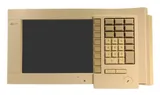
- 5952: point-of-sale keyboard with a 10.4 inch VGA flat panel LCD, dynamic keys beside the LCD and two up/down scroll keys p. 13, 37
- 5952 features
- 5952: keylock, 3-track ISO magnetic stripe reader (MSR), speaker; terminal-powered p. 37
- 5952 connectors
- 5952: connectors for a PC keyboard and an RS-232 scanner p. 37
- 5952 mounting
- 5952: integrated in the 7456, 5953-K032 Remote Table Top Mount or 5964-K032 Checkstand Mount p. 62
- 5952 video card
- 5952: in dual display configuration B it connects to the 5952-K052 VGA LCD adapter card (65550 chip) p. 65, 66
- Terminal
- RealPOS 80c (7456): retail POS terminal with Intel Celeron or Pentium III processors p. 17, 26
- Terminal models
- RealPOS 80c: 7456-1000, -1010, -1020: 566 MHz Celeron, 64 MB; 7456-1200, -1230: 850 MHz Celeron, 128 MB; 7456-1300, -1330: 850 MHz Celeron, 256 MB; 7456–2200: 1 GHz PIII, 256 MB p. 18
- Terminal memory
- RealPOS 80c: two DIMM sockets, up to 512 MB of PC133 SDRAM p. 22
- Terminal ports
- RealPOS 80c: four external RS-232 (two powered, one selectable, one non-powered), 10/100 Ethernet, 25-pin parallel, PS/2, DVI-I, 15-pin VGA, 4 to 6 Powered USB via daughter card p. 22
- Terminal power
- RealPOS 80c: 100-240 Vac, 6.0 A, 50-60 Hz (label); 237W output power p. 21, 24
- Terminal storage
- RealPOS 80c: 3.5 in. flex disk, 3.5 in. hard disk, bootable slimline CD-ROM, 64MB or 256MB Compact Flash p. 24
- Operating systems
- RealPOS 80c: DOS 6.22, Windows CE 3.0, Windows 2000 Professional, Windows XPe, Linux certified; Windows NT Workstation by special request p. 25
- Feature kits
- RealPOS 80c: 7456-K132 128MB and 7456-K133 256MB DIMM (PC-133); 7456-K141 CD ROM; 7456-K152 64MB and 7456-K154 256MB Compact Flash; 7456-K160 hard disk; 7456-K181 internal battery backup; 7456-K350 PCI VGA dual display card p. 20
- Scanner cables
- 7892: 497-0425593, 3.0 m; 7882: 497-0419723, 4.0 m; 7837: 497-0412952, 2.5 m; 7872 or 7875 scanner/scale: 497-0300422, 4 m p. 141
What this manual walks you through
- Installing a 5952 DynaKey and its mounting options p. 62
- Installing the PCI LCD board and a 5982 5-inch operator display p. 63, 64
- Setting up dual displays and which operating systems support each configuration p. 65, 66
- Finding the serial number and model number label p. 21
- How the internal UPS battery backup works p. 25
- Power management and waking the terminal over the LAN p. 26
- Peripherals: DynaKeys, keyboards and printers p. 36, 37, 38, 47, 48, 49
- Ordering feature kits for memory, storage and video p. 20, 138
- Cable part numbers for printers, scanners, displays, cash drawers and payment terminals p. 139, 140, 141, 142, 146, 148
Good to know
- Do not connect or disconnect a printer, keyboard or other terminal-powered peripheral while the terminal is on. p. 4
- The power supply filters only minor line variations and does not protect against excessive AC line spikes. p. 25
- With BIOS 3.0.0.0 or greater, Wake on Alarm from the off state is not supported; Wake on LAN is. p. 26
- PCI cards may be at most 150mm (5.9 in.) long. p. 24
- The terminal has no user serviceable parts. p. 3
Questions this manual answers
What features does the NCR 5952 Wedge DynaKey have?
A VGA flat panel LCD with dynamic keys beside it, two scroll keys, a keylock, a 3-track ISO MSR, a speaker and connectors for a PC keyboard and an RS-232 scanner. It is terminal-powered. p. 37
How can the NCR 5952 DynaKey be mounted?
Integrated in the 7456 terminal, on a 5953-K032 Remote Table Top Mount, or on a 5964-K032 Checkstand Mount. p. 62
Which cable connects a 5992 or 5945 payment terminal to the RealPOS 80c?
The 5945/5992 EPT cable (RS-232 with power), part 497-0418406, 4.0 m. p. 148
How much memory does the RealPOS 80c support?
Up to 512 MB of PC133 SDRAM in two DIMM sockets. p. 22
Where is the serial number on the RealPOS 80c?
On a label on the bottom of the unit; it is repeated on the rear panel under the PCI slots and inside the front security door. p. 21
Contents
Chapters and sections
Each line opens the PDF at its page.
- Product Overview17
- Hardware Installation51
- Introduction51
- Out-of-Box Hardware Installation52
- Installing the Keyboard and Mouse53
- Installing the Transaction Printer55
- Installing an NCR 5964 12.1-Inch Touch LCD57
- Installing a 5942 12.1-Inch LCD Monitor60
- Installing a 5953 DynaKey61
- Installing a 5952 DynaKey62
- Installing an NCR 5982 5-Inch Operator Display63
- Installing a Secondary CRT Display (Dual Display)65
- Installing an NCR 5972 Remote Customer Display70
- Installing an NCR 5973 Remote Customer Display72
- Setup75
- Operating System Recovery87
- BIOS Updating Procedures104
- Memory Dump115
15 more lines, from page 129 on
The whole text · 18 parts
Read the manual here as text
Its text as extracted from the PDF, unedited, in parts; each page opens the PDF at that page.
- Pages 1 to 61-6
- Table of Contents7-16
- Product Overview, pages 17 to 2517-25
- Product Overview, pages 26 to 3426-34
- Product Overview, pages 35 to 4335-43
- Product Overview, pages 44 to 5044-50
- Hardware Installation, pages 51 to 5851-58
- Hardware Installation, pages 59 to 6659-66
- Hardware Installation, pages 67 to 7467-74
- Setup75-86
- Operating System Recovery, pages 87 to 9587-95
- Operating System Recovery, pages 96 to 10396-103
- BIOS Updating Procedures104-114
- Memory Dump115-128
- Retail Keyboard Key Layouts129-136
- Pages 137 to 150137-150
- Memory Maps151-154
- Index155-157
The file