Manual · Motorola
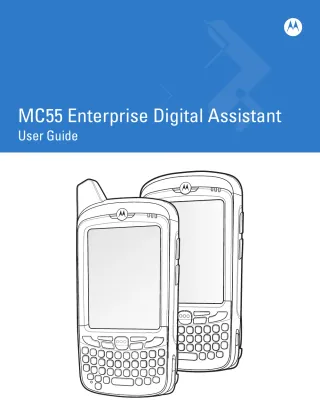
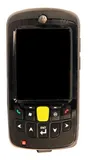
MC55 Enterprise Digital Assistant User Guide
Manual244 pagesPDF 15 MB
User guide for the Motorola MC55 Enterprise Digital Assistant, covering the MC5574, MC5590 and MC55A0 configurations.
Covers · 2 models
The models it covers
Summary
What is in it
User guide for the Motorola MC55 Enterprise Digital Assistant (EDA) and its accessories, covering the MC5574, MC5590, MC55A0 and MC55A0-HC configurations. It explains getting started (microSD card, SIM card, battery and charging), daily use of the Windows Mobile device, keypads, bar code scanning and imaging, the camera, GPS navigation, the phone, Bluetooth, the cradles and other accessories, maintenance and troubleshooting, and lists the technical specifications.
Its parts
- About This Guide
- Getting Started
- Using the MC55
- Using GPS Navigation
- Using the Phone
- Using Bluetooth
- Accessories
- Maintenance & Troubleshooting
From the manual
Key facts from this manual
Each line names its page in the PDF.
Motorola's MC55 Enterprise Digital Assistant User Guide (copyright 2009-10), covering the MC5574 and MC5590 and also the MC55A0 and MC55A0-HC. It explains getting started, everyday use, the phone, Bluetooth, the accessories, maintenance and troubleshooting, and lists technical specifications for the devices and their cradles, chargers and cables.
- Device
- Enterprise Digital Assistant (EDA) in the Motorola MC55 family p. 15
- Operating system
- MC5574: Windows Mobile 6.X Professional; MC5590: Windows Mobile 6.X Classic p. 190
- Processor and memory
- XScale Bulverde PXA270 at 520 MHz; 128MB RAM with 256MB or 512MB Flash p. 190
- Display
- Transflective color 3.5" QVGA TFT-LCD, 65K colors, 240 W x 320 H; glass analog resistive touch; LED backlight p. 190
- Battery
- Rechargeable Lithium Ion 3.7V smart battery, 2400 or 3600 mAh; spares BTRY-MC55EAB02 (3600 mAh) and BTRY-MC55EAB00 (2400 mAh, MC5590 only) p. 23, 190
- Radios
- MC5574: GSM GPRS/EDGE (850, 900, 1800 and 1900 MHz), 802.11b/g, Bluetooth v 2.0 EDR, SiRF III GPS; MC5590: 802.11a/b/g, Bluetooth v 2.0 EDR p. 191, 192
- Interfaces and expansion
- Full-speed USB 1.1 host or client (output 5 VDC @ 200 mA max.); microSD slot up to 16 GB p. 190
- Data capture
- 1D laser scanner (SE950) or 2D imager (MC5574: SE4400; MC5590: SE4500), alone or with a 2 megapixel camera with flash and auto focus p. 192, 193, 194
- Laser scanner (SE950)
- 50 (+/- 6) scans/sec bidirectional; 0.005 in. minimum element width; 46.5° scan angle p. 192
- Keypads
- 26-key numeric; 44-key QWERTY, AZERTY or QWERTZ; PIM p. 190
- Size and weight
- MC5574: 15.2 x 7.7 x 2.7 cm (6.0 x 3.03 x 1.10 in.), 359 g (12.5 oz.) with 3600 mAh battery; MC5590: 14.7 x 7.7 x 2.6 cm (5.78 x 3.03 x 1.06 in.), 315 g (11.1 oz.) with 2400 mAh battery p. 189
- Environment
- Operating -10°C to 50°C (14°F to 122°F); charging 0° C to 40° C; IP54; multiple 1.2 m (4 ft.) drops to concrete p. 190, 191
- Cradles and chargers
- Single Slot USB Cradle CRD5500-1000UR; Single Slot Ethernet/Modem/USB Cradle CRD5500-1000XR; Four Slot Charge Only CRD5500-4000CR; Four Slot Ethernet CRD5500-4000ER; Vehicle Cradle VCD5500-1000R; Vehicle Holder VCH5500-1000R; Four Slot Spare Battery Charger SAC5500-4000CR p. 23
- Cables and add-ons
- USB Charging Cable 25-108022-02R; Charge Only Cable 25-112560-01R; Auto Charge Cable VCA5500-01R; DEX Cable 25-127558-01R; Magnetic Stripe Reader MSR5500-100R; Trigger Handle TRG5500-100R p. 23
What this manual walks you through
- Finding the AKU and OEM software versions p. 16, 17
- Unpacking and checking the contents p. 22
- Troubleshooting power, battery, display, memory and scanning problems p. 180, 181, 182
- Troubleshooting Bluetooth connections p. 182
- Troubleshooting the single slot USB cradle p. 183
- Fixing ActiveSync and charging problems in the four slot Ethernet cradle p. 184, 185
- Troubleshooting the vehicle cradle p. 185
- Looking up cradle, charger, magstripe reader and cable specifications p. 196, 197, 198, 199, 200, 201
Good to know
- The battery does not charge below 0°C (32°F) or above 40°C (104°F). p. 180
- When the battery is low, the scanner shuts off before the low battery notification appears. p. 182
- USB host mode works only with the appropriate cables. p. 190
- The camera application does not launch while DataWedge is running; end DataWedge in Task Manager. p. 181
- Remove the protective shipping film from the scan window, display and camera window before first use. p. 22
Questions this manual answers
How long does the MC55 battery take to charge?
The guide gives four hours for the 2400 mAh battery and less than six hours for the 3600 mAh battery. p. 185
What is the part number of the MC55 spare battery?
The spare 3600 mAh battery is BTRY-MC55EAB02 (10- and 50-packs end in -10 and -50); the 2400 mAh BTRY-MC55EAB00 is for the MC5590 only. p. 23
Does the Motorola MC5574 have GPS?
Yes. GPS is on the MC5574 only, a SiRF III receiver with an on-board antenna. p. 192
Why is my MC55 battery not charging?
Causes the guide lists include a failed battery, removing the MC55 from the cradle too soon, and a temperature below 0°C (32°F) or above 40°C (104°F). p. 180
How close must a Bluetooth device be to the MC55?
Within a range of 10 meters. p. 182
Contents
Chapters and sections
Each line opens the PDF at its page.
- Revision History5
- About This Guide15
- Getting Started21
- Using the MC5537
- Introduction37
- Today Screen37
- Status Icons38
- Programs40
- Settings43
- Adjusting Volume46
- Battery Status Indications46
- LED Indicators49
- Resetting the MC5550
- Waking the MC5551
- Locking the MC5551
- Keypads54
- Function Buttons69
- Stylus69
- Entering Data70
- Data Capture71
- Using Voice-Over-IP76
- Taking Photos76
- Recording Video77
- Viewing Photos and Videos77
- Using GPS Navigation79
67 more lines, from page 79 on
- Introduction79
- Using the Phone83
- Introduction83
- Accessing the Phone Keypad83
- Turning the Phone On and Off84
- Audio Modes85
- Making a Call86
- Making an Emergency Call90
- Answering a Call90
- Smart Dialing91
- Muting a Call92
- Taking Notes93
- Using Speed Dial94
- Using Call History98
- Swapping Calls102
- Conference Calling103
- Text Messaging104
- Establishing a Data Connection108
- Using Bluetooth111
- Accessories157
- Maintenance & Troubleshooting175
- Technical Specifications189
- Voice Quality Manager203
- Windows Mobile 6.5207
- Glossary229
- Index237
The whole text · 30 parts
Read the manual here as text
Its text as extracted from the PDF, unedited, in parts; each page opens the PDF at that page.
- Pages 1 to 41-4
- Pages 5 to 115-11
- Pages 12 to 1412-14
- About This Guide15-20
- Getting Started, pages 21 to 2821-28
- Getting Started, pages 29 to 3629-36
- Using the MC55, pages 37 to 4537-45
- Using the MC55, pages 46 to 5446-54
- Using the MC55, pages 55 to 6355-63
- Using the MC55, pages 64 to 7264-72
- Using the MC55, pages 73 to 7873-78
- Using GPS Navigation79-82
- Using the Phone, pages 83 to 9283-92
- Using the Phone, pages 93 to 10293-102
- Using the Phone, pages 103 to 110103-110
- Using Bluetooth, pages 111 to 120111-120
- Using Bluetooth, pages 121 to 130121-130
- Using Bluetooth, pages 131 to 140131-140
- Using Bluetooth, pages 141 to 150141-150
- Using Bluetooth, pages 151 to 156151-156
- Accessories, pages 157 to 165157-165
- Accessories, pages 166 to 174166-174
- Maintenance & Troubleshooting175-188
- Technical Specifications189-202
- Voice Quality Manager203-206
- Windows Mobile 6.5, pages 207 to 214207-214
- Windows Mobile 6.5, pages 215 to 222215-222
- Windows Mobile 6.5, pages 223 to 228223-228
- Glossary229-236
- Index237-244
The file