Manual · Monarch
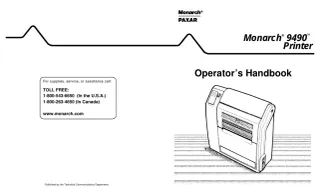
Monarch 9490 Printer Operator's Handbook
Manual47 pagesPDF 719 KB
Operator's handbook for the Monarch 9490 portable thermal label printer: battery, loading supplies, printing, care and troubleshooting.
Covers · 1 model
The models it covers
Summary
What is in it
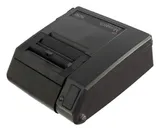
Monarch's operator's handbook for the 9490, a portable, online-only thermal label printer that prints data downloaded from a host. It is written for the person printing and applying labels and covers charging and loading the battery, the AC power supply and shoulder strap, the trigger and LED, loading ribbon and labels for peel and non-peel modes, connecting the communications cable, on-demand and continuous printing, clearing jams and cleaning, troubleshooting with a test label, and specifications with cable pin outs.
Its parts
- Getting Started
- Loading Supplies
- Printing
- Care and Maintenance
- Troubleshooting
- Specifications
From the manual · read page by page
Key facts from this manual
Each line names its page in the PDF.
This is the Operator's Handbook for the Monarch 9490, a portable thermal label printer that prints jobs a host downloads to it. It covers charging the battery, loading ribbon and labels for peel or non-peel mode, connecting the host cable, printing, cleaning and troubleshooting by the LED. It ends with specifications, accessories and the connector pinout.
- Device
- Portable, online-only label printer; the host must download data before it can print p. 6
- Printing
- Thermal direct and thermal transfer (ribbon cassette for thermal transfer supplies) p. 17, 42
- Battery
- 13.2VDC NiCd; about two years of daily use and recharging p. 7
- Chargers
- 8-hour "trickle" charger; optional 1-hour "fast" charger and 4-station "Gang" charger p. 42
- AC power
- Optional AC power supply, 110/220 VAC, 50-60 Hz, with a power pack that fits the battery well p. 11, 12, 42
- Host connector
- Male 8-pin mini-DIN (CTS, RTS, TXD, GND, RXD, DTR, DSR, DTR or +5V) p. 44
- Memory
- 4K EPROM, 256K RAM, 256K ROM; optional additional 256K RAM p. 42
- Supply widths
- 2" (51mm), 2.5" (64mm), 3" (76mm), 3.5" (89mm), 4" (102mm) p. 20
- Supply lengths
- Up to 6.0 inches (152 mm); stocked lengths 1.0, 2.0, 4.0 and 6.0 inch p. 43
- Dimensions
- 8.7 inches (221 mm) high, 8.1 inches (206 mm) wide, 2.8 inches (71 mm) deep p. 42
- Weight
- 4 lbs. (1.8 kg.) p. 42
- Temperature
- Operating 40°F to 95°F (4°C to 35°C) thermal transfer, 40°F to 110°F (4°C to 43°C) thermal direct; storage 15°F to 120°F (-9°C to 49°C) p. 42
- Accessories
- Host cables, AC adapter, shoulder harness/belt, rain cover, vehicle mount and powered vehicle mount, CG Triumvirate fonts, Programmer's Kit p. 43
What this manual walks you through
- Charging the battery p. 7, 8, 9
- Loading and removing the battery or AC power pack p. 10, 11, 12
- Attaching the shoulder strap p. 12
- Loading and reloading a ribbon cassette p. 17, 18, 19
- Loading labels for peel or non-peel mode p. 20, 21, 22, 23, 24, 25, 26
- Connecting and removing the communications cable p. 28, 29
- Printing on demand or continuously, and pausing or canceling a job p. 30, 31
- Clearing label jams and cleaning the printhead, rollers and battery contacts p. 33, 34, 35, 36
- Printing a test label p. 38, 39
- Fixing light print, no printing, feed problems and a printer that does not respond p. 40, 41
Good to know
- Do not use a charger with bare wires; use only chargers approved for this printer. p. 7
- Turn the printer off before plugging or unplugging the power supply; another AC power supply may damage the printer. p. 11
- Use only paper labels for peel mode. p. 20
- Disconnect the host before printing a test label, because the printer sends a character string to the port. p. 38
- Do not touch the printhead with your hands. p. 34
Questions this manual answers
What battery does the Monarch 9490 use?
A 13.2VDC NiCd battery, shipped with an 8-hour trickle charger; it can be used and recharged daily for about two years. p. 7
What are the 9490 default communication settings?
9600 baud, 8-bit data frame, 1 stop bit, no parity and DTR flow control. p. 30
Why is my 9490 LED slowly flashing amber and green?
The printer is out of labels. Load a new roll and press the trigger to clear the error. p. 23
How do I print a test label on the 9490?
With the host disconnected, hold the trigger down and turn the printer on, then release the trigger as soon as the amber LED turns off. p. 38
Contents
Chapters and sections
Each line opens the PDF at its page.
- Chapter 1. Getting Started 1-16
- Chapter 2. Loading Supplies 2-114
- Chapter 3. Printing 3-128
- Chapter 4. Care and Maintenance 4-132
- Chapter 5. Troubleshooting 5-138
- Chapter 6. Specifications 6-142
- Chapter 1. Getting Started 1-16
- Chapter 2. Loading Supplies 2-114
- Chapter 3. Printing 3-128
- Chapter 4. Care and Maintenance 4-132
- Chapter 5. Troubleshooting 5-138
- Chapter 6. Specifications 6-142
The whole text · 5 parts
Read the manual here as text
Its text as extracted from the PDF, unedited, in parts; each page opens the PDF at that page.
The file