Manual · Monarch
Setting up the Paxar Monarch 9403
Manual23 pagesPDF 4.4 MB
Step-by-step setup notes for a Paxar Monarch 9403 tag printer on a PC serial port: printer menus, Windows XP and serial settings.
What this file really is
The old site listed this file as a manual for the Monarch 9403. Not a Monarch user manual: it is a 23-page in-house setup note for using a 9403 as an Aux tag printer with Windows XP, the PRISM ICS system and SecureCRT.
Filed under · 1 model
Filed under these models in the old catalog
Summary
What is in it
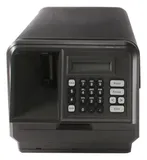
A short set of step-by-step instructions for setting up a Paxar Monarch 9403 tag printer as an Aux printer attached to a PC workstation's serial port. It walks through the printer's own setup menus (ribbon, print position, baud rate, word length, stop bits, parity, flow control), adding the printer in Windows XP as a Generic / Text Only printer, matching the COM port settings, and then configuring it in the PRISM ICS system and SecureCRT for printing price tags.
From the manual · read page by page
Key facts from this manual
Each line names its page in the PDF.
A step-by-step setup note, dated July 18, 2006, for attaching a Paxar Monarch 9403 tag printer to a Windows XP PC workstation as an auxiliary printer. It walks through the printer's own serial port settings, adding it in Windows as a Generic / Text Only printer, and selecting it in the PRISM ICS and SecureCRT programs to print price tags.
- Device
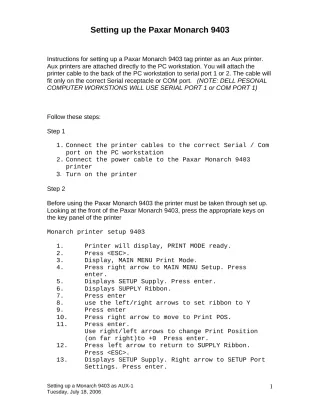
- Paxar Monarch 9403 tag printer, attached directly to a PC workstation as an Aux printer p. 1
- Connection
- Printer cable to serial port 1 or 2 (COM port) on the PC; Dell workstations use COM port 1 p. 1
- Printer serial settings
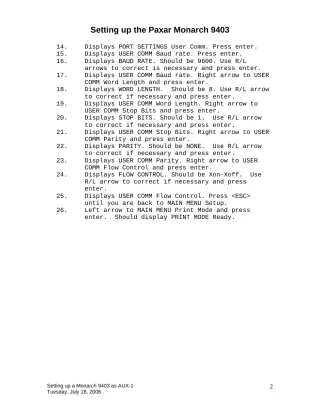
- 9600 baud, word length 8, 1 stop bit, parity NONE, Xon-Xoff flow control p. 2
- Windows driver
- Generic / Text Only, as a local printer on Com1 (other PCs may use Com2, Com3 or Com4) p. 7
- Supply settings
- Ribbon set to Y; print position +0 p. 1
- Operating system
- Windows XP p. 3
- Software
- PRISM ICS (Menu Jump 543 Auxiliary Printers, 544 Employee printers) and SecureCRT p. 14, 16, 20
What this manual walks you through
- Connecting the printer cable and power p. 1
- Setting ribbon and print position from the printer key panel p. 1
- Setting baud rate, word length, stop bits, parity and flow control on the printer p. 2
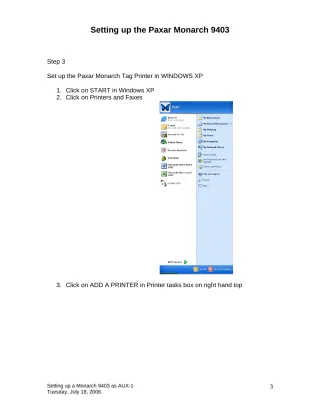
- Adding the printer in Windows XP with the Add Printer Wizard p. 3, 5, 6, 7, 8, 9, 10, 11
- Setting the Windows COM port flow control to Xon/Xoff p. 11, 12, 13, 14
- Setting up the Aux printer in PRISM ICS p. 14, 15
- Assigning employee printers in PRISM p. 16, 17, 18, 19
- Selecting the tag printer in SecureCRT to print price tags p. 20, 21, 22
- Setting the default printer in Windows p. 23
Good to know
- Do not send a Windows test page to the printer. p. 10
- A regular print job sent to the Monarch causes it to error. p. 22
- Switch SecureCRT back to the laser printer after printing shelf tags. p. 22
- The cable fits only the correct serial receptacle or COM port. p. 1
Questions this manual answers
What serial settings does the Monarch 9403 need?
In this setup the printer is set to 9600 baud, word length 8, 1 stop bit, parity NONE and Xon-Xoff flow control. p. 2
Which Windows driver works with the Monarch 9403?
The note adds it as a local printer on a COM port using the Generic / Text Only driver. p. 7
Which port does the Monarch 9403 connect to?
A serial (COM) port on the PC, port 1 or 2; Dell workstations use COM port 1. p. 1
The whole text · 3 parts
Read the manual here as text
Its text as extracted from the PDF, unedited, in parts; each page opens the PDF at that page.
The file