Manual · MagTek
Non Encrypting PINPad Installation and Operation Manual
Manual20 pagesPDF 396 KB
Installation and operation manual for the MagTek Non-Encrypting PINPad, an RS-232 keypad used with MagTek swipe readers.
Covers · 1 model
The models it covers
Summary
What is in it
MagTek's installation and operation manual for the Non-Encrypting PINPad, a general-purpose keypad that sends key presses as ASCII characters over RS-232. It gives features, part numbers and specifications, then installation and test steps with the PINPAL, a wedge swipe reader, an RS-232 swipe reader (with HyperTerminal and MS-DOS Edit) and the MCAT, followed by the command and response set and the RJ-11 pin list.
Its parts
- Features and Specifications
- Installation
- Commands and Responses
- Appendix A. Pin List
From the manual · read page by page
Key facts from this manual
Each line names its page in the PDF.
MagTek Installation and Operation Manual (part number 99833004 Rev 5, April 2003) for the Non Encrypting PINPad, a numeric keypad that sends key presses as ASCII characters over a serial link through an RJ-11 cord. It gives the specifications, hookup and test steps with the PINPAL, wedge and RS-232 swipe readers and the MCAT, the command set and the connector pin list.
- Device
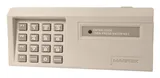
- General-purpose keypad that converts key closures into ASCII characters sent with an RS-232 protocol p. 7
- Connector
- RJ11 (4 pins): 1 TXD, 2 GND, 3 RXD, 4 +5V; power comes through the same connector p. 8, 19
- Power
- 4.5VDC minimum, 5.5VDC maximum, 10mA, taken from the attached product p. 8, 9
- Serial format
- Asynchronous full duplex, 0-5V CMOS levels; 300 baud (fixed); ASCII, 7 data bits, odd parity, 1 start bit, 1 stop bit p. 8
- Part numbers
- 30015021 for use with the wedge or RS-232 swipe reader; 30015022 for use with the PINPAL and MCAT p. 9, 10, 11, 15
- Keypad
- Ten numeric keys (0 through 9), Clear and Enter; function keys F1-F4 reserved p. 7
- Key codes
- ASCII 48-57 for keys 0 to 9; A (65) for Enter; B (66) for Clear p. 7
- Operating modes
- Buffered mode holds up to 17 keys until Enter; digit mode sends each key as pressed p. 7
- Handshake
- ACK/NAK: K for a recognized command, N for a faulty transmission such as a parity error p. 7, 17
- Indicator
- LED on the face, controlled by commands p. 7, 8
- Weight
- 7.5 oz (212.6 grams) with cord p. 8
- Works with
- MagTek PINPAL, Wedge Swipe Reader, RS-232 Swipe Reader (1 or 2 track), MCAT p. 9
- Adapter cables
- With control signals: 21083528 (PC AT, 9-pin to 9-pin), 21083530 (PC XT and PS/2, 9-pin to 25-pin); without: 21083529 (PC AT), 21083531 (PC XT and PS/2) p. 9
- MCAT manual
- MCAT Manual, Part Number 99832005, Chapter 3 p. 15
What this manual walks you through
- Connecting the RJ-11 cord to the host product and checking the power-up LED flash p. 9
- Testing the PINPad with a PINPAL and its program and test cards p. 9, 10
- Testing the PINPad with a wedge swipe reader on the PC keyboard jack p. 10, 11
- Setting up an MT-211 RS-232 swipe reader with the right adapter cable and switch settings p. 11, 12
- Setting up HyperTerminal on Windows 95 at 9600 baud, 7 data bits, even parity p. 12
- Creating command files with the MS-DOS Edit program p. 13, 14
- Testing buffered and digit modes by sending command files from HyperTerminal p. 14, 15
- Connecting the PINPad to an MCAT p. 15
- Understanding the PINPad commands and its K and N responses p. 17
Good to know
- In buffered mode, keys pressed after the 17th are lost. p. 17
- The initialize message cannot be typed on the keyboard because there can be no delays between characters; send it from a program. p. 13
- The function keys are not used on the Non Encrypting PINPad. p. 14
- The manual states the unit meets Class A limits; in a residential area it is likely to cause harmful interference. p. 4
Questions this manual answers
What baud rate does the MagTek Non Encrypting PINPad use?
A fixed 300 baud, ASCII with 7 data bits, odd parity, 1 start bit and 1 stop bit. p. 8
What is the pinout of the MagTek PINPad RJ-11 jack?
Pin 1 TXD, pin 2 GND, pin 3 RXD, pin 4 +5V. p. 19
Does the MagTek PINPad need its own power supply?
No; it takes its power from the product it plugs into, through the RJ-11 cord. p. 9
What do K and N mean from the PINPad?
K acknowledges a recognized command; N means a faulty transmission, such as a parity error. p. 17
How many keys can the PINPad buffer?
Up to 17 keys, held until Enter is pressed. p. 7
Contents
Chapters and sections
Each line opens the PDF at its page.
The whole text · 3 parts
Read the manual here as text
Its text as extracted from the PDF, unedited, in parts; each page opens the PDF at that page.
The file