Spec sheet · MagTek
Card Personalization & Issuance
Spec sheet12 pagesPDF 591 KB
MagTek brochure on card personalization and issuance products: ExpressCard 1000, IntelliCAT, Motorized IntelliCoder and the MCAT terminal.
What this file really is
The old site listed this file as a spec sheet for the MagTek MCAT 300600. This is a brochure for MagTek's card personalization and issuance product line, with one page on the MCAT terminal, not a spec sheet for the MCAT alone.
Filed with · 1 model
Also filed with these models on the old site
Summary
What is in it
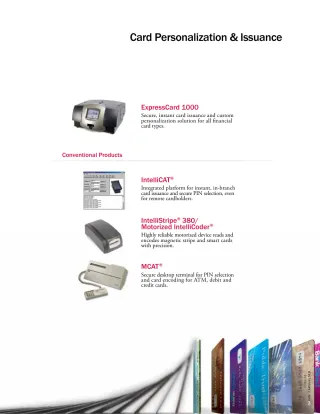
A MagTek product brochure on card personalization and instant card issuance for banks and stores. It describes four products with their benefits and features: the ExpressCard 1000 desktop card personalization device, the IntelliCAT card issuance and PIN selection software platform, the IntelliStripe 380 / Motorized IntelliCoder magstripe and smart card encoder, and the MCAT desktop terminal for PIN selection and card encoding, ending with a page about MagTek.
From the sheet · read page by page
Key facts from this sheet
Each line names its page in the PDF.
MagTek brochure on card personalization and issuance products. It covers the ExpressCard 1000, the IntelliCAT platform, the IntelliStripe 380/Motorized IntelliCoder and the MCAT desktop terminal, with a page of benefits and features for each; it does not print the designation MCAT 300600.
- What it is
- MCAT: desktop terminal for cardholder PIN selection and card encoding for ATM, debit and credit cards p. 10
- Encoding
- MCAT: track 1, 2, 3 magstripe encoding per ISO 7810, 7811; detects and encodes LoCo or HiCo media p. 10
- Display
- MCAT: two-line LCD with instructions and status for the operator p. 10
- PINpad
- MCAT: portable PINpad that can be handed to the cardholder p. 10
- Encode slot
- MCAT: closed end encode slot against card skimming p. 10
- Access and audit
- MCAT: supervisor cards set operator rights; transaction logs keep an audit trail p. 10
- Other products
- ExpressCard 1000, IntelliCAT, IntelliStripe 380/Motorized IntelliCoder p. 3
- Motorized IntelliCoder
- IntelliStripe 380/Motorized IntelliCoder: reads and writes HiCo and LoCo magstripe cards (ISO 7810, 7811) and smart cards (ISO 7816); RS-232 and USB p. 8
- ExpressCard 1000
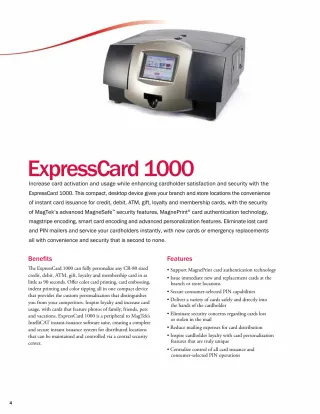
- ExpressCard 1000: personalizes a CR-80 card in as little as 90 seconds, with color printing, embossing, indent printing and color tipping p. 4
- IntelliCAT PIN algorithms
- IntelliCAT: Single DES, Triple DES, VISA PVV, IdentiKey and ANSI encrypted PIN block p. 6
- Brochure number
- PN 99875461 Rev 1.01 12/09 p. 12
What this sheet walks you through
- MCAT benefits and features for in-branch PIN selection and card encoding p. 10
- Instant card issuance and personalization with the ExpressCard 1000 p. 4
- Running card issuance and PIN selection with IntelliCAT software p. 6
- Encoding magstripe and smart cards with the Motorized IntelliCoder p. 8
Good to know
- The brochure states that MCAT security features make a stolen or lost unit non-operational. p. 10
Questions this sheet answers
What is the MagTek MCAT?
A desktop terminal for secure PIN selection and card encoding for ATM, debit and credit cards. p. 10
Does the MCAT encode HiCo and LoCo cards?
Yes; it detects and encodes LoCo or HiCo media, tracks 1, 2 and 3 per ISO 7810 and 7811. p. 10
Does the MCAT have a PINpad?
Yes, a portable PINpad that can be handed directly to the cardholder. p. 10
The whole text · 2 parts
Read the sheet here as text
Its text as extracted from the PDF, unedited, in parts; each page opens the PDF at that page.
The file