Manual · LXE
MX3 Cradle Reference Guide
Manual50 pagesPDF 1.5 MB
Reference guide for the LXE MX3 desk top cradle (2381A001DESKCRADLE) and powered vehicle mount cradle: installation, connectors and power supplies.
Filed with · 1 model
Also filed with these models on the old site
Summary
What is in it
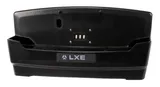
Reference guide for the cradles used with LXE's MX3 family of mobile devices: the desk top cradle (2381A001DESKCRADLE) and the powered vehicle mount cradle. It shows which MX3 device fits which cradle, then covers quick start installation, status LEDs, power and RS-232 connectors, mounting the vehicle cradle with a U-bracket or RAM ball, AC adapters and vehicle power connections, DC to DC power supply wiring, maintenance, accessories, regulatory notices and obsolete equipment such as the passive vehicle cradle.
Its parts
- MX3 Cradles
- Regulatory Notices and Safety Information
- Obsolete Equipment
From the manual
Key facts from this manual
Each line names its page in the PDF.
LXE's reference guide for the desk top and vehicle mount cradles of the MX3 family of mobile computers (MX3X and MX3Plus, with an appendix on the obsolete MX3, MX3-CE, MX3P and MX3-RFID). It explains the cradle status light and RS-232 port, mounting, and the AC and vehicle power supplies, with their part numbers. Its cover marks this guide itself as obsolete while the cradle is still in use.
- What it is
- Desk top cradle and vehicle mount cradle that recharge the device's main battery and connect it to a host computer p. 7
- Compatible devices
- MX3X and MX3Plus, with main battery MX3A378BATT installed p. 8
- Cradle part numbers
- MX3002DSKCRDL and 9000005VMCRADLE (for MX3X and MX3Plus) p. 8
- Host port
- RS-232, 9-pin D male; carries only transmit, receive and ground; pin 9 gives +5VDC at 200mA p. 12
- Device link
- Infrared: the device's IR signals are converted to RS-232 in the cradle p. 12
- Status LED
- Orange: power applied; green: power and device connected; red: IR communication active; off: no power p. 11
- US AC adapter
- 9000A301PSACUS: +12VDC unregulated, 1.5 Amps max, for the desk top cradle p. 13, 22
- Worldwide AC adapter
- 9000A322PSACWW p. 23
- 12 V vehicle cable
- 1300A053CBL12ML3, 12 ft: 10.8 - 16 VDC input, 1.25 Amps, 5A time delay fuse p. 24
- 12 V cable wiring
- DC + red with white stripe; DC - red with black stripe; chassis ground green p. 24
- Higher-voltage vehicle supply
- 9000A316PS24V72MX13 (replaces 1300A301PS24WW), for systems of 2 to 5 twelve volt batteries in series p. 25
- DC to DC supplies
- 9000301PWRSPLY (18-60VDC) and 9000302PWRSPLY (60-110VDC); output 12 VDC ± 10%, 50 W p. 28
- Desk cradle footprint
- 5.75 in. (14.6 cm) by 9.25 in. (23.5 cm) p. 10
- Vehicle supply size
- Length 9.25 in., width 4.7 in., height 2.5 in. p. 26
What this manual walks you through
- Setting up the desk top cradle and seating or removing the device p. 9, 10
- Reading the cradle status LED p. 11, 14
- RS-232 connector pinout p. 12, 16
- Mounting the vehicle cradle on its U-bracket p. 17, 18, 19
- Mounting the vehicle cradle with a RAM ball assembly p. 20, 21
- Connecting the cradle directly to a 12 V vehicle supply p. 24
- Installing the vehicle power supply for higher-voltage batteries p. 25, 26, 27
- Wiring a DC to DC power supply p. 28, 29, 30
- Maintenance checks of the cradle and vehicle mount p. 31
- Passive vehicle cradle for the obsolete MX3-RFID and MX3P p. 39, 40
Good to know
- Pin 9 of the RS-232 port carries +5VDC, so only approved LXE cables are to be used on it. p. 12
- Reversing the polarity of the vehicle power cable blows the vehicle cradle fuse. p. 24
- The vehicle power cable must go to a fused circuit with a 5 Amp maximum time delay fuse. p. 25
- For uninterrupted power, do not connect at any point after the vehicle's ignition switch. p. 26
- A bent U-bracket can over-compress or over-extend the rubber isolators and make them fail. p. 18
Questions this manual answers
Which MX3 devices fit the MX3002DSKCRDL cradle?
The MX3X and the MX3Plus, each with an MX3A378BATT main battery installed. p. 8
What power supply does the MX3 desk top cradle use?
An LXE US AC Adapter or an LXE International AC Adapter; the US supply is 9000A301PSACUS. p. 11, 13
What do the MX3 cradle LED colors mean?
Orange means power is applied, green means power is applied and the device is connected, and red means IR communication is active. p. 11
How do I power the MX3 vehicle cradle from a 24 V or higher battery system?
Through the 9000A316PS24V72MX13 power supply, recommended for systems of 2 to 5 twelve volt batteries in series. p. 25
Do the MX3-RFID and MX3P fit the powered MX3 cradles?
No. A passive vehicle cradle holds them instead; it gives no charging or host link through the cradle. p. 39
Contents
Chapters and sections
Each line opens the PDF at its page.
The whole text · 7 parts
Read the manual here as text
Its text as extracted from the PDF, unedited, in parts; each page opens the PDF at that page.
The file