Manual · LXE
2320 Operator's Guide
Manual54 pagesPDF 464 KB
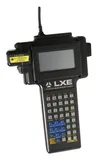
Operator's guide for the LXE OmniNet 2320 Scout hand held terminal, a modular DOS-compatible data collection computer.
Covers · 1 model
The models it covers
Summary
What is in it
LXE's operator's guide for the OmniNet 2320 Scout hand held terminal, a modular, DOS-compatible portable computer (LXE notes the 2320 is obsolete). It covers installing the laser bar code, RS232, Touch Memory and D-9 modules, the radio card, PC card and battery, setting up and loading software, power up and key combinations, scanning, and a reference to the DOS commands and utilities on the unit. Appendices give RS232 cable pinouts, technical specifications, file transfer methods and accessories.
Its parts
- Introduction
- Getting Started
- Commands and Functions
From the manual
Key facts from this manual
Each line names its page in the PDF.
This is the February 1996 operator's guide for the LXE OmniNet 2320 Scout, a modular hand-held DOS terminal; its cover notes that the 2320 is obsolete. It explains how to install modules, the radio card, a PC card and the battery, load software, power up and scan, and it lists the DOS commands, cable pinouts, specifications and accessories.
- Device
- Modular hand-held DOS terminal in a cast-metal case p. 9
- Modules
- Two at a time: laser bar code scanner, Touch Memory, RS232 (RJ-11) serial port, serial port with IR transmitter p. 9
- Memory
- 1Mb RAM and 256Kb flash ROM p. 9
- Operating system
- ROM-DOS 5.0 in flash ROM p. 9
- Battery
- Camcorder-style 6-volt, 1200 mAh nickel-cadmium pack p. 22
- Display
- Graphics supertwist LCD, 64 x 128 dots, 8 lines x 21 characters p. 46
- PC card slot
- Type I and Type II cards (Release 1.0), SRAM cards up to 64 Mb p. 46
- Bar codes
- Code 39, Interleaved 2 of 5, UPC-A and E, EAN-8 and 13, Codabar, Code 128 p. 10
- Laser
- Class II visible laser diode at 670 nm, 36 (±3) scans per second p. 12, 47
- Serial module
- RJ-11 connector, up to 115.2K baud, five-wire interface p. 47
- Radio
- Optional OmniNet/ISA radio card with snap-in antenna, in an internal slot p. 18
- Touch Memory buttons
- DS1990 read-only; DS1991, DS1992, DS1993, DS1994 read/write p. 47, 48
- Module cables
- D25 modem, D25 printer, D25 PC, D9 PC p. 51
- Chargers
- NPSS battery; NPSS single unit charger (also 240VAC), six unit charger, battery analyzer p. 51
What this manual walks you through
- Installing an RS232 serial port module p. 15
- Installing the radio card and antenna p. 18, 19
- Installing a PC card p. 20
- Installing the battery p. 22
- Powering up and using key combinations p. 28, 29
- Scanning bar codes with the laser module p. 30
- Transferring files by PC card or serial port p. 49, 50
- Wiring RS232 module cables p. 45
Good to know
- Disconnect or remove all power before installing modules, cards or the battery. p. 11
- New NiCad batteries must be fully discharged, then recharged. p. 22
- The unit powers off when the battery drops below 5.5V. p. 46
- The IR serial port module only transmits, and the cable pinouts do not apply to it. p. 45
- The MODE command accepts only N,8,1; O,7,1; or E,7,1. p. 50
Questions this manual answers
What battery does the LXE 2320 use?
A camcorder-style 6-volt, 1200 mAh nickel-cadmium battery. p. 22
How long does the LXE 2320 battery last?
About six to eight hours with a laser scan module, and eight hours for most applications. p. 22
How do I turn the LXE 2320 on?
Press the f and Ent keys at the same time, or press the trigger if a laser module is fitted. p. 29
How do I transfer files to the LXE 2320?
Copy them with a PC card in a PC card drive, or connect the RS232 (RJ-11) serial port module to a computer and use the XFER utility. p. 49
What PC cards fit the LXE 2320?
Type I and Type II Release 1.0 PC cards, including SRAM cards up to 64 Mb. p. 46
Contents
Chapters and sections
Each line opens the PDF at its page.
- 2320 Operator's Guide1
- Introduction9
- Getting Started11
- Installation11
- Laser Bar Code Module12
- Remove A Module14
- Install an RS232 Serial Port Module15
- Install a Touch Memory Module16
- Install a D-9 Connector Module17
- Install Radio Card18
- Install the PC Card20
- Optional Hand Strap21
- Install Battery22
- Set Up and Load the Software Programs23
- Change Files to Meet 2320 Requirements26
- Power Up and Test the Unit28
- Scanning30
- Commands and Functions31
The whole text · 8 parts
Read the manual here as text
Its text as extracted from the PDF, unedited, in parts; each page opens the PDF at that page.
The file