


Manual · Lipman
Lipman Nurit 3020 Manual
Manual1 pagePDF 23 KB
The page is below, with its text.
Covers · 1 model
The models it covers
From the manual · read page by page
Key facts from this manual
Each line names its page in the PDF.
This one-page step table explains how to download the application program and parameters to a Nurit 3020 payment terminal over a modem line. Each step shows the expected display and the key to press, including the download phone number, an optional PABX access code and the baud rate.
- Download link
- Phone line through the terminal's modem, set to 2400 baud p. 1
- Needed to start
- Site ID number and download phone number; PABX access code if the line needs one p. 1
- Load order
- Application program first, then the parameters, automatically p. 1
- Sheet revision
- CP N3020 Rev. 03.18.07 p. 1
What this manual walks you through
- Downloading the application and parameters by modem p. 1
- Entering a PABX access code for the download call p. 1
Good to know
- If the connect display does not match, or the merchant needs an access code, extra steps in the sheet's second table apply. p. 1
- No action is needed while downloading; progress shows as a percentage. p. 1
- The terminal clears its parameter and program memory as part of the download. p. 1
Questions this manual answers
How do I download software to a Nurit 3020?
From the download menu, enter the site ID and download phone number, set the connection to the modem at 2400 baud, then run Auto load; the terminal dials and loads the program, then the parameters. p. 1
What baud rate does the Nurit 3020 download use?
The sheet sets the modem connection to 2400 baud. p. 1
Where does a PABX access code go on the Nurit 3020?
It is keyed in, if needed, during the communication settings steps, followed by ENTER. p. 1
The file
Size and text
Every page · 1
Read it here
Each page as it is printed, and its words beside it, so a phone can search and copy them.
Page1of 1
Open in the PDF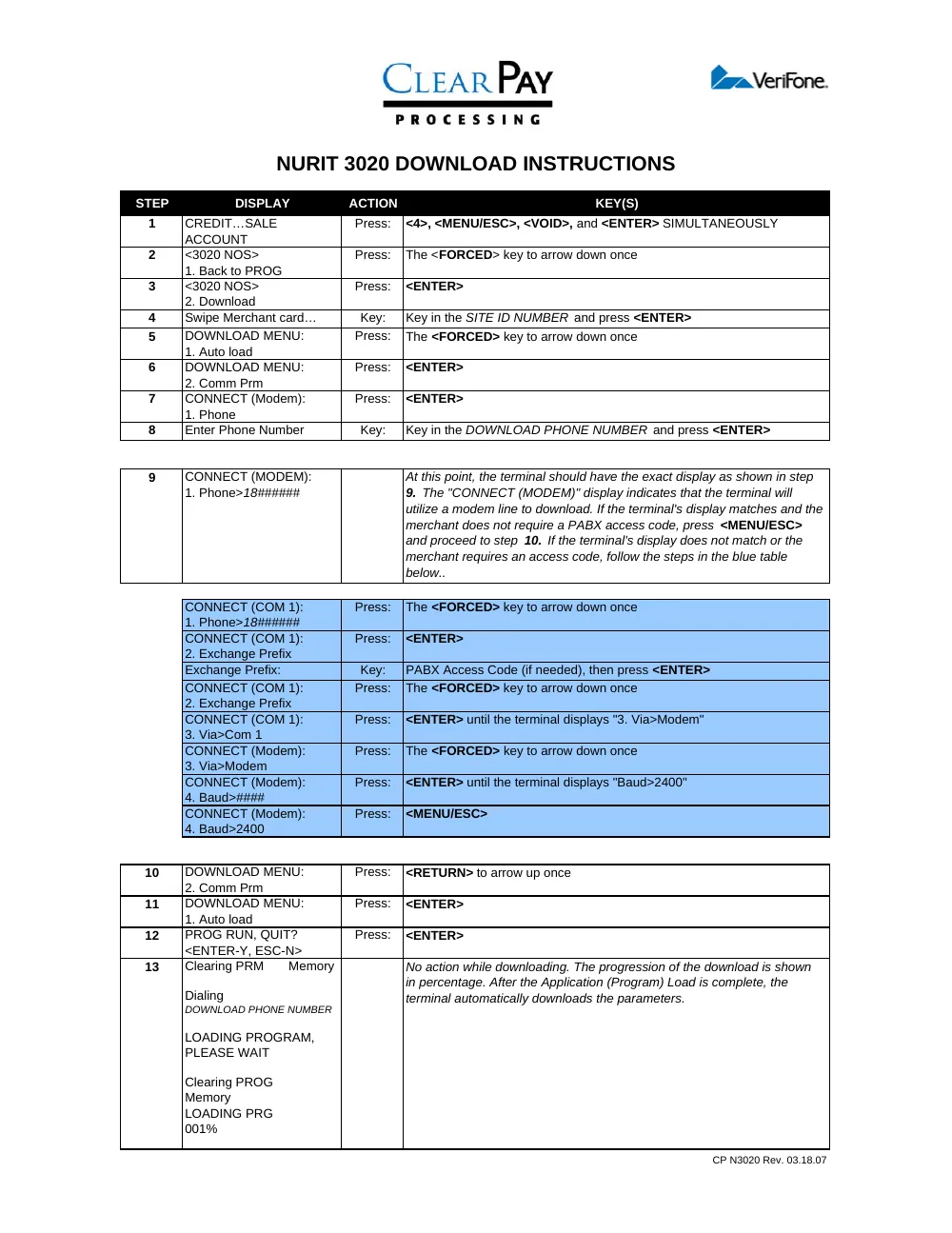
The text of page 1, from the PDF itself
NURIT 3020 DOWNLOAD INSTRUCTIONS STEP
DISPLAYACTION1
CREDIT…SALE ACCOUNT <3020 NOS> …………… 1. Back to PROG <3020 NOS> ……………. 2. Download Swipe Merchant card… DOWNLOAD MENU: …… 1. Auto load DOWNLOAD MENU: …… 2. Comm Prm CONNECT (Modem): …… 1. Phone Enter Phone Number
- Press
- <4>, <MENU/ESC>, <VOID>, and <ENTER> SIMULTANEOUSLY
- Press
- The <FORCED> key to arrow down once
- Press
- <ENTER>
- Key: Press
- Key in the SITE ID NUMBER and press <ENTER> The <FORCED> key to arrow down once
- Press
- <ENTER>
- Press
- <ENTER>
- Key
- Key in the DOWNLOAD PHONE NUMBER and press <ENTER>
2 3 4 5 6 7 8910 11 12 13
CONNECT (MODEM): …. 1. Phone>18######
KEY(S)
At this point, the terminal should have the exact display as shown in step 9. The "CONNECT (MODEM)" display indicates that the terminal will utilize a modem line to download. If the terminal's display matches and the merchant does not require a PABX access code, press <MENU/ESC> and proceed to step 10. If the terminal's display does not match or the merchant requires an access code, follow the steps in the blue table below..
CONNECT (COM 1): …. 1. Phone>18###### CONNECT (COM 1):…... 2. Exchange Prefix Exchange Prefix: CONNECT (COM 1): ….. 2. Exchange Prefix CONNECT (COM 1): ….. 3. Via>Com 1 CONNECT (Modem): …… 3. Via>Modem CONNECT (Modem): …… 4. Baud>#### CONNECT (Modem): …… 4. Baud>2400
- Press
- The <FORCED> key to arrow down once
- Press
- <ENTER>
- Key: Press
- PABX Access Code (if needed), then press <ENTER> The <FORCED> key to arrow down once
- Press
- <ENTER> until the terminal displays "3. Via>Modem"
- Press
- The <FORCED> key to arrow down once
- Press
- <ENTER> until the terminal displays "Baud>2400"
- Press
- <MENU/ESC>
DOWNLOAD MENU: …… 2. Comm Prm DOWNLOAD MENU: …… 1. Auto load PROG RUN, QUIT? <ENTER-Y, ESC-N> Clearing PRM Memory
- Press
- <RETURN> to arrow up once
- Press
- <ENTER>
- Press
- <ENTER>
………..………………...…. Dialing …..……..…. DOWNLOAD PHONE NUMBER …………………………………..
No action while downloading. The progression of the download is shown in percentage. After the Application (Program) Load is complete, the terminal automatically downloads the parameters.
LOADING PROGRAM, PLEASE WAIT ……….…………………..
Clearing PROG …. Memory ……………………. LOADING PRG …...…. 001% CP N3020 Rev. 03.18.07