Manual · Klein Tools
VDV Scout Pro & VDV Scout Pro LT Instruction Manual
Manual36 pagesPDF 11 MB
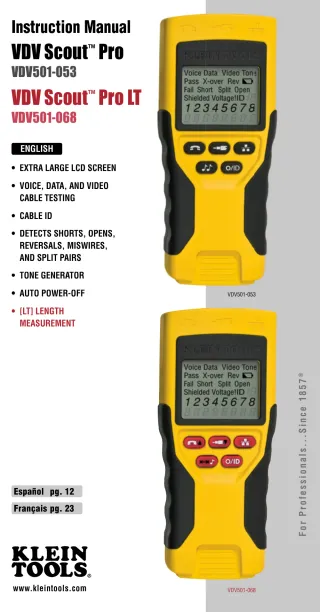
Instruction manual for the Klein Tools VDV Scout Pro (VDV501-053) and Pro LT (VDV501-068) voice, data and video cable testers.
Covers · 1 model
The models it covers
Summary
What is in it
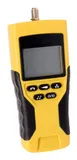
Klein Tools' instruction manual, in English, Spanish and French, for the VDV Scout Pro (VDV501-053) and VDV Scout Pro LT (VDV501-068) portable cable testers. It gives the specifications and warnings, explains the ports, display and keypad, and shows how to test continuity on RJ45, RJ11/12 and coax cables, identify installed cables with ID remotes, trace cables with tone, and (on the LT) measure cable length using the length constant. It ends with FAQs, wiring and display examples, battery replacement and care.
Its parts
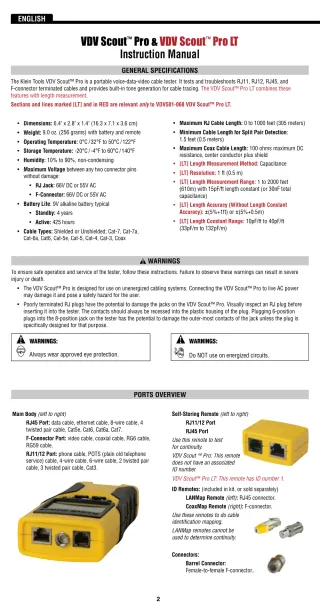
- General Specifications
- Warnings
- Ports Overview
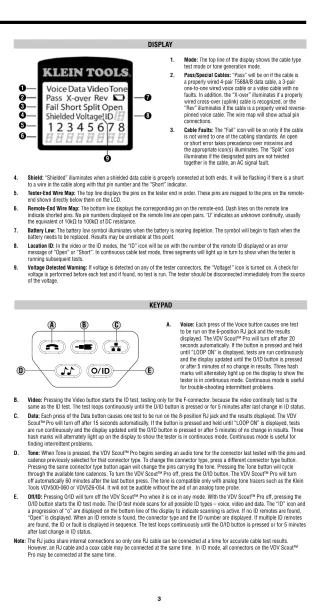
- Display
- Keypad
- [LT] Measuring Length
- Testing Continuity
- Cable Identification
- Frequently Asked Questions
- Wiring and Display Examples
- Battery Replacement
- Warranty
- Cleaning
- Storage
- Customer Service
From the manual
Key facts from this manual
Each line names its page in the PDF.
Klein Tools instruction manual for the VDV Scout Pro (VDV501-053) and VDV Scout Pro LT (VDV501-068) voice, data and video cable testers, in English, Spanish and French. It explains continuity testing, cable identification with ID remotes, tone tracing and, on the LT, cable length measurement. It also shows how to read the wire map display and replace the battery.
- Type
- Portable voice, data and video cable tester for RJ11, RJ12, RJ45 and F-connector cables, with a built-in tone generator p. 2
- Detects
- Shorts, opens, reversals, miswires and split pairs p. 1
- Cable types
- Shielded or unshielded Cat-7, Cat-7a, Cat-6a, Cat6, Cat-5e, Cat-5, Cat-4, Cat-3, and coax p. 2
- Maximum cable length
- RJ: 0 to 1000 feet (305 meters); coax: 100 ohms max. DC resistance, center conductor plus shield p. 2
- Battery
- 9 volt alkaline (IEC 6LR61, ANSI/NEDA 1640A); standby 4 years, active 425 hours p. 2, 11
- Operating temperature
- 0°C / 32°F to 50°C / 122°F; humidity 10% to 90%, non-condensing p. 2
- Size and weight
- 6.4" x 2.8" x 1.4" (16.3 x 7.1 x 3.6 cm); 9.0 oz. (256 grams) with battery and remote p. 2
- Voltage limit
- 66V DC or 55V AC between any two pins of the RJ jack or F-connector without damage p. 2
- Length measurement
- VDV Scout Pro LT only: by capacitance, 1 to 2000 feet (610m) at 15pF/ft; resolution 1 ft; accuracy ±(5%+1ft) without length constant accuracy p. 2
- Length constants
- VDV Scout Pro LT: defaults voice 17pF/ft, data 15pF/ft, video 15pF/ft; range 10pF/ft to 40pF/ft p. 4
- Split pair detection
- Cables of 1.5 feet (0.5 meters) or longer p. 2
- ID remote kits
- VDV526-055 LANMap Kit and VDV512-056 CoaxMap Kit, 19 remotes each; the VDV501-809 kit has 5 of each p. 7
- Tone probes
- Analog tone probes such as Klein Tools VDV526-054 or VDV500-060 p. 7
- Auto power-off
- Tone mode turns off 60 minutes after the last button press; loop tests stop after 5 minutes with no change p. 3
What this manual walks you through
- Testing continuity of terminated and installed RJ45 and RJ12 cables p. 6
- Testing continuity of terminated and installed coax cables p. 6, 7
- Identifying installed RJ45 and coax cables with numbered ID remotes p. 7, 8
- Tracing RJ and coax cables with the tone generator and a tone probe p. 8, 9
- Measuring cable length on the VDV Scout Pro LT p. 4
- Setting or finding the length constant on the LT p. 5
- Switching the LT between feet and meters p. 5
- Reading the display, wire map and fault icons p. 3
- Wiring and display examples for good and faulty cables p. 9, 10, 11
- Replacing the battery p. 11
Good to know
- The tester is for unenergized cabling only; connecting it to live AC power may damage it. p. 2
- Poorly terminated RJ plugs, or 6-position plugs in the 8-position jack, can damage the tester's jacks. p. 2
- The RJ jacks share internal connections, so only one RJ cable can be tested at a time. p. 3
- LANMap ID remotes cannot verify continuity; only the self-storing remote can, for data and phone cables. p. 7
- A continuity test is not a bandwidth test. p. 6
Questions this manual answers
Does the Klein VDV Scout Pro measure cable length?
No. Only the VDV Scout Pro LT measures length, using the cable's capacitance rather than TDR. p. 9
Why can't I hear the tone from the VDV Scout Pro?
The tone can only be heard with an analog tone probe, such as the Klein Tools VDV500-060 or VDV526-054. p. 9
Why does the VDV Scout Pro flash 3 and 6 with U when testing an ethernet cable?
Continuity can only be tested with the self-storing remote, not with the small ID remotes. p. 9
What battery does the VDV Scout Pro take?
A 9 volt alkaline battery (IEC 6LR61, ANSI/NEDA 1640A), reached by removing one screw on the back. p. 11
How many locations can the VDV Scout Pro identify?
Up to 19 locations with numbered ID remotes, in one trip to the wiring closet. p. 7
The whole text · 4 parts
Read the manual here as text
Its text as extracted from the PDF, unedited, in parts; each page opens the PDF at that page.
The file