Manual · Itronix
Husky FS/2 User Leaflet
Manual8 pagesPDF 55 KB
User leaflet for the Husky FS/2 rugged waterproof hand-held computer: keys, ports, batteries, cleaning and problems.
Names · 3 models
The models it names
 Itronix Husky FS2Portable batch data collection terminal from$995.0064 in stock Sokkia Husky FS2Portable batch data collection terminal from$995.001 in stock Topcon Husky FS2Portable batch data collection terminal from$995.002 in stock
Filed with · 1 model
Also filed with these models on the old site
Summary
What is in it
A short user leaflet for the Husky FS/2, a rugged and waterproof hand-held computer. It labels the keys, ports and screen, explains turning the unit on and off, screen contrast and backlight, typing and moving the cursor, and covers rechargeable and replaceable batteries, charging with the FS/2 AC adaptor or rack, replacing batteries, cleaning the unit under running water, connecting peripherals, quick checks for problems, and electromagnetic compatibility notes.
Its parts
- Using Your FS/2
- Controls
- Batteries
- Cleaning
- Peripherals
- Problems
From the manual · read page by page
Key facts from this manual
Some pages are scans or cannot be read; this says only what the readable text supports. Each line names its page in the PDF.
An eight-page Husky Computers user leaflet for the Husky FS/2 rugged hand-held computer, printed in 1993. It labels the keys and connectors and explains turning the unit on, screen contrast and backlight, batteries and charging, cleaning, connecting peripherals and quick checks for problems. The cover is a scan read by OCR; the other pages have a real text layer.
- Device
- Rugged, waterproof hand-held computer p. 2
- Connectors
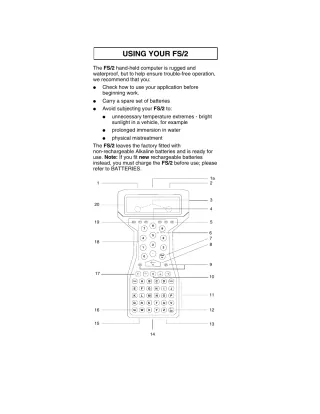
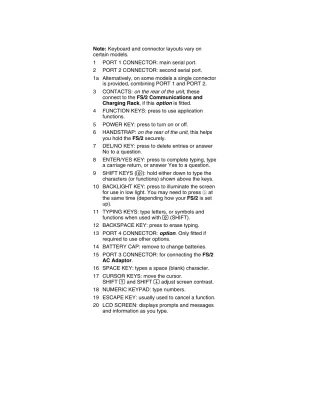
- Port 1 main serial, Port 2 second serial (combined into one connector on some models), Port 3 AC adaptor, Port 4 optional p. 3
- Batteries
- Rechargeable or replaceable; three AA size Alkaline cells or a rechargeable battery stick p. 5
- As shipped
- Fitted with non-rechargeable Alkaline batteries, ready for use p. 2
- Charging
- FS/2 AC Adaptor on Port 3, preferably 8 hours; or the FS/2 Charging and Communications Rack p. 5
- Rack contacts
- Rear contacts connect to the optional FS/2 Communications and Charging Rack p. 3
- Display
- LCD screen with backlight and adjustable contrast p. 3
- Keyboard
- Function keys, typing keys, numeric keypad, cursor keys, two SHIFT keys, power, escape, backspace and space keys p. 3
- Power saving
- Turns off automatically after a short while without key presses; backlight also times out p. 4
- Leaflet number
- P-2240-0010, Issue 1 p. 8
What this manual walks you through
- Identifying the keys and connectors p. 2, 3
- Turning the unit on and off p. 4
- Adjusting screen contrast and the backlight p. 4
- Typing data and moving the cursor p. 4
- Charging rechargeable batteries p. 5
- Replacing the batteries p. 6
- Cleaning the unit p. 7
- Connecting and disconnecting peripherals p. 7
- Quick checks when the unit has problems p. 8
Good to know
- Never recharge non-rechargeable batteries, and do not fit lithium batteries. p. 5, 6
- After changing batteries, the battery type, capacity and power management must be set correctly in the application. p. 6
- Do not expose the unit to temperatures above 55˚C, and avoid prolonged immersion in water. p. 2, 7
- There are no user serviceable parts inside; do not open the unit. p. 8
- Use only approved peripherals and AC adaptors, with shielded communications cables. p. 8
Questions this manual answers
What batteries does the Husky FS/2 take?
Either three AA size Alkaline batteries or rechargeable batteries; it ships with non-rechargeable Alkaline cells fitted. p. 2, 5
How do I charge a Husky FS/2?
With rechargeable batteries fitted, connect the FS/2 AC Adaptor to Port 3 and leave it, preferably for 8 hours, or place the unit on the Charging and Communications Rack. p. 5
How do I adjust the Husky FS/2 screen contrast?
Hold down either SHIFT key and press the up arrow to increase or the down arrow to decrease contrast. p. 4
Which port is the AC adaptor on the Husky FS/2?
Port 3. p. 3
The whole text · 1 part
Read the manual here as text
Its text as extracted from the PDF, unedited, in parts; each page opens the PDF at that page.
The file