Manual · Ithaca
Ithaca Model 850 Manual
Manual2 pagesPDF 199 KB
Both pages are below, each with its text.
Covers · 1 model
The models it covers
From the manual · read page by page
Key facts from this manual
Each line names its page in the PDF.
A two-page service note for the Ithaca Model 850 ticket printer. It explains the two interface versions (IGT Netplex and RS232 serial), the sensors and switches, how to print a stand-alone test ticket, the status LED blink codes and two common faults.
- Device
- Ticket printer used in games, with a thermal printhead p. 1
- Interfaces
- Two versions: IGT Netplex, or RS232 serial for all other game manufacturers p. 1
- IGT Netplex version
- Communication board E030062-01 (10 pin connector); powered through an 8 pin pigtail; firmware PE88xx p. 1
- RS232 version
- Communication board 85-03526 (14 pin connector); external power supply; firmware PP85xx p. 1
- Status LED codes
- Ready on; head up or door open medium blink; paper out slow blink; temperature error fast blink; paper jam 4 blinks; RAM error 2 blinks; checksum error 5 blinks p. 2
- Paper low sensor
- Optical; reports paper low with 30-35 tickets left in the tray p. 1
- Sensors and switches
- Open/close, paper low, top of form, ticket taken; head-up switch; ticket feed switch p. 1
- Internal cable
- Gray 30 pin flex cable to the communication board p. 1
What this manual walks you through
- Telling the IGT Netplex and RS232 versions apart p. 1
- Locating the sensors and switches p. 1
- Printing a stand-alone test ticket p. 2
- Clearing a wrong type of paper error and a ticket that will not load p. 2
- Reading the status LED blink codes p. 2
Good to know
- Never unplug the gray 30 pin flex cable with power on; it damages the communication board. p. 2
- Take care when closing the inner slide assembly so the 30 pin flex cable is not pinched. p. 2
- How the game uses the paper low status byte depends on the game manufacturer. p. 1
Questions this manual answers
What does "Wrong type of paper" mean on an IGT game with an Ithaca 850?
The ticket perforation did not break when the customer took the ticket, pulling the next ticket under the ticket taken sensor. Reload the tickets to clear it. p. 2
How do I print a test ticket on the Ithaca 850?
Remove power, rack out the printer, block the open/close sensor on the RS232 printer, hold the ticket feed button and apply power. p. 2
What do the Ithaca 850 LED blinks mean?
On means ready; a slow blink means paper out, a fast blink a temperature error, and 4, 2 or 5 blinks with a pause mean paper jam, RAM error or checksum error. p. 2
Which communication board does the IGT version of the Model 850 use?
Board E030062-01 with a 10 pin connector, powered through an 8 pin pigtail and running PE88xx firmware. p. 1
The file
Size and text
Every page · 2
Read it here
Each page as it is printed, and its words beside it, so a phone can search and copy them.
Page1of 2
Open in the PDF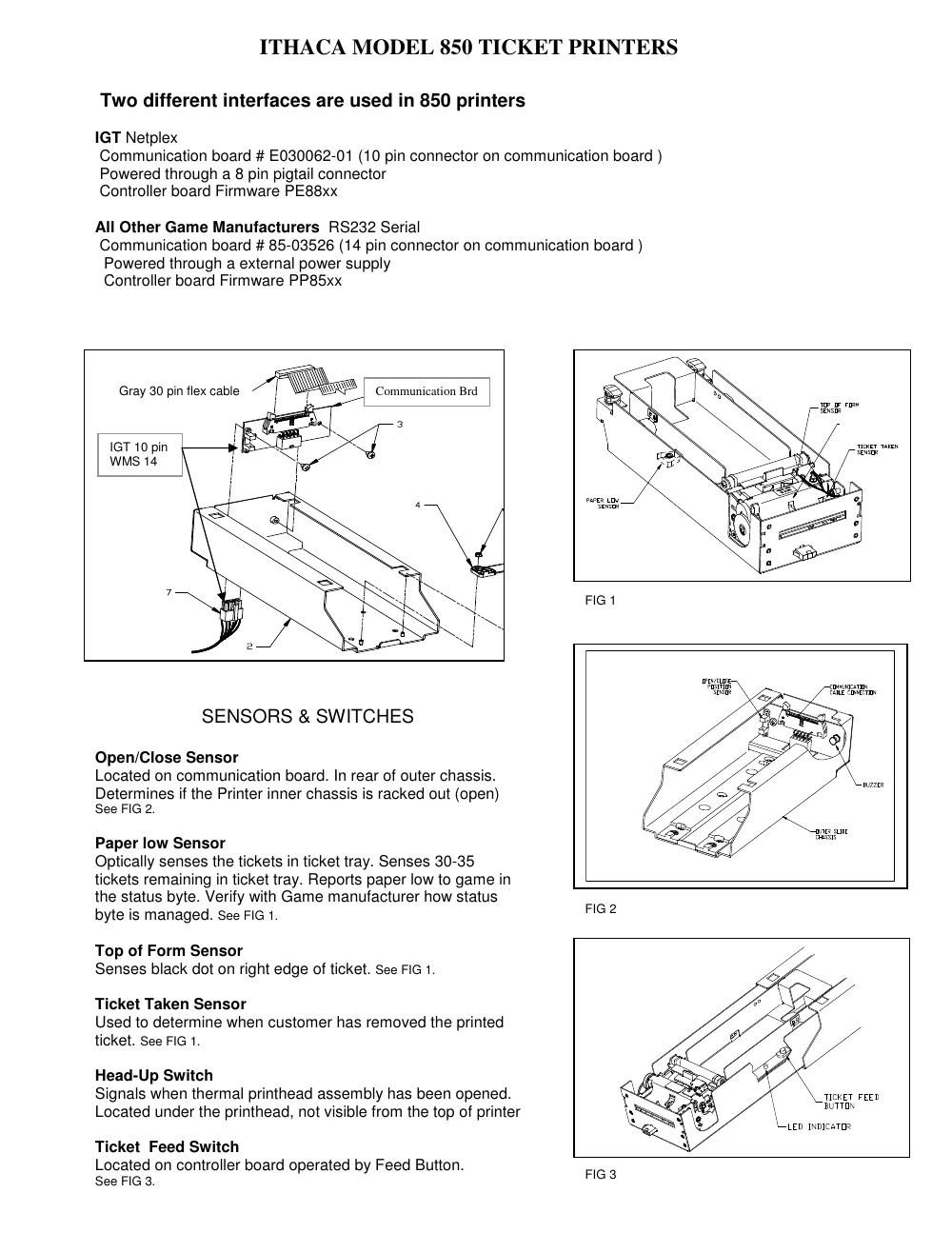
The text of page 1, from the PDF itself
ITHACA MODEL 850 TICKET PRINTERS Two different interfaces are used in 850 printers IGT Netplex Communication board # E030062-01 (10 pin connector on communication board ) Powered through a 8 pin pigtail connector Controller board Firmware PE88xx All Other Game Manufacturers RS232 Serial Communication board # 85-03526 (14 pin connector on communication board ) Powered through a external power supply Controller board Firmware PP85xx
Gray 30 pin flex cableCommunication BrdIGT 10 pin WMS 14 pinFIG 1
SENSORS & SWITCHES Open/Close Sensor Located on communication board. In rear of outer chassis. Determines if the Printer inner chassis is racked out (open) See FIG 2.
Paper low Sensor Optically senses the tickets in ticket tray. Senses 30-35 tickets remaining in ticket tray. Reports paper low to game in the status byte. Verify with Game manufacturer how status byte is managed. See FIG 1.
FIG 2
Top of Form Sensor Senses black dot on right edge of ticket. See FIG 1. Ticket Taken Sensor Used to determine when customer has removed the printed ticket. See FIG 1. Head-Up Switch Signals when thermal printhead assembly has been opened. Located under the printhead, not visible from the top of printer Ticket Feed Switch Located on controller board operated by Feed Button.
See FIG 3.
FIG 3
Page2of 2
Open in the PDF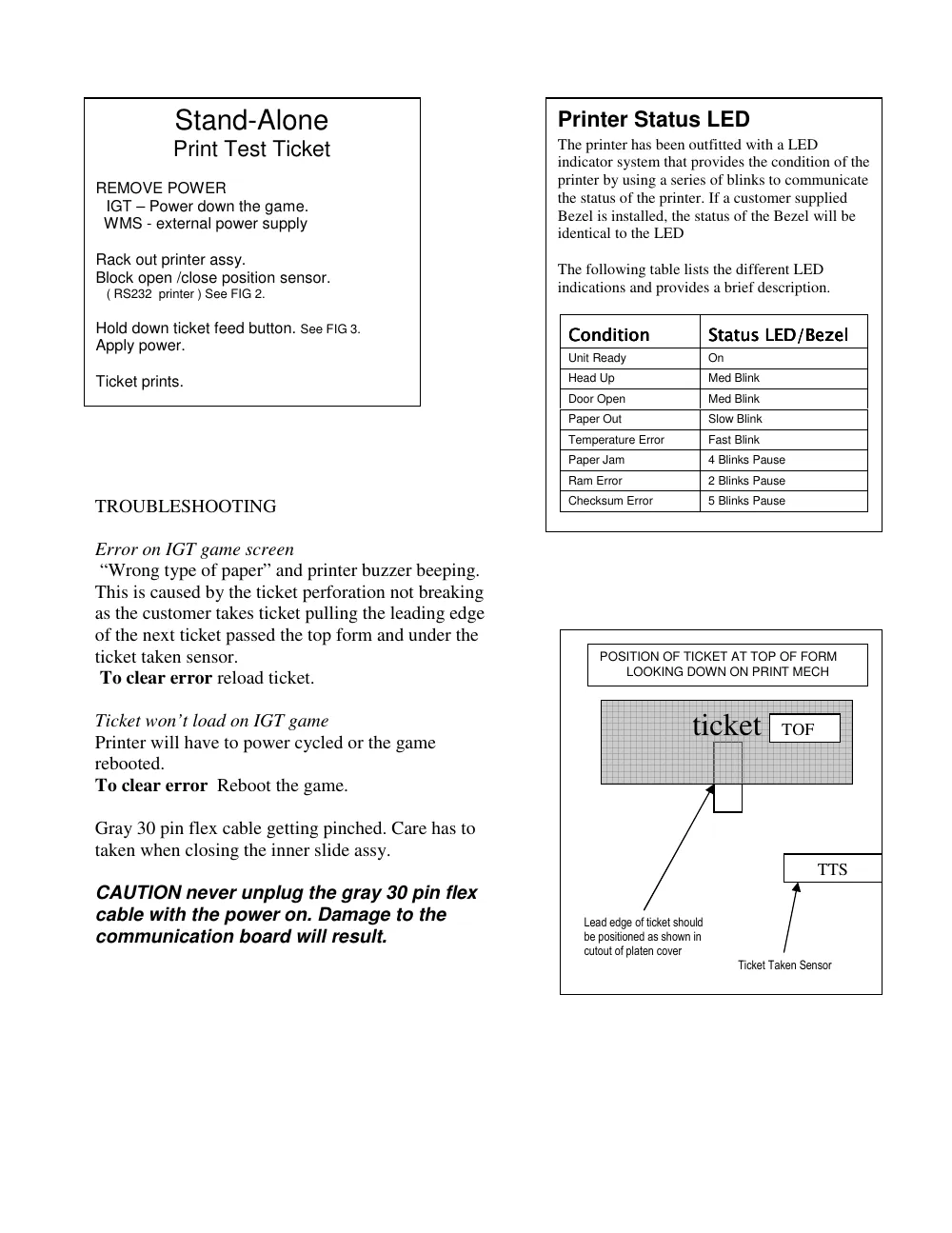
The text of page 2, from the PDF itself
Stand-Alone
Print Test Ticket REMOVE POWER IGT – Power down the game. WMS - external power supply Rack out printer assy. Block open /close position sensor. ( RS232 printer ) See FIG 2.
Hold down ticket feed button. See FIG 3. Apply power. Ticket prints.
TROUBLESHOOTING Error on IGT game screen “Wrong type of paper” and printer buzzer beeping. This is caused by the ticket perforation not breaking as the customer takes ticket pulling the leading edge of the next ticket passed the top form and under the ticket taken sensor. To clear error reload ticket. Ticket won’t load on IGT game Printer will have to power cycled or the game rebooted. To clear error Reboot the game. Gray 30 pin flex cable getting pinched. Care has to taken when closing the inner slide assy. CAUTION never unplug the gray 30 pin flex cable with the power on. Damage to the communication board will result.
Printer Status LED The printer has been outfitted with a LED indicator system that provides the condition of the printer by using a series of blinks to communicate the status of the printer. If a customer supplied Bezel is installed, the status of the Bezel will be identical to the LED The following table lists the different LED indications and provides a brief description.
Unit ReadyOnHead UpMed BlinkDoor OpenMed BlinkPaper OutSlow BlinkTemperature ErrorFast BlinkPaper Jam4 Blinks PauseRam Error2 Blinks PauseChecksum Error5 Blinks Pause
POSITION OF TICKET AT TOP OF FORM LOOKING DOWN ON PRINT MECH
ticket TOF TOF
TTS