


Spec sheet · Intermec
Intermec TZ2410 Spec Sheet
Spec sheet2 pagesPDF 91 KB
Both pages are below, each with its text.
Covers · 1 model
The models it covers
From the sheet · read page by page
Key facts from this sheet
Each line names its page in the PDF.
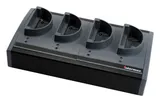
The Intermec instruction and specification sheet (P/N 069549-002, 2004) for the TZ2410 4-pack battery charger, which charges up to four lithium-ion battery packs for the Trakker Antares 241X Handheld Terminals. It gives the specifications, the batteries and charge times, the power supply and power cord part numbers, the status LEDs and basic troubleshooting.
- Device
- 4-pack battery charger for Trakker Antares 241X Handheld Terminal batteries p. 1
- Batteries
- Intermec lithium-ion packs P/N 069428, 069429, 073929 or 073930 p. 1
- Charge times
- 1350 mAh single-cell (069428) 1.25 hours; 2700 mAh dual-cell (069429) 2.5 hours; 2400 mAh single-cell (073929) 5 hours; 4800 mAh dual-cell (073930) 9 hours p. 2
- Input power
- 12V, 1.7A from an autoranging external power supply, P/N 065236 or 073941 p. 1
- Charge cycle
- Current limit 1.4 Amps maximum; float voltage 4.2V + 50 mV, - 100mV p. 1
- AC power cords
- Ordered separately: North and Central America 586105; Europe 586267; United Kingdom 586266; China 071918 p. 1
- Status LEDs
- Two per slot: yellow charging or cold; green fully charged or overheated; flashing yellow charge interrupt or timeout p. 2
- Size and weight
- Approximately 51 x 102 x 178 mm (2 x 4 x 7 in); approximately 365.7 g (12.9 oz) p. 1
- Temperature
- Operating 0°C to 50°C (32°F to 122°F); storage -20°C to 50°C (-4°F to 122°F); 0 to 95% humidity non-condensing p. 1
- Terminal manual
- Trakker Antares 241X Handheld Terminal User's Manual, P/N 069538 p. 1
What this sheet walks you through
- Choosing a location for the charger p. 1
- Connecting the external power supply and AC cord p. 1
- Loading and unloading battery packs p. 2
- Reading the status LEDs p. 2
- Troubleshooting a charger that does not charge or light up p. 2
Good to know
- Use only Intermec-labeled lithium-ion packs P/N 069428, 069429, 073929 or 073930 in the charger. p. 2
- Do not expose the charger to rain or moisture. p. 1
- Remove battery packs within 24 hours after charging is completed. p. 2
- The AC power cord is ordered separately. p. 1
- Do not let anything metallic touch the charger contacts. p. 2
Questions this sheet answers
Which batteries fit the Intermec TZ2410 charger?
Intermec-labeled lithium-ion packs P/N 069428, 069429, 073929 or 073930, up to four at once. p. 1, 2
How long does the TZ2410 take to charge a battery?
From 1.25 hours for the 1350 mAh pack (069428) up to 9 hours for the 4800 mAh dual-cell pack (073930), at most, from fully discharged. p. 2
What power supply does the TZ2410 charger need?
An autoranging external power supply, P/N 065236 or 073941, plus an AC power cord ordered separately. p. 1
What does a flashing yellow LED on the TZ2410 mean?
There has been a charge interrupt or timeout. p. 2
The file
Size and text
Every page · 2
Read it here
Each page as it is printed, and its words beside it, so a phone can search and copy them.
Page1of 2
Open in the PDF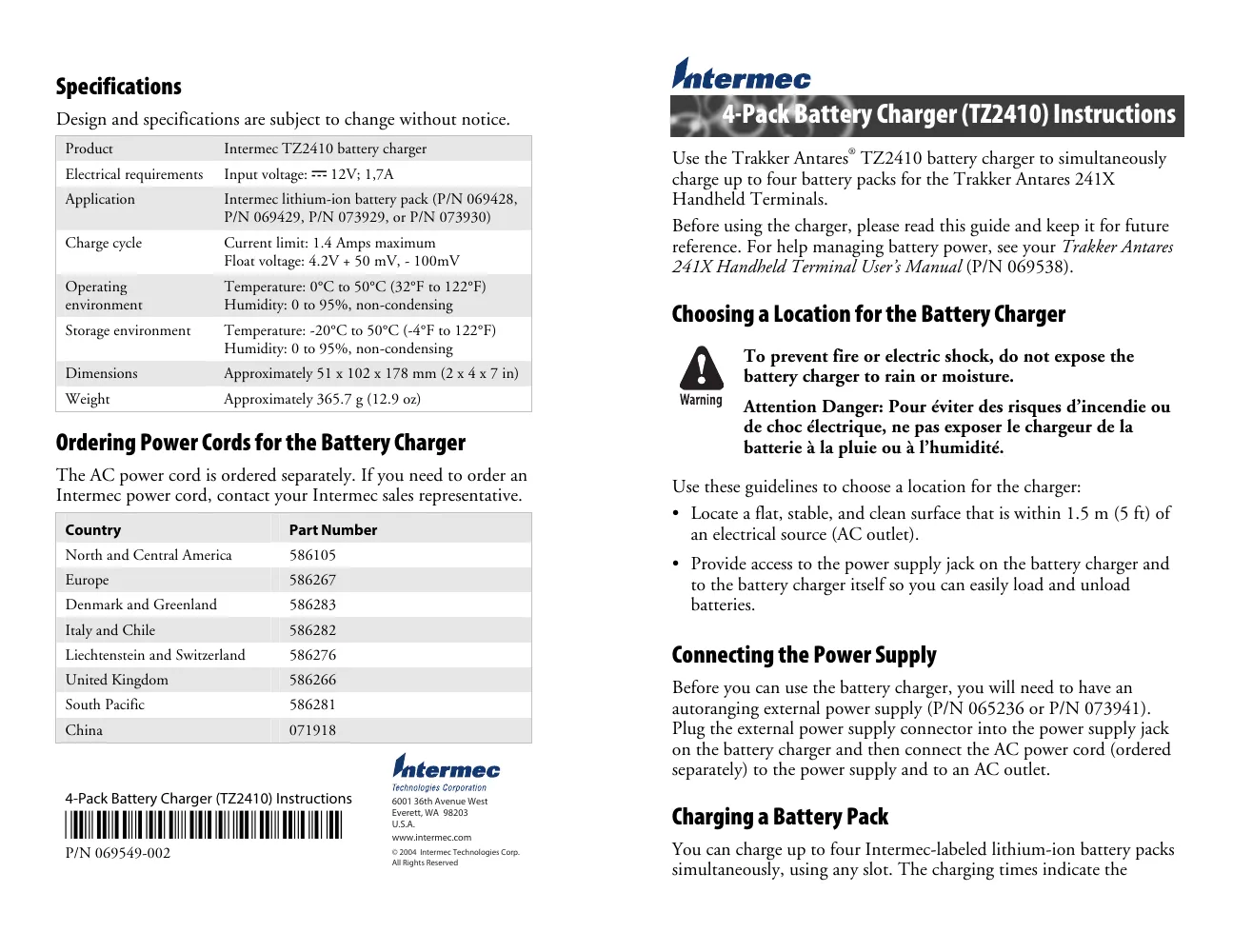
The text of page 1, from the PDF itself
Specifications Design and specifications are subject to change without notice. Product
Intermec TZ2410 battery charger
Electrical requirements
Input voltage: x 12V; 1,7A
Application
Intermec lithium-ion battery pack (P/N 069428, P/N 069429, P/N 073929, or P/N 073930)
Charge cycle
Current limit: 1.4 Amps maximum Float voltage: 4.2V + 50 mV, - 100mV
Operating environment
Temperature: 0°C to 50°C (32°F to 122°F) Humidity: 0 to 95%, non-condensing
Storage environment
Temperature: -20°C to 50°C (-4°F to 122°F) Humidity: 0 to 95%, non-condensing
Dimensions
Approximately 51 x 102 x 178 mm (2 x 4 x 7 in)
Weight
Approximately 365.7 g (12.9 oz)
Ordering Power Cords for the Battery Charger The AC power cord is ordered separately. If you need to order an Intermec power cord, contact your Intermec sales representative.
4-Pack Battery Charger (TZ2410) Instructions Use the Trakker Antares® TZ2410 battery charger to simultaneously charge up to four battery packs for the Trakker Antares 241X Handheld Terminals. Before using the charger, please read this guide and keep it for future reference. For help managing battery power, see your Trakker Antares 241X Handheld Terminal User’s Manual (P/N 069538).
Choosing a Location for the Battery Charger To prevent fire or electric shock, do not expose the battery charger to rain or moisture. Attention Danger: Pour éviter des risques d’incendie ou de choc électrique, ne pas exposer le chargeur de la batterie à la pluie ou à l’humidité. Use these guidelines to choose a location for the charger:
- Locate a flat, stable, and clean surface that is within 1.5 m (5 ft) of an electrical source (AC outlet).
Country
Part Number
North and Central America
586105Europe586267Denmark and Greenland586283Italy and Chile586282
Liechtenstein and Switzerland
586276
Connecting the Power Supply
United Kingdom586266South Pacific586281China071918
Before you can use the battery charger, you will need to have an autoranging external power supply (P/N 065236 or P/N 073941). Plug the external power supply connector into the power supply jack on the battery charger and then connect the AC power cord (ordered separately) to the power supply and to an AC outlet.
4-Pack Battery Charger (TZ2410) Instructions
*069549-002* P/N 069549-002
- Provide access to the power supply jack on the battery charger and to the battery charger itself so you can easily load and unload batteries.
6001 36th Avenue West Everett, WA 98203 U.S.A. www.intermec.com © 2004 Intermec Technologies Corp. All Rights Reserved
Charging a Battery Pack You can charge up to four Intermec-labeled lithium-ion battery packs simultaneously, using any slot. The charging times indicate the
Page2of 2
Open in the PDF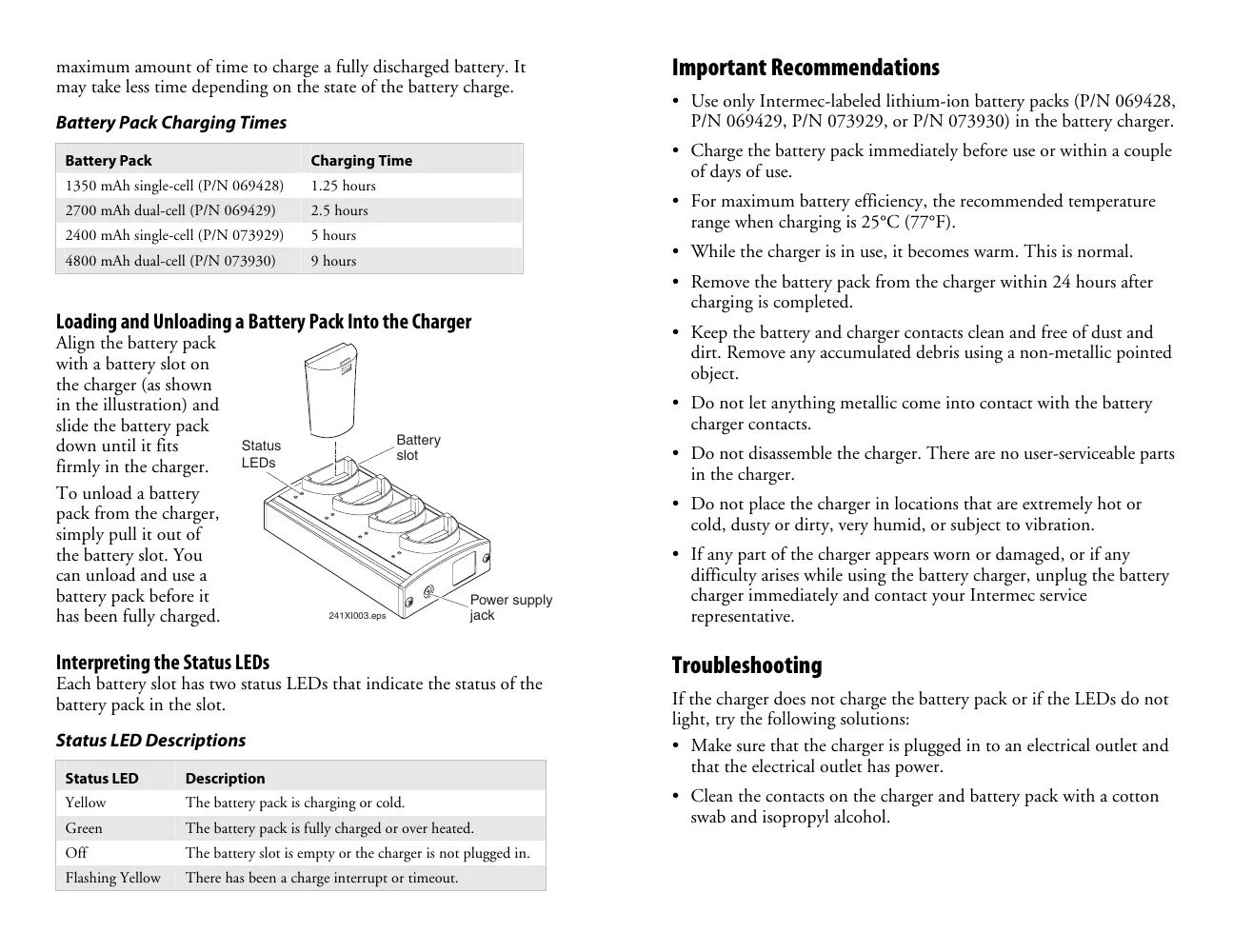
The text of page 2, from the PDF itself
maximum amount of time to charge a fully discharged battery. It may take less time depending on the state of the battery charge. Battery Pack Charging Times Battery Pack
Charging Time
1350 mAh single-cell (P/N 069428)
1.25 hours
2700 mAh dual-cell (P/N 069429)
2.5 hours
2400 mAh single-cell (P/N 073929)
5 hours
4800 mAh dual-cell (P/N 073930)
9 hours
Important Recommendations
- Use only Intermec-labeled lithium-ion battery packs (P/N 069428, P/N 069429, P/N 073929, or P/N 073930) in the battery charger.
- Charge the battery pack immediately before use or within a couple of days of use.
- For maximum battery efficiency, the recommended temperature range when charging is 25°C (77°F).
- While the charger is in use, it becomes warm. This is normal.
- Remove the battery pack from the charger within 24 hours after charging is completed.
Loading and Unloading a Battery Pack Into the Charger Align the battery pack with a battery slot on the charger (as shown in the illustration) and slide the battery pack down until it fits firmly in the charger. To unload a battery pack from the charger, simply pull it out of the battery slot. You can unload and use a battery pack before it has been fully charged.
- Keep the battery and charger contacts clean and free of dust and dirt. Remove any accumulated debris using a non-metallic pointed object.
- Do not let anything metallic come into contact with the battery charger contacts.
Battery slot
Status LEDs
- Do not disassemble the charger. There are no user-serviceable parts in the charger.
- Do not place the charger in locations that are extremely hot or cold, dusty or dirty, very humid, or subject to vibration.
241XI003.eps
Power supply jack
Interpreting the Status LEDs Each battery slot has two status LEDs that indicate the status of the battery pack in the slot. Status LED Descriptions Status LED
Description
Yellow
The battery pack is charging or cold.
Green
The battery pack is fully charged or over heated.
Off
The battery slot is empty or the charger is not plugged in.
Flashing Yellow
There has been a charge interrupt or timeout.
- If any part of the charger appears worn or damaged, or if any difficulty arises while using the battery charger, unplug the battery charger immediately and contact your Intermec service representative.
Troubleshooting If the charger does not charge the battery pack or if the LEDs do not light, try the following solutions:
- Make sure that the charger is plugged in to an electrical outlet and that the electrical outlet has power.
- Clean the contacts on the charger and battery pack with a cotton swab and isopropyl alcohol.